• Skip to primary navigation
  • Skip to main content
  • Skip to primary sidebar
  • Skip to footer

SuperTekBoy

Practical Help for Exchange & Office 365

  • Exchange
    • News
    • Tutorials
    • Solve a Problem
  • Office 365
    • News
    • Tutorials
    • Solve a Problem
  • Outlook
    • Tutorials
    • Solve a Problem
  • Books
  • Podcasts
  • Quick Links…
    • Generate or Renew SSL Certs for Exchange
    • Connect PowerShell to Exchange Online
    • Connect PowerShell to Office 365
    • Extend Schema for Exchange
    • Exchange Schema & Build Numbers
  • More…
    • Kemp Load Balancers
    • Other tech…
    • Videos
    • About SuperTekBoy
    • Contact Us

Exchange News

Exchange 2016 is here!

October 1, 2015 By Gareth Gudger Leave a Comment

Share
Tweet
Share

It is an exciting new chapter today for the Exchange community. October 1st, 2015 marked the general availability of Exchange 2016.

Exchange 2016 is available to download here.

Download Exchange 2016 RTM

For all the new features and requirements I recommend checking out, What Ignite taught us about Exchange 2016.

It’s always recommended to deploy Exchange to your lab first for testing. Check out the 7-part series, Install Exchange 2016 in your lab.

You will also want to review all the new Exchange documentation on TechNet prior to deploying into your production environment.

You may also wish to take a peek at the Exchange Product Guide.

Videos on Exchange 2016

Office Mechanics has released a number of bite-sized videos under five minutes. Here are the ones I recommend.

Greg Taylor has an excellent video on architectural and performance improvements on Exchange 2016. Greg also announces that CU1 will be available early 2016 with additional features.

Rebecca Lawler demos the new modern attachment feature in Exchange. She describes two available deployment scenarios for Modern Attachments. Rebecca also demos side-by-side collaboration view.

Allen Flush demos all the new features included in Outlook on the Web (formerly Outlook Web App). I also recommend checking out the last part of our Exchange lab series where we explore Outlook on the Web.

Jason Henderson discusses the Search improvements in Exchange that benefit both Outlook and Outlook on the Web users. Jason also discusses improvements to Outlook add-ins.

I recommend checking out all the videos posted by the Exchange Team from Microsoft Ignite. In particular, I recommend checking out Ross Smith IV’s session on Exchange Server Preferred Architecture and Brian Day’s Deploying Exchange Server.

Articles on Exchange 2016

There is a ton of great content out there already. I recommend checking these out.

  • What’s New and Cool in Exchange – It’s out now! — Jason Sherry
  • Exchange Server: Forged in the cloud — Exchange Team Blog
  • Exchange @ Ignite 2015 — Exchange Team Blog
  • Exchange Server Architecture — Exchange Team Blog
  • Exchange Server – Planning, Deployment & Migration — Paul Cunningham
  • Exchange – What’s New? — Jaap Wesselius
  • Exchange debuts to delight on-premises customers — Tony Redmond
  • Exchange Server is available! Now what? — Dave Stork

How about you? What feature are you most excited to see? Perhaps you are disappointed to see a feature dropped. Let us know in the comments below.
Filed Under: Exchange News

Exchange 2016 public preview released

July 23, 2015 By Gareth Gudger Leave a Comment

Share
Tweet
Share
Exchange 2016 Big Logo

Today was an exciting day! Microsoft released the public preview for Exchange 2016.

Our first exposure to Exchange 2016 was at Microsoft Ignite back in May. Since then its been fairly tight-lipped. For more information on what we learned regarding Exchange 2016, I recommend my write-up ‘What Ignite taught us about Exchange 2016‘.

If you haven’t seen them I highly recommend checking out all Exchange sessions from Microsoft Ignite. The Exchange Team collated them in a blog post here. If there are any two Exchange sessions you should watch then it is these two; Ross Smith’s Exchange Server Preferred Architecture and Brian Day’s Deploying Exchange 2016.

The official release announcement for Exchange 2016 can be found on the Exchange Team’s blog. To download the bits follow this link.

[Read more…] about Exchange 2016 public preview released

Filed Under: Exchange News

Exchange June 2015 Updates

June 30, 2015 By Gareth Gudger Leave a Comment

Share
Tweet
Share
Exchange 2013 Big Logo

The Exchange Team announced Cumulative Update 9 earlier this month.

As always, test these updates in a lab first!

It doesn’t have to be anything elaborate. In fact, I used to do a lot of testing from a Windows 8.1 laptop where I had Hyper-V installed. My laptop ran 3 VMs–Exchange 2010, 2013 and a DC. Hyper-V comes included with Windows 8. Its comparable to VMware Workstation in functionality.

Enough about labs! What are these updates and where can I get them?

The updates are as follows:

Exchange 2013 Cumulative Update 9

Exchange Server 2013 Cumulative Update 9

Exchange 2013 Mini

UM Language Packs for Cumulative Update 9

Exchange 2010 Mini

Exchange Server 2010 SP3 Update Rollup 10

Exchange 2007 Mini

Exchange Server 2007 SP3 Update Rollup 17

So what’s new?

This update is a culmination of bug fixes and feature tweaks. Cumulative Update 9 also included changes to the behavior of saving Sent Items when using Shared Mailboxes; more info on that here.

[Read more…] about Exchange June 2015 Updates

Filed Under: Exchange News

What Ignite taught us about Exchange 2016

May 18, 2015 By Gareth Gudger 16 Comments

Share
Tweet
Share
Microsoft Ignite

If you are feeling a little overwhelmed by the 688 Ignite sessions on Channel 9, then check out this great article from the Exchange Team.

The Exchange Team collates all the Exchange, Office 365 and Outlook content into several easy to navigate lists. In the first list, you will find 20 videos on Exchange Server. The majority of the content is focused on Exchange Server 2016.

Here is what we learned about our favorite product.

Tip: For a summary of the Microsoft Ignite Keynote be sure to check out this article.

Keeping it together

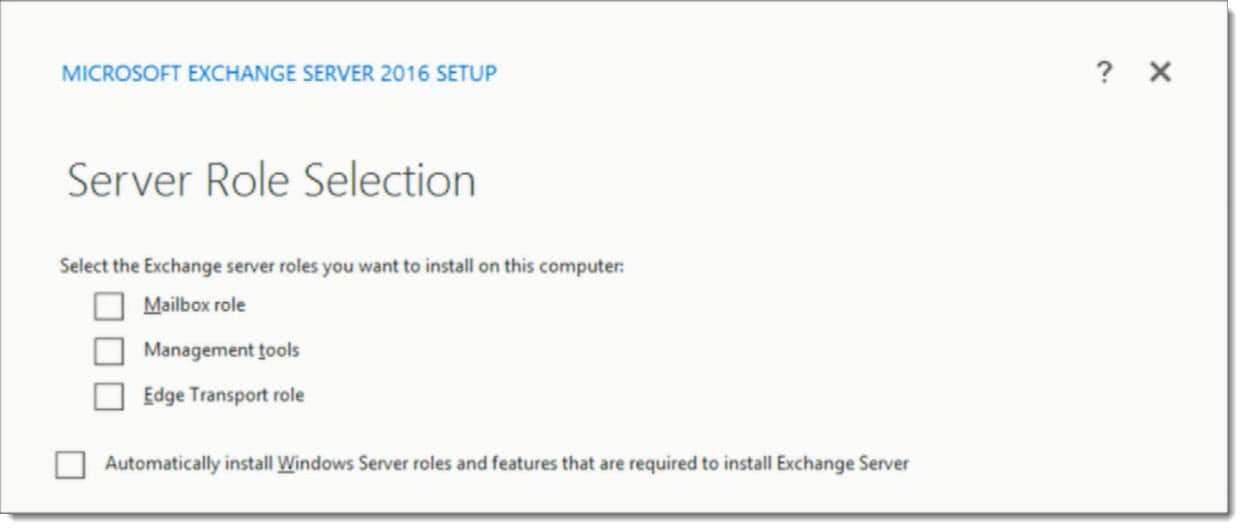
The biggest announcement is that you can no longer split the Client Access and Mailbox roles. While multi-role was a recommendation in Exchange 2013, this is now mandatory in Exchange 2016. Check the screenshot below from Brian Day’s session. You will notice the absence of Client Access which has been rolled into the Mailbox role.

Exchange 2016 Server Role Selection setup screen

You’ll also notice Edge Transport is listed as an option. Ross Smith announced that Edge will ship with Server 2016 RTM.

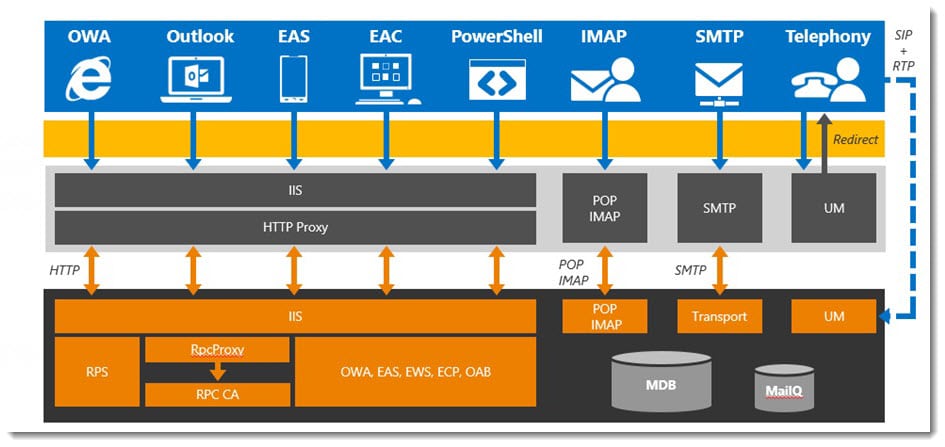
For more information on the architectural changes, check out this post from the Exchange Team Blog.

MAPI over HTTP

We saw the introduction of MAPI over HTTP in Exchange 2013 Service Pack 1. MAPI over HTTP provides several advances over RPC, including faster reconnection times for clients and greater visibility into errors. While disabled by default in 2013, the new protocol will come enabled as default in 2016.

To quote Ross Smith

It removed the dependency of RPC as an intermediary. It was a huge win for us. RPC, as great as it is, is not owned by the Exchange development team. Any time we felt we wanted to enhance the RPC protocol…we couldn’t do it. We own MAPI. We can make any investment in the MAPI protocol we want.Ross Smith IV

Further improvements have been made in 2016 for the new protocol. In 2013, MAPI over HTTP was turned on or off at the organization level. In 2016, this protocol is enabled on a per-user basis. This is great for a coexistence scenario.

Exchange 2016 MAPI over HTTP

When Outlook discovers the availability of MAPI over HTTP the change will occur the next time Outlook is restarted. The Outlook client will continue to use RPC until it is closed. This is great for the end-user. By continuing to use RPC means the user won’t receive any disruptive dialog boxes regarding admin changes.

Tip: Before deploying 2016, it is important you have the MAPI virtual directories configured on your load balancers. It is also important that MAPI virtual directory URLs are configured appropriately.

Previously, MAPI over HTTP was only available to users running Outlook 2013 SP1. In April Microsoft extended this support to Outlook 2010. But what does this mean for 2007 users?

[Read more…] about What Ignite taught us about Exchange 2016

Filed Under: Exchange News

Microsoft Ignite : Did your 2016 just get busier?

May 5, 2015 By Gareth Gudger Leave a Comment

Share
Tweet
Share

If you weren’t aware Microsoft is hosting its Ignite conference this week in Chicago (May 4th-8th).

Microsoft Ignite is the convergence of several Microsoft conferences into one mammoth event. And, it makes sense. With so much cross-product integration there was a growing amount of duplicate content. To quote the Microsoft Blog;

It will bring together the best of previously individual events – the Management Summit, the Exchange, SharePoint, Lync, Project, and TechEd conferences – and then take it to the next levelThe Official Microsoft Blog

So how popular is Ignite? Joe Belfiore (@joebelfiore) revealed during the Cortana Power BI demo that over 23,000 people were in attendance. Unfortunately, I couldn’t make this conference. But luckily Microsoft has not forgotten us. You can watch the on-demand recording of the keynote here. Furthermore, Channel 9 is live-streaming several of the sessions at http://channel9.msdn.com/. Their featured session guide is on the front page.

UPDATE: Channel 9 has all the Ignite recordings available here. There are 688 recorded sessions!!

Your 2016 may have just gotten a little busier

If you saw the keynote then you know there was a slew of product announcements made. Microsoft CEO, Satya Nadella (@satyanadella), announced several new product releases. Many of which are already available for preview, or, will be second-half 2015.

Products included:

  • Windows Server 10
  • Exchange 2016
  • System Center 2016
  • SQL Server 2016
  • Windows 10
  • Office 2016

Also highlighted were:

  • Azure for your Datacenter
  • Skype for Business Broadcast
  • Windows Update for Business
  • Cortana improvements
  • Continuum for Windows Phone
  • Hello feature
  • Skype for HoloLens
  • Microsoft Advanced Threat Analytics
  • Operations Management Suite
  • Device Guard
  • Azure Rights Management and Data Loss Prevention

One message from Satya’s presentation was very clear.

[Read more…] about Microsoft Ignite : Did your 2016 just get busier?

Filed Under: Exchange News, Office 365 News, Other Tech

Exchange March 2015 Updates

March 28, 2015 By Gareth Gudger Leave a Comment

Share
Tweet
Share
Exchange 2013 Big Logo

The Exchange Team announced Cumulative Update 8 earlier this month.

As always, test these updates in a lab first!

It doesn’t have to be anything elaborate. In fact, I used to do a lot of testing from a Windows 8.1 laptop where I had Hyper-V installed. My laptop ran 3 VMs–Exchange 2010, 2013 and a DC. Hyper-V comes included with Windows 8. It’s comparable to VMware Workstation in functionality.

Enough about labs! What are these updates and where can I get them?

The updates are as follows:

Exchange 2013 Mini

Exchange Server 2013 Cumulative Update 8

Exchange 2013 Mini

UM Language Packs for Cumulative Update 8

Exchange 2010 Mini

Exchange Server 2010 SP3 Update Rollup 9

Exchange 2007 Mini

Exchange Server 2007 SP3 Update Rollup 16

So what’s new?

This update is a culmination of bug fixes and feature tweaks. This update also includes Daylight Saving Time changes. Microsoft reports there are no security patches included in this update.

[Read more…] about Exchange March 2015 Updates

Filed Under: Exchange News

  • « Go to Previous Page
  • Page 1
  • Interim pages omitted …
  • Page 8
  • Page 9
  • Page 10
  • Page 11
  • Go to Next Page »

Primary Sidebar

Want to stay up to date?

Sidebar Form

Join thousands of IT professionals and get the latest Exchange & Office 365 tips and tutorials direct to your inbox

DigiCert Banner 300x348

(help support us using our affiliate link)

Footer

Site Navigation

  • Subscribe to blog
  • About SuperTekBoy
  • Disclaimer
  • Privacy & Cookies
  • Contact Us

Want to stay up to date?

Footer Form

Join thousands of IT professionals and get the latest Exchange & Office 365 tips and tutorials direct to your inbox

Join the conversation

  • Twitter
  • LinkedIn
  • Facebook
  • RSS

Copyright © 2026 · SuperTekBoy LLC