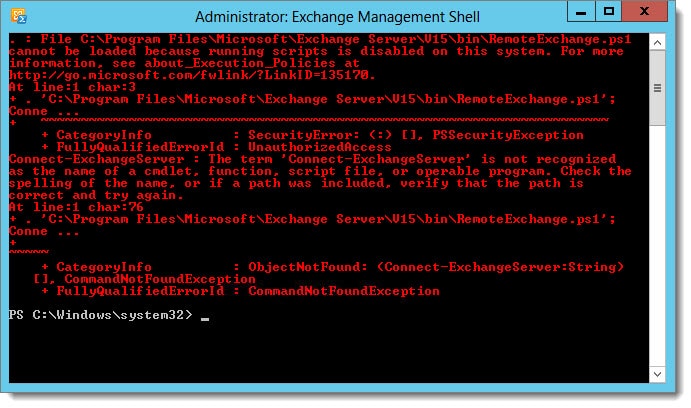
File .\RemoteExchange.ps1 cannot be loaded because running scripts is disabled on this system. For more information, see about_Execution_Policies at http://go.microsoft.com/fwlink/?LinkID=135170.
If you see the above error the fix is actually quite simple. The error is caused when your execution policy in PowerShell is too restrictive. You can determine the level of restriction by typing Get-ExecutionPolicy cmdlet. You may see a response similar to that of the following:
 C:\> Get-ExecutionPolicy
Restricted
By default, Exchange needs its execution policy to be at RemoteSigned. Remote signed implies the following characteristics.
        RemoteSigned
            - Scripts can run. This is the default execution
              policy in Windows Server 2012 R2.

            - Requires a digital signature from a trusted
              publisher on scripts and configuration files that
              are downloaded from the Internet (including
              e-mail and instant messaging programs).

            - Does not require digital signatures on scripts that
              you have written on the local computer (not
              downloaded from the Internet).

            - Runs scripts that are downloaded from the Internet
              and not signed, if the scripts are unblocked, such
              as by using the Unblock-File cmdlet.

            - Risks running unsigned scripts from sources other
              than the Internet and signed, but malicious, scripts.
To change the execution policy we need to use the Set-ExcutionPolicy cmdlet with a parameter of RemoteSigned. Press enter at the confirmation prompt to select Yes.
 C:\> Set-ExecutionPolicy RemoteSigned

Execution Policy Change
The execution policy helps protect you from scripts that you do not trust. Changing the execution policy might expose you to the security risks described in the about_Execution_Policies help topic at http://go.microsoft.com/fwlink/?LinkID=135170. Do you want to change the execution policy?
[Y] Yes [N] No [S] Suspend [?] Help (default is "Y"):
[PS] C:\>
Close and reopen the Exchange Management Shell. The error should be gone.

Join the conversation on Twitter @SuperTekBoy.


i love youuuuuuuuuuuu thank youuuuuuuuuuuuuuuuuuuuuuuuu