• Skip to primary navigation
  • Skip to main content
  • Skip to primary sidebar
  • Skip to footer

SuperTekBoy

Practical Help for Exchange & Office 365

  • Exchange
    • News
    • Tutorials
    • Solve a Problem
  • Office 365
    • News
    • Tutorials
    • Solve a Problem
  • Outlook
    • Tutorials
    • Solve a Problem
  • Books
  • Podcasts
  • Quick Links…
    • Generate or Renew SSL Certs for Exchange
    • Connect PowerShell to Exchange Online
    • Connect PowerShell to Office 365
    • Extend Schema for Exchange
    • Exchange Schema & Build Numbers
  • More…
    • Kemp Load Balancers
    • Other tech…
    • Videos
    • About SuperTekBoy
    • Contact Us

Exchange

CU Fails: Unable to remove product. Error code is 2330

July 1, 2015 By Gareth Gudger 1 Comment

Share
Tweet
Share

I was helping a friend recently update his Exchange servers. When we launched the cumulative update we ran into this error.
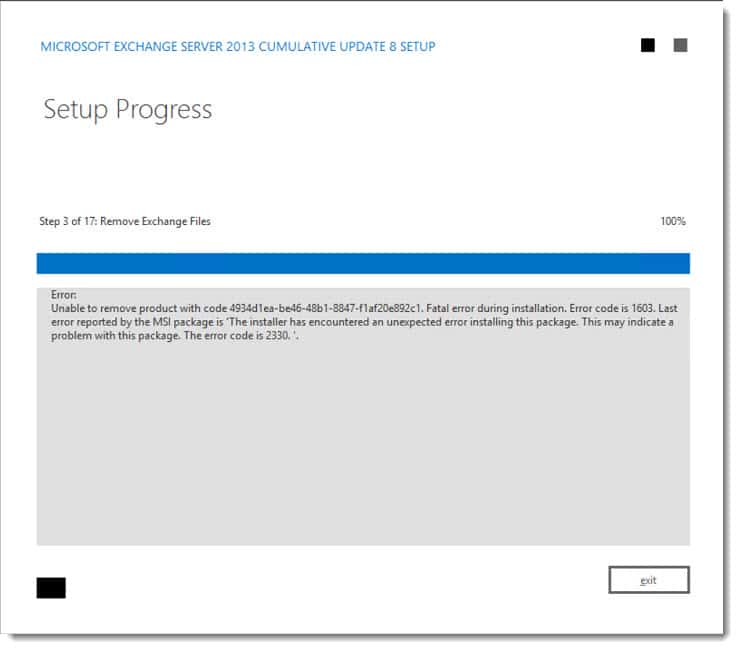
Exchange CU Fails Unable to remove product. Error code is 1603. Error code is 2330.
Unable to remove product with code 4934d1ea-be46-48b1-8847-f1af20e892c1. Fatal error during installation. Error code is 1603. Last error reported by the MSI package is 'The installer has encountered an unexpected error installing this package. This may indicate a problem with this package. The error code is 2330.'

According to this reference guide from DesktopEngineer.com Error Code 2330 translates to ‘Error getting file attributes’.

Ruh-roh! That sounds like file corruption.

When exploring the Application Log we discovered a number of 10005 MSIINSTALLER errors.

[Read more…] about CU Fails: Unable to remove product. Error code is 2330
Filed Under: Exchange Solutions

Create an IP-less DAG (No Administrative Access Point)

June 30, 2015 By Gareth Gudger 28 Comments

Share
Tweet
Share

Beginning with Exchange 2013 SP1 Microsoft introduced the IP-less DAG as an option. In this article, we explore how to create an IP-less DAG, as well as the pros and cons of deploying one.

Note: With Exchange 2016 IP-less DAGs will become the default configuration.

Why would I want to do this?

Quite simply, its easier to set up.

With an IP-less DAG, you don’t need to pre-stage a Cluster Name Object (CNO) in Active Directory. This is especially useful for organizations that have implemented the split-permission model. You also don’t need to burn an IP address for the cluster.

Any downsides?

Couple gotchas.

Before you implement a DAG without an Administrative Access Point (AAP) you need to check compatibility with 3rd party programs. Backup software is typically the sticking point for migrating to the new DAGs. You need to make sure your 3rd party software doesn’t require an AAP.

The lack of an AAP means the cluster cannot be managed with Failover Cluster Manager either. But the Exchange Team doesn’t want you messing around in there anyway–and for good reason–they want Exchange to manage the cluster. Let Exchange do the heavy lifting for you.

Finally, there is no conversion process to take an IP-based DAG to an IP-less DAG. You will need to create a new DAG.

Choosing an OS (maybe)

While Windows Server 2008 R2 and above support Exchange 2013 DAGs, only 2012 R2 can support an IP-less DAG. If you wish to go with 2008 R2 or 2012 RTM, you will need to create an IP-based DAG instead. For that purpose, I recommend Paul Cunningham’s blog post here.

Are IP-less DAGs the only benefit of going with 2012 R2?

Actually, no. If I haven’t convinced you yet then consider these two additional benefits.

The first is that 2012 includes clustering in its Standard Edition. This can result in some serious cost savings compared to 2008 R2 Enterprise. Especially if you plan on building a 16 member DAG.

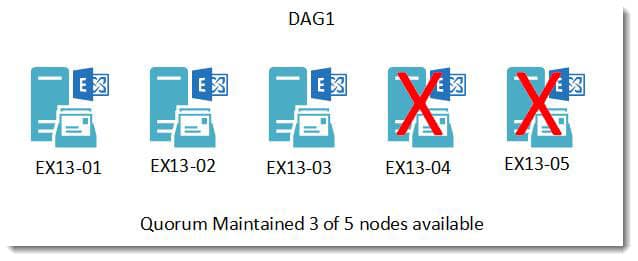
The second is 2012 introduced the concept of dynamic quorum. Dynamic quorum automatically adjusts the votes needed to maintain quorum as servers go offline. Take, for example, a traditional five node DAG. To maintain a quorum three servers must remain online.

DAG Static Quorum 3 of 5 nodes

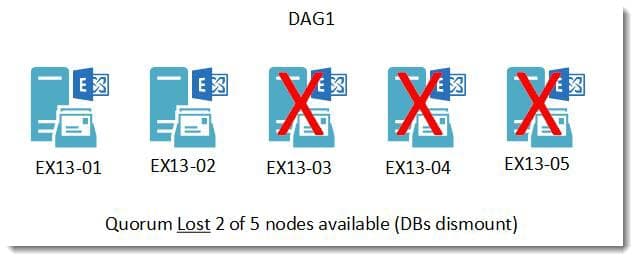
If three of the five servers were to go offline quorum would be lost and the databases would dismount.

DAG Static Quorum 2 of 5 nodes

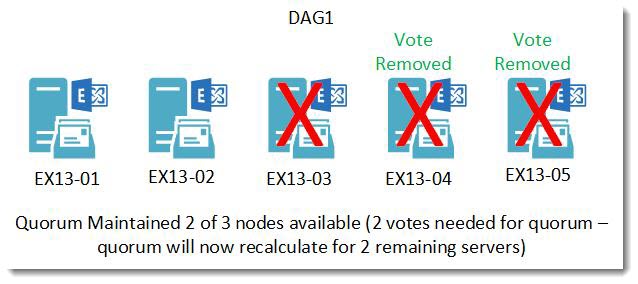
With a dynamic quorum, if two of the servers went offline their votes would be removed. At this point, the quorum is recalculated for the three remaining servers. To maintain quorum only two of the three remaining servers would need to be online. Should a third server go offline, that server’s vote would be removed and, the quorum would be recalculated for the two remaining servers. In many situations, a dynamic quorum can successfully navigate a ‘last man standing’ scenario where only a single server remains operational.

DAG Static Dynamic Quorum

As servers come back online votes are assigned back and the quorum is recalculated.

[Read more…] about Create an IP-less DAG (No Administrative Access Point)

Filed Under: Exchange Tutorials

Exchange June 2015 Updates

June 30, 2015 By Gareth Gudger Leave a Comment

Share
Tweet
Share
Exchange 2013 Big Logo

The Exchange Team announced Cumulative Update 9 earlier this month.

As always, test these updates in a lab first!

It doesn’t have to be anything elaborate. In fact, I used to do a lot of testing from a Windows 8.1 laptop where I had Hyper-V installed. My laptop ran 3 VMs–Exchange 2010, 2013 and a DC. Hyper-V comes included with Windows 8. Its comparable to VMware Workstation in functionality.

Enough about labs! What are these updates and where can I get them?

The updates are as follows:

Exchange 2013 Cumulative Update 9

Exchange Server 2013 Cumulative Update 9

Exchange 2013 Mini

UM Language Packs for Cumulative Update 9

Exchange 2010 Mini

Exchange Server 2010 SP3 Update Rollup 10

Exchange 2007 Mini

Exchange Server 2007 SP3 Update Rollup 17

So what’s new?

This update is a culmination of bug fixes and feature tweaks. Cumulative Update 9 also included changes to the behavior of saving Sent Items when using Shared Mailboxes; more info on that here.

[Read more…] about Exchange June 2015 Updates

Filed Under: Exchange News

Exchange 2013: ASP.NET Event ID 1309 Event Code 3005

June 25, 2015 By Gareth Gudger 7 Comments

Share
Tweet
Share

I was helping a good friend of mine recently with his Exchange 2013 server. When he logged into Outlook Web App he would get the “Something went wrong” internal server error.

Exchange 2013 Something Went Wrong Internal Server Error 500

Unfortunately, this is an incredibly generic error that can be caused by a variety of different problems. We decided to hit the Event Logs. Almost instantly we ran across several occurrences of this error.

ASP.NET Event ID 1309 Event Code 3005
Event code: 3005
 Event message: An unhandled exception has occurred.
 Event time: 6/1/2015 7:00:00 PM
 Event time (UTC): 6/1/2015 11:00:00 PM
 Event ID: 4d1bb9b639774fd689f5b1eeec309375
 Event sequence: 2
 Event occurrence: 1
 Event detail code: 0

Sadly, ASP.NET Event ID 1309 is a very generic message. In fact, Event Code 3005 could be caused by any number of possibilities. Ruling the Event Code out we examined the rest of the error. We quickly found our answer in the Exception Message. I’ve highlighted the section below.

Tip: Exchange MVP Jeff Guillet identifies another cause of Code 3005 in this article.

[Read more…] about Exchange 2013: ASP.NET Event ID 1309 Event Code 3005

Filed Under: Exchange Solutions

Error running Public Folder Migration Scripts

May 26, 2015 By Gareth Gudger Leave a Comment

Share
Tweet
Share

Recently, while working on a Public Folder migration from Exchange 2007 to 2013, I ran into the following error.

 C:\Program Files\Microsoft\Exchange Server\Scripts>.\Export-PublicFolderStatistics.ps1 "C:\PFMigration\PublicFolderStats.csv"  Ex2007.domain.local 
Parameter declarations are a comma-separated list of variable names with optional initializer expressions. 
At C:\Program Files\Microsoft\Exchange Server\Scripts\Export-PublicFolderStatistics.ps1:16 char:168 
+         HelpMessage = "Full path of the output file to be generated. If only filename is specified, then the output file will be generated in the current directory.")] <<<<

It had me scratching my head for a couple of minutes. Then I quickly realized what I had forgotten. I needed PowerShell 2.0 to run this script.

If you are having this same error then make sure you download the Windows Management Framework Core pack from Microsoft. The pack includes PowerShell 2.0 and WinRM 2.0.

You can find it here.

The install won’t require a reboot. Once installed rerun your script.

With the rapid whirlwind of technological advancements its easy to forget the nuances of older operating systems.

Filed Under: Exchange Solutions

What Ignite taught us about Exchange 2016

May 18, 2015 By Gareth Gudger 16 Comments

Share
Tweet
Share
Microsoft Ignite

If you are feeling a little overwhelmed by the 688 Ignite sessions on Channel 9, then check out this great article from the Exchange Team.

The Exchange Team collates all the Exchange, Office 365 and Outlook content into several easy to navigate lists. In the first list, you will find 20 videos on Exchange Server. The majority of the content is focused on Exchange Server 2016.

Here is what we learned about our favorite product.

Tip: For a summary of the Microsoft Ignite Keynote be sure to check out this article.

Keeping it together

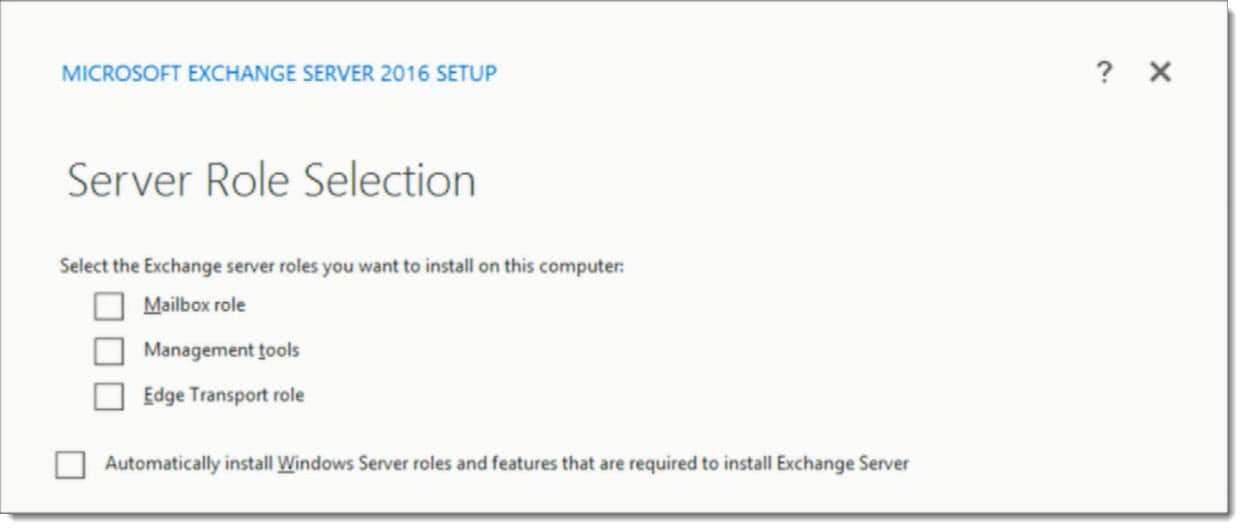
The biggest announcement is that you can no longer split the Client Access and Mailbox roles. While multi-role was a recommendation in Exchange 2013, this is now mandatory in Exchange 2016. Check the screenshot below from Brian Day’s session. You will notice the absence of Client Access which has been rolled into the Mailbox role.

Exchange 2016 Server Role Selection setup screen

You’ll also notice Edge Transport is listed as an option. Ross Smith announced that Edge will ship with Server 2016 RTM.

For more information on the architectural changes, check out this post from the Exchange Team Blog.

MAPI over HTTP

We saw the introduction of MAPI over HTTP in Exchange 2013 Service Pack 1. MAPI over HTTP provides several advances over RPC, including faster reconnection times for clients and greater visibility into errors. While disabled by default in 2013, the new protocol will come enabled as default in 2016.

To quote Ross Smith

It removed the dependency of RPC as an intermediary. It was a huge win for us. RPC, as great as it is, is not owned by the Exchange development team. Any time we felt we wanted to enhance the RPC protocol…we couldn’t do it. We own MAPI. We can make any investment in the MAPI protocol we want.Ross Smith IV

Further improvements have been made in 2016 for the new protocol. In 2013, MAPI over HTTP was turned on or off at the organization level. In 2016, this protocol is enabled on a per-user basis. This is great for a coexistence scenario.

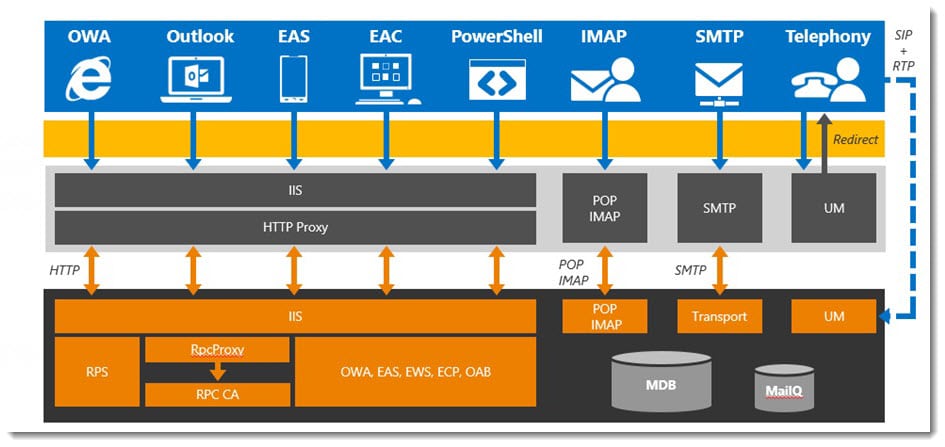
Exchange 2016 MAPI over HTTP

When Outlook discovers the availability of MAPI over HTTP the change will occur the next time Outlook is restarted. The Outlook client will continue to use RPC until it is closed. This is great for the end-user. By continuing to use RPC means the user won’t receive any disruptive dialog boxes regarding admin changes.

Tip: Before deploying 2016, it is important you have the MAPI virtual directories configured on your load balancers. It is also important that MAPI virtual directory URLs are configured appropriately.

Previously, MAPI over HTTP was only available to users running Outlook 2013 SP1. In April Microsoft extended this support to Outlook 2010. But what does this mean for 2007 users?

[Read more…] about What Ignite taught us about Exchange 2016

Filed Under: Exchange News

  • « Go to Previous Page
  • Page 1
  • Interim pages omitted …
  • Page 22
  • Page 23
  • Page 24
  • Page 25
  • Page 26
  • Interim pages omitted …
  • Page 31
  • Go to Next Page »

Primary Sidebar

Want to stay up to date?

Sidebar Form

Join thousands of IT professionals and get the latest Exchange & Office 365 tips and tutorials direct to your inbox

DigiCert Banner 300x348

(help support us using our affiliate link)

Footer

Site Navigation

  • Subscribe to blog
  • About SuperTekBoy
  • Disclaimer
  • Privacy & Cookies
  • Contact Us

Want to stay up to date?

Footer Form

Join thousands of IT professionals and get the latest Exchange & Office 365 tips and tutorials direct to your inbox

Join the conversation

  • Twitter
  • LinkedIn
  • Facebook
  • RSS

Copyright © 2026 · SuperTekBoy LLC