• Skip to primary navigation
  • Skip to main content
  • Skip to primary sidebar
  • Skip to footer

SuperTekBoy

Practical Help for Exchange & Office 365

  • Exchange
    • News
    • Tutorials
    • Solve a Problem
  • Office 365
    • News
    • Tutorials
    • Solve a Problem
  • Outlook
    • Tutorials
    • Solve a Problem
  • Books
  • Podcasts
  • Quick Links…
    • Generate or Renew SSL Certs for Exchange
    • Connect PowerShell to Exchange Online
    • Connect PowerShell to Office 365
    • Extend Schema for Exchange
    • Exchange Schema & Build Numbers
  • More…
    • Kemp Load Balancers
    • Other tech…
    • Videos
    • About SuperTekBoy
    • Contact Us

Symantec

Removable Disks in Backup Exec 2012/2014 go into Read-Only Mode

May 29, 2013 By Gareth Gudger 1 Comment

Share
Tweet
Share

UPDATED: This same option also exists in Backup Exec 2014. These instructions are also the same for 2014. However, in 2014 there is also a checkbox where you can disable this feature. Click here for a screenshot.
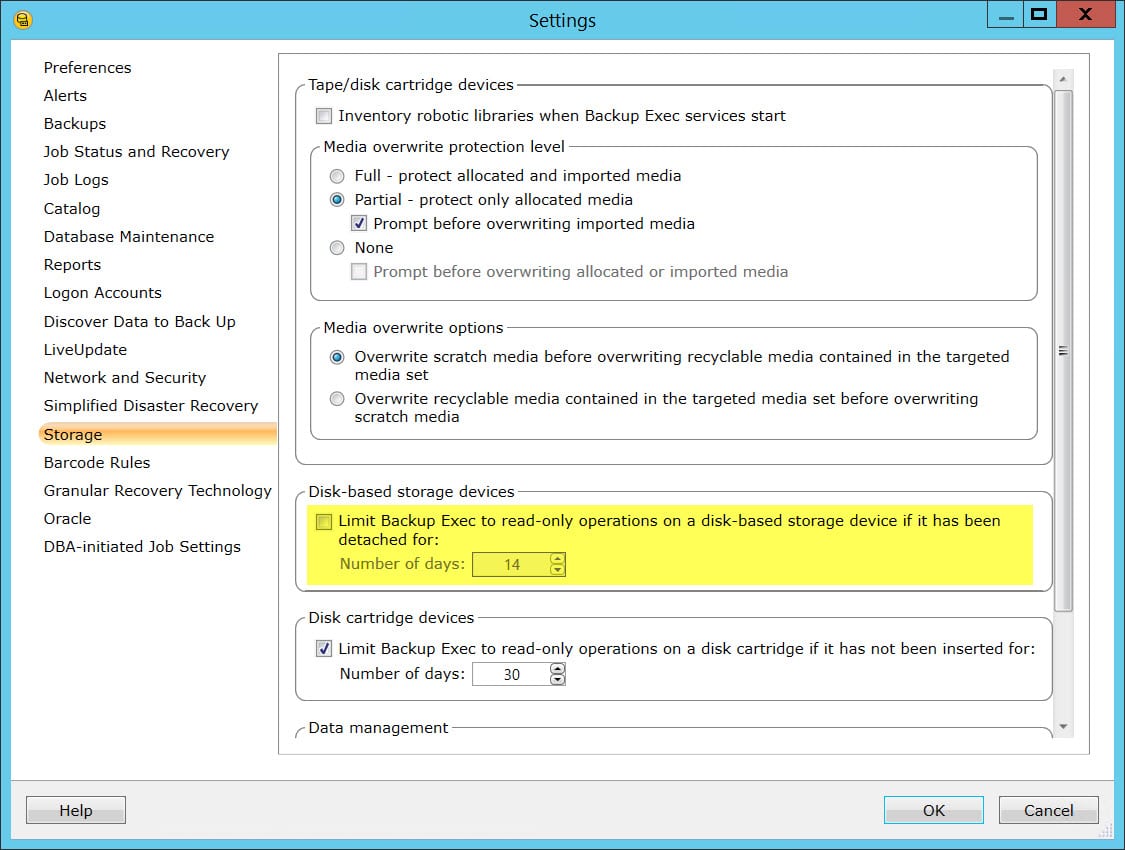
I ran across this issue recently when troubleshooting why four removable backup drives in a drive pool kept going into read-only mode at seemingly random intervals. Initially, I would go into the drive properties, switch the drive to allow write operations, only for it go back to read-only just a few weeks later.

My client was using 4 removable USB drives in rotation. These drives were all in one drive pool in Backup Exec. They would swap the drives out weekly, so each drive would be offline for as much as 3 weeks.

What I found, which appears to be new to Backup Exec 2012, is a setting that automatically switches any removable disk to read-only mode after a set number of days. The default is 14 days. I’ve since increased this number past 3 weeks and had no problems.

[Read more…] about Removable Disks in Backup Exec 2012/2014 go into Read-Only Mode

Filed Under: Other Tech, Symantec

Global Exclusions Selection List in Backup Exec

March 11, 2013 By Gareth Gudger Leave a Comment

Share
Tweet
Share

I thought I would post on this feature because it seems it is often overlooked and not everyone is aware it exists. This feature is the Global Exclusions Selection List in Backup Exec and it has been around for a very long time.

This global selection list allows you to exclude a path or file just once and this exclusion will automatically apply to every job you create. This is a lot easier than deselecting the same checkbox for a common exclusion across dozens of servers and jobs.

This came to light recently because I had to add global exclusions for the Symantec Endpoint Protection 12.1 client, which kept causing dozens of exceptions in my job and I really didn’t need to recover this program data in the event of a catastrophic event. I could simply reinstall the client if needed.

I know most of my posts have been on Backup Exec 2012, and I know a lot of people are still using Backup Exec 2010, so I thought I would design this article for setting this up in Backup Exec 2010.

[Read more…] about Global Exclusions Selection List in Backup Exec

Filed Under: Other Tech, Symantec

Backup Exec To Include Job-Based Backups Maybe: PART DEUX

February 23, 2013 By Gareth Gudger Leave a Comment

Share
Tweet
Share

PART I: http://supertekboy.com/2013/01/12/symantec-backup-exec-to-include-job-based-backups-maybe/

Back in January, I wrote a post about the possibility of job-centric options coming back to the Backup Exec product line. My inside sources had told me October initially, then later February and now I guess later still. For more details on the job-centric versus server-centric debate please see the previous post.

One thing I wanted to add to the argument against, server-centric backups in 2012, which dawned on me recently, was the use of an autoloader or robotic tape library with Backup Exec 2012.

Going back to the previous version of Backup Exec, 2010 and earlier, and using my 10 servers example from the last post, most people are aware that the average robotic arm takes 2-3 minutes to move a tape from a slot and into the drive. The same can be said on the back end of the job where the tape is removed from the drive and moved back into the slot.

Under the job-centric philosophy of 2010, one job that backs up 10 servers, only had this movement happen twice. Once at the beginning of the job and once and the end of the job (unless your job spanned multiple tapes – for the sake of this example lets assume you can fit it all onto one tape).

Under the Backup Exec 2012 server-centric philosophy, those ten servers are now ten individual jobs. That tape now moves twice for each server/job. So, the same backup now has 20 tape movements in a robotic library/autoloader as opposed to 2.

The problem here is the amount of time that adds to the backup window you used to have in 2010. In 2010 the average robotic-libraries tape operations were likely 4-6 minutes. Now using our 10 server example in 2012, the tape operations have been multiplied ten-fold, so your tape operations have increased to 36-54 minutes. Adding 54 minutes to your backup window may not be desirable.

Hopefully, we will see job-centric return soon as an option.

Filed Under: Other Tech, Symantec

Unable to copy the virtual machine disk using the VMware VixDiskLib

February 22, 2013 By Gareth Gudger Leave a Comment

Share
Tweet
Share

Unable to copy the virtual machine disk using the VMware VixDiskLib.

VixDiskLib_Read() reported the error: Unknown error.

I ran into this error recently when attempting to back up a virtual machine in VMWare ESXi 4.1 using the Backup Exec Agent for VMWare. There are lots of articles out there for various causes of the VixDiskLib_Read error but none of them with the status of “Unknown Error”.

The problem was also very intermittent. Sometimes the virtual machine would back up fine and other times it would generate this error.

I jumped into VCenter and what I found was that this VM had a 32GB snapshot that had been created almost 6 months ago. The snapshot said it was created by Symantec Backup Exec. For whatever reason, perhaps loss of power in the environment during backup, Symantec had never cleaned up this snapshot.

[Read more…] about Unable to copy the virtual machine disk using the VMware VixDiskLib

Filed Under: Other Tech, Symantec, VMware

How to enable Remote Desktop on the Backup Exec 3600 appliances

February 12, 2013 By Gareth Gudger Leave a Comment

Share
Tweet
Share

For any of you that own a Backup Exec 3600 appliance, you already know that it is a locked-down version of Windows Storage Server 2008. Console access (through a keyboard, mouse, or monitor) is not recommended after the initial setup, and that Remote Desktop is turned off. The only method of administration is through the appliance web portal.

For those of you that are looking for a little more, you can enable RDP through PowerShell. Keep in mind that enabling Remote Desktop is not supported by Symantec and is not considered a best practice. Do so at your own risk.

[Read more…] about How to enable Remote Desktop on the Backup Exec 3600 appliances

Filed Under: Other Tech, Symantec

Backup Exec 3600 appliances do not boot after a DR move of the data drives.

February 12, 2013 By Gareth Gudger Leave a Comment

Share
Tweet
Share

I have seen this issue a few times now while performing a disaster recovery of a Backup Exec 3600 appliance. There are many DR scenarios for a Backup Exec 3600 appliance but the one I am referencing in this post is when the appliance is a total loss and you need to move your four data drives from the old appliance to a new appliance.

I have seen some instances that after you move the 4 existing data drives from the old appliance to the new appliance, you get past the Symantec POST screen only to be left at a white cursor that is blinking in the top-left of a black screen.

[Read more…] about Backup Exec 3600 appliances do not boot after a DR move of the data drives.

Filed Under: Other Tech, Symantec

  • « Go to Previous Page
  • Page 1
  • Page 2
  • Page 3
  • Page 4
  • Go to Next Page »

Primary Sidebar

Want to stay up to date?

Sidebar Form

Join thousands of IT professionals and get the latest Exchange & Office 365 tips and tutorials direct to your inbox

DigiCert Banner 300x348

(help support us using our affiliate link)

Footer

Site Navigation

  • Subscribe to blog
  • About SuperTekBoy
  • Disclaimer
  • Privacy & Cookies
  • Contact Us

Want to stay up to date?

Footer Form

Join thousands of IT professionals and get the latest Exchange & Office 365 tips and tutorials direct to your inbox

Join the conversation

  • Twitter
  • LinkedIn
  • Facebook
  • RSS

Copyright © 2026 · SuperTekBoy LLC