• Skip to primary navigation
  • Skip to main content
  • Skip to primary sidebar
  • Skip to footer

SuperTekBoy

Practical Help for Exchange & Office 365

  • Exchange
    • News
    • Tutorials
    • Solve a Problem
  • Office 365
    • News
    • Tutorials
    • Solve a Problem
  • Outlook
    • Tutorials
    • Solve a Problem
  • Books
  • Podcasts
  • Quick Links…
    • Generate or Renew SSL Certs for Exchange
    • Connect PowerShell to Exchange Online
    • Connect PowerShell to Office 365
    • Extend Schema for Exchange
    • Exchange Schema & Build Numbers
  • More…
    • Kemp Load Balancers
    • Other tech…
    • Videos
    • About SuperTekBoy
    • Contact Us

Icons missing in Remote Desktop Services Web Access

October 5, 2013 By Gareth Gudger Leave a Comment

Share
Tweet
Share

If you are missing the pictures of the icons in Remote Desktop Services Web Access, but you can still see the icon text, then it is a compatibility issue with Internet Explorer 10.

While there appears to be no actual fix there is a very easy workaround. Simply switch your RDS Web Access portal page into compatibility mode.

You can do this by clicking the icon of the torn page in Internet Explorer’s Address Bar. The page will reload in compatibility mode and you should now have matching pictures to go with the text descriptions. As long as you don’t clear your browser cache, Internet Explorer will remember the compatibility mode setting.

Print Friendly, PDF & Email

Filed Under: Other Tech, Windows

V-79-57344-38278 – Unable to find the metadata for a disk of the virtual machine

October 5, 2013 By Gareth Gudger Leave a Comment

Share
Tweet
Share

V-79-57344-38278 – Unable to find the metadata for a disk of the virtual machine.

I recently received this error in Backup Exec 2010 when I selected to back up a Template. This template existed on a VMware ESXi 5.1 cluster. I was using the Agent for VMware and backing up through VCenter using the NBD method. Being a template, it was offline and did not have a Remote Agent installed.

The problem I discovered was that I had used a special character in the building of this machine. Being that this was a template, which I planned to deploy many virtual machines from, I wanted to easily attach a date in its name. Mostly, I did this so I knew how far out it was on Windows Updates. So I named by Template, “Base Win2K8 SP1 (6/20/13)”.

[Read more…] about V-79-57344-38278 – Unable to find the metadata for a disk of the virtual machine
Print Friendly, PDF & Email

Filed Under: Other Tech, Symantec

Upgrade Exchange Address Lists from 2003 to 2010

October 5, 2013 By Gareth Gudger 11 Comments

Share
Tweet
Share
Exchange 2010 Upgrade Address Lists from 2003 Error.

As mentioned in a previous blog post the end-of-life deadline for Exchange 2003 looms on the horizon. That being said, I discussed last time the process and syntax for upgrading the Recipient Update Policies in Exchange 2003 to the new Email Address Policies in Exchange 2010. Following a similar theme, this post will discuss how to upgrade the Address Lists in Exchange 2003 to 2010.

Like before this process is conducted in the Exchange Management Shell and like before if you tried to edit those Address List in the Exchange Management Console you would receive an error that the Address Lists were created in a legacy version of Exchange and need to be upgraded.

The specified address list could not be edited. Address lists created by using legacy versions of Microsoft Exchange must be upgraded by using the "ForceUpgrade" parameter of the "Set-AddressList" cmdlet.

Typically these are the commands you would need to run.

[Read more…] about Upgrade Exchange Address Lists from 2003 to 2010
Print Friendly, PDF & Email

Filed Under: Exchange, Exchange Tutorials

Upgrade Recipient Update Policy to Email Address Policy

October 5, 2013 By Gareth Gudger 2 Comments

Share
Tweet
Share
Exchange 2010 Upgrade Recipient Update Policy from 2003 Error.

With Exchange 2003 end-of-life deadline looming ever closer I thought it would be a good time to revisit the syntax for upgrading the Recipient Update Policies in Exchange 2003 to the Email Address Policies in Exchange 2010.

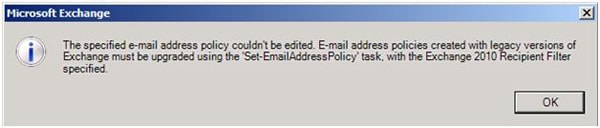
If you have received the error below when you try to double-click or edit an Email Address Policy in the Exchange Management Console, then your Recipient Update Policy still needs to be updated.

The specified e-mail address policy couldn't be edited. E-mail address policies created with legacy versions of Exchange must be upgraded using the 'Set-EmailAddressPolicy' task, with the Exchange 2010 Recipient Filter specified.

To update the Email Address Policy open Exchange Management Shell and issue the command below. This command finds all the current legacy Email Address Policies (Recipient Update Policies from Exchange 2003) and pipes those findings directly into the Set-EmailAddressPolicy cmdlet. This cmdlet converts those Recipient Update Policies into Email Address Policies. You will be prompted to confirm.

[Read more…] about Upgrade Recipient Update Policy to Email Address Policy
Print Friendly, PDF & Email

Filed Under: Exchange, Exchange Tutorials

Internet Explorer 11 Preview For Windows 7 now available!

October 5, 2013 By Gareth Gudger Leave a Comment

Share
Tweet
Share

Microsoft has released its preview for Internet Explorer 11 for Windows 7. The full blog post can be found here.

This blog post has a great video with a significant benchmark test versus Google Chrome and it clearly smokes Google Chrome on that test. The video explains that Internet Explorer can now harness a computers GPU to perform graphics rendering for web applications. Check the video out for yourself!

[Read more…] about Internet Explorer 11 Preview For Windows 7 now available!
Print Friendly, PDF & Email

Filed Under: Other Tech, Windows

Don’t overlook your Thin Clients

August 24, 2013 By Gareth Gudger Leave a Comment

Share
Tweet
Share

I ran into an issue recently where Thin Clients were connecting to a Server 2008 R2 RDS Farm. The RDS Farm had three Sessions Hosts and one Connection Broker. DNS was providing round-robin and the Connection Broker was providing load balancing.

The issue we were facing was that the Thin Clients were experiencing a double logon. When they connected they would logon, and immediately after they hit enter, they were given a second logon. It almost seemed like it was rejecting their password. But it wasn’t. They would retype their credentials and get in and continue on.

This didn’t always happen and what we observed was the following.

[Read more…] about Don’t overlook your Thin Clients
Print Friendly, PDF & Email

Filed Under: Other Tech, Windows

  • « Go to Previous Page
  • Page 1
  • Interim pages omitted …
  • Page 44
  • Page 45
  • Page 46
  • Page 47
  • Page 48
  • Interim pages omitted …
  • Page 51
  • Go to Next Page »

Primary Sidebar

Want to stay up to date?

Sidebar Form

Join thousands of IT professionals and get the latest Exchange & Office 365 tips and tutorials direct to your inbox

DigiCert Banner 300x348

(help support us using our affiliate link)

Footer

Site Navigation

  • Subscribe to blog
  • About SuperTekBoy
  • Disclaimer
  • Privacy & Cookies
  • Contact Us

Want to stay up to date?

Footer Form

Join thousands of IT professionals and get the latest Exchange & Office 365 tips and tutorials direct to your inbox

Join the conversation

  • Twitter
  • LinkedIn
  • Facebook
  • RSS

Copyright © 2026 · SuperTekBoy LLC