On March 24th I had the great pleasure of being a guest on #MVPBuzzChat. I joined host Christian Buckley to discuss data residency, hybrid modern authentication and new products shipping in 2018. We also discussed the importance of TAP, Windows Insider program and participating in UserVoice.
Exchange
Exchange March 2018 Updates
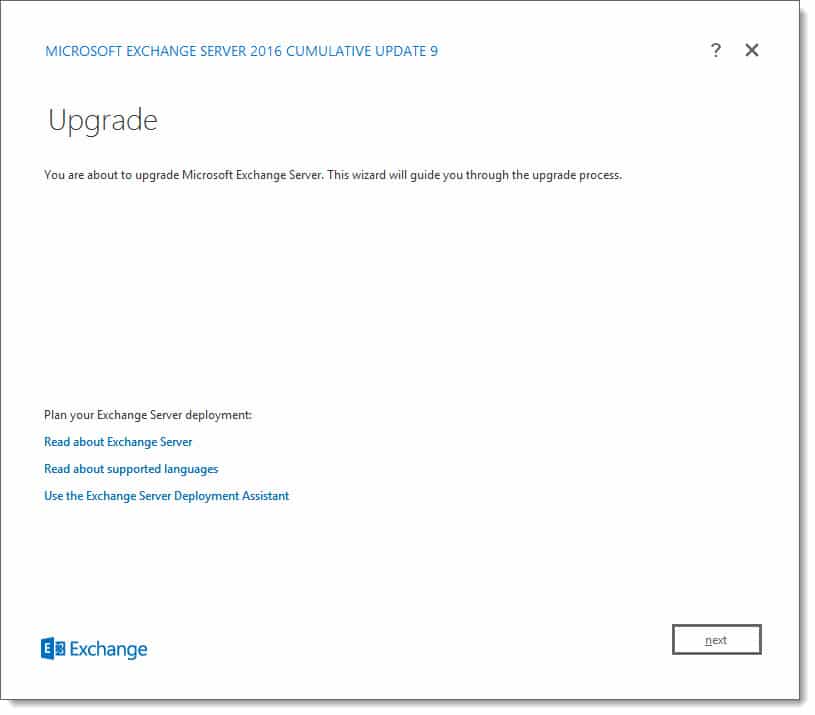
Today was a big day for Exchange updates. Not only did we get Cumulative Update 9 for Exchange 2016, but we also got Cumulative Update 20 for Exchange 2013. Exchange 2010 also receives a critical security update in rollup 20.
As always, test these updates in a lab first! I recommend checking out this 7-part guide on configuring Exchange in your lab. It doesn’t take much to get one going.
The updates are as follows:

Exchange 2016 Cumulative Update 9 | KB4055222 | UM Language Pack

Exchange 2013 Cumulative Update 20 | KB4055221 | UM Language Pack

Exchange 2010 SP3 Rollup 20 | KB4073537
So, what’s new in these Cumulative Updates?
The March 2018 updates introduce full support for TLS 1.2. This is critical because in future updates Exchange will end support for the older TLS protocols. TLS 1.2 boasts significantly stronger ciphers than its predecessors by introducing SHA-256. For a great comparison of the differences between each version of the protocol I recommend the article TLS 1.2 vs TLS 1.1 by KeyCDN.
Disabling the older TLS protocols does present some challenges. As mentioned in my article Disabling TLS 1.0 may cause Outlook to crash, older operating systems such as Windows 7, will require additional registry hacks and tweaks to work in a pure TLS 1.2 environment. Before disabling TLS 1.0 in your environment you may want to look at the state of your client operating systems as a whole and determine if a project to upgrade to Windows 10 should be tackled first. TLS support is based on what the operating system can do and not the Outlook client.
I highly recommend checking out Brian Day’s series on transitioning an Exchange organization to TLS 1.2.
These updates also contain security and bug fixes. Check the appropriate KB article above for a list of issues each update resolves.
[Read more…] about Exchange March 2018 UpdatesMVPs Talk Microsoft 365 podcast – What’s new in Exchange & Office 365
On January 13th I had the great pleasure of being a guest on the MVPs Talk Microsoft 365 podcast. I joined host Neil McDonnell to discuss what’s new in Exchange and Office 365.
[Read more…] about MVPs Talk Microsoft 365 podcast – What’s new in Exchange & Office 365GMail App fails to connect to Exchange – Certificate not valid
Ran into an issue recently where Outlook was working fine, however, Android devices, particularly mobile phones, would throw an error that the certificate was invalid when configuring an Exchange mailbox via the Gmail app. The error was:
Certificate not valid

The Gmail app can't guarantee the security of this email address. Your messages would be at risk.
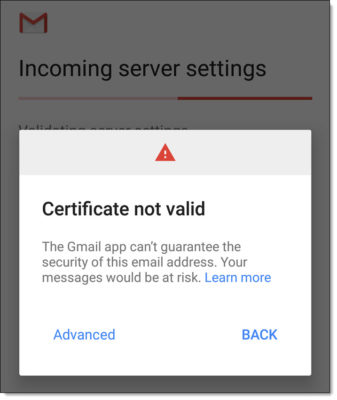
When clicking Advanced, we received more clarification that the certificate was not trusted. However, we could quickly see that the correct certificate was being presented to the Android devices, and it clearly wasn’t an issue with the date.
Certificate not trusted

Contact your email provider about this error, or proceed with username (unsafe).

We then tested our certificate with DigiCert’s SSL Certificate Checker. This is a great tool to confirm that the certificate is installed correctly and that the certificate path is valid. You can check any certificate with this tool. It does not have to be a certificate issued by DigiCert. In our case, we were testing our GoDaddy certificate with this tool.
[Read more…] about GMail App fails to connect to Exchange – Certificate not validExchange does not have Audit Security Privilege on the domain controller
While reviewing the event logs on your Exchange server you could encounter the following error.
Log Name: Application
Source: MSExchange ADAccess
Event ID: 2112
Task Category: Topology

Description:
 Process Microsoft.Exchange.Directory.TopologyService.exe (PID=2700).
 The Exchange computer dc03.supertekboy.com does not have Audit Security
 Privilege on the domain controller dc03.supertekboy.com. This domain
 controller will not be used by Exchange Active Directory Provider.
We ran into this recently at a customer. This was an odd error because the description specified the name of one of our domain controllers as an “Exchange Computer”. That aside, my customer was receiving this error for two of their three domain controllers (dc02 & dc03). The error was also repeated across all their Exchange servers.
To make matters worse if the customer shut down the only domain controller not reported in these errors (dc01) Exchange would become completely unavailable. As the error stated, dc02 and dc03 were definitely not being used by the Exchange Active Directory Provider.
Further analysis of the event logs also revealed informational alert MSExchange ADAccess 2080. In this alert, we could see our three domain controllers with one striking difference.
Log Name: Application
Source: MSExchange ADAccess
Event ID: 2080
Task Category: Topology

Description:
 Exchange Active Directory Provider has discovered the following servers with
 the following characteristics:

 (Server name | Roles | Enabled | Reachability | Synchronized | GC capable |
 PDC |  SACL right  | Critical Data | Netlogon | OS Version)
 In-site:
 dc01.supertekboy.com CDG 1 7 7 1 0  1  1 7 1
 dc02.supertekboy.com CDG 1 7 7 1 0  0  1 7 1
 dc03.supertekboy.com CDG 1 7 7 1 0  0  1 7 1
In the eighth column (highlighted), dc01 was reporting a 1 whereas dc02 and dc03 were reporting a 0. All other column data was identical between the three servers. The words in parenthesis are actually the column headers. They don’t line up very well in event viewer but if we count to the eighth word we see the column is titled “SACL right”. What this means is that the Exchange servers are missing the SACL right on the domain controllers marked with a zero. Or more specifically, Exchange is missing the right to manage the security and audit logs of those two domain controllers.
[Read more…] about Exchange does not have Audit Security Privilege on the domain controllerError ‘Cannot stop tmlisten service’ when installing Exchange updates
When installing an Exchange update you may run into the following error.
Error:
The following error was generated when "$error.Clear();
 & $RoleBinPath\ServiceControl.ps1 -Operation:DisableServices -Roles:($RoleRoles.Replace('Role','').Split(',')) -SetupScriptsDirectory:$RoleBinPath;
 & $RoleBinPath\ServiceControl.ps1 Stop $RoleRoles.Replace('Role','').Split(',')
 " was run: "Microsoft.Exchange.Configuration.Tasks.ServiceStopFailureException:
 Service 'tmlisten' failed to stop due to error:'Cannot stop tmlisten service on computer
---> System.InvalidOperationException:  Cannot stop tmlisten service on computer
---> System.ComponentModel.Win32Exception: The requested control is not valid for this service
The tmlisten service is associated with the Trend Micro antivirus product and specifically the Trend Micro Listener service. This service requires a password to stop and can not be disabled via either the services snap-in or command line.
Tip: It’s best practice to temporarily shut down antivirus products during the Exchange install as they have been known to increase install times by several hours. Or, in this case, completely block updates.
The tmlisten workaround
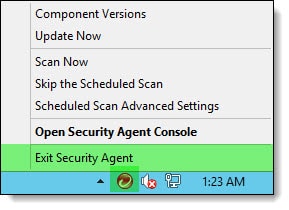
To disable Trend Micro right-click on its icon in the system tray and select Exit Security Agent.
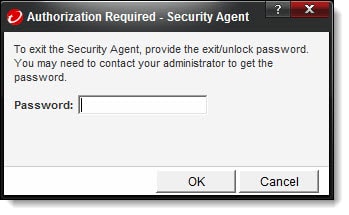
You will be prompted to enter a password to shut down the Trend Micro services. Enter this password and click Ok.
You may need to wait about 60 seconds for the Trend Micro services to stop. Once stopped you can continue your Exchange update past this error.

Have you ever run into this problem? What did you do to fix it? Drop a comment below or come join the conversation on Twitter @SuperTekBoy.