• Skip to primary navigation
  • Skip to main content
  • Skip to primary sidebar
  • Skip to footer

SuperTekBoy

Practical Help for Exchange & Office 365

  • Exchange
    • News
    • Tutorials
    • Solve a Problem
  • Office 365
    • News
    • Tutorials
    • Solve a Problem
  • Outlook
    • Tutorials
    • Solve a Problem
  • Books
  • Podcasts
  • Quick Links…
    • Generate or Renew SSL Certs for Exchange
    • Connect PowerShell to Exchange Online
    • Connect PowerShell to Office 365
    • Extend Schema for Exchange
    • Exchange Schema & Build Numbers
  • More…
    • Kemp Load Balancers
    • Other tech…
    • Videos
    • About SuperTekBoy
    • Contact Us

Windows

Disable Server Manager automatic launch

June 16, 2014 By Gareth Gudger Leave a Comment

Share
Tweet
Share

Do you find the automatic launch of the Server Manager a pest?

I do.

I admit it is a great tool. But, I rarely use it.

I spend most of my time knee-deep in Exchange consoles. That’s my focus. So, when I log in to a server to do something real quick that extra delay of launching and closing the Server Manager is a nuisance.

Thankfully, Microsoft lets you disable this.

[Read more…] about Disable Server Manager automatic launch
Filed Under: Other Tech, Videos, Windows

Disable Internet Explorer Enhanced Security Configuration

March 21, 2014 By Gareth Gudger Leave a Comment

Share
Tweet
Share

If you have used Windows Server products for some time, then you have probably run into Internet Explorer Enhanced Security Configuration.

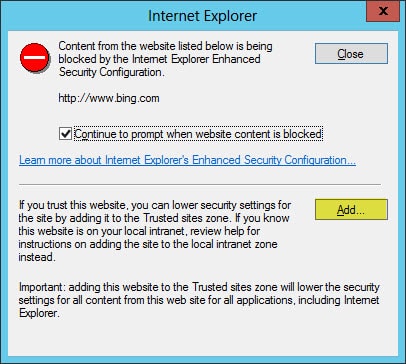
It’s that pesky feature that Content Blocks any site not in your Trusted Zone.

Internet Explorer Enhanced Security Configuration Content Block

One workaround is to simply add every site that you trust. This is the preferred Microsoft way to allow access. When this dialog box appears, click the Add button.

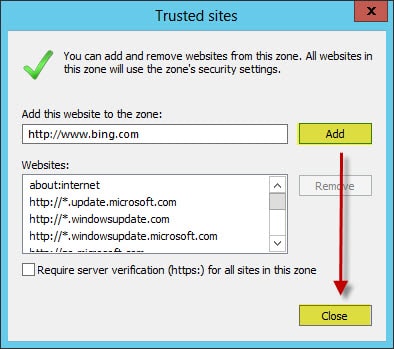
Internet Explorer Trusted Sites Add

The Add this website field should already be populated with the site you are trying to access. Simply click the Add button, followed by Close.

The page will reload with the website you wish to trust.

Now, this can become quite tedious.

We could disable Enhanced Security Configuration altogether.

[Read more…] about Disable Internet Explorer Enhanced Security Configuration

Filed Under: Other Tech, Videos, Windows

Password Crack a Domain Controller in under a minute

February 13, 2014 By Gareth Gudger Leave a Comment

Share
Tweet
Share

So, we thought it would be awesome to do a quick follow up to our previous video titled: Password Crack Windows Server 2008 R2 in under a minute!

In the previous video, we password cracked the Local Administrator account. Well, we decided to take it one step further.

In this video, we will be password cracking the built-in Domain Admin account. Scary huh?

[Read more…] about Password Crack a Domain Controller in under a minute

Filed Under: Other Tech, Videos, Windows

Password Crack Windows Server in under a minute!

January 30, 2014 By Gareth Gudger Leave a Comment

Share
Tweet
Share

Anyone knows that losing a password is a horrible feeling. Even more so when it is for a server.

In this tutorial video, I step you through the process of recovering the local administrator password on a Server 2008 R2 system (Note: This is an old video – this product does work with newer versions of Windows Server). A process that can be completed in under a minute, saving you both time and money.

[Read more…] about Password Crack Windows Server in under a minute!

Filed Under: Other Tech, Videos, Windows

Microsoft makes a mistake with Windows 8.1

December 11, 2013 By Gareth Gudger 9 Comments

Share
Tweet
Share

‘What’s this?’ you may ask, ‘Microsoft made a mistake with Windows 8.1?’.

Yes, unfortunately, they did.

And while not apparent to most users, it is something that will affect many network administrators, desktop support technicians and technology consultants alike.

Those that know me may also wonder why I have posted such a powerful heading like the one above. My coworkers often accuse me of drinking the Microsoft Kool-Aid. With my PC running Windows 8.1, with Internet Explorer 11 as my default browser, my Bing.com homepage, Bing Bar and Bing Desktop apps, my Windows Phone and my Xbox (oh and the fact I want to buy a car with Sync), I honestly don’t know where they get it from.

But back to the topic at hand. What is this mistake Microsoft made with Windows 8.1 and how that will affect IT professionals?

[Read more…] about Microsoft makes a mistake with Windows 8.1

Filed Under: Other Tech, Windows

Icons missing in Remote Desktop Services Web Access

October 5, 2013 By Gareth Gudger Leave a Comment

Share
Tweet
Share

If you are missing the pictures of the icons in Remote Desktop Services Web Access, but you can still see the icon text, then it is a compatibility issue with Internet Explorer 10.

While there appears to be no actual fix there is a very easy workaround. Simply switch your RDS Web Access portal page into compatibility mode.

You can do this by clicking the icon of the torn page in Internet Explorer’s Address Bar. The page will reload in compatibility mode and you should now have matching pictures to go with the text descriptions. As long as you don’t clear your browser cache, Internet Explorer will remember the compatibility mode setting.

Filed Under: Other Tech, Windows

  • « Go to Previous Page
  • Page 1
  • Page 2
  • Page 3
  • Page 4
  • Go to Next Page »

Primary Sidebar

Want to stay up to date?

Sidebar Form

Join thousands of IT professionals and get the latest Exchange & Office 365 tips and tutorials direct to your inbox

DigiCert Banner 300x348

(help support us using our affiliate link)

Footer

Site Navigation

  • Subscribe to blog
  • About SuperTekBoy
  • Disclaimer
  • Privacy & Cookies
  • Contact Us

Want to stay up to date?

Footer Form

Join thousands of IT professionals and get the latest Exchange & Office 365 tips and tutorials direct to your inbox

Join the conversation

  • Twitter
  • LinkedIn
  • Facebook
  • RSS

Copyright © 2026 · SuperTekBoy LLC