• Skip to primary navigation
  • Skip to main content
  • Skip to primary sidebar
  • Skip to footer

SuperTekBoy

Practical Help for Exchange & Office 365

  • Exchange
    • News
    • Tutorials
    • Solve a Problem
  • Office 365
    • News
    • Tutorials
    • Solve a Problem
  • Outlook
    • Tutorials
    • Solve a Problem
  • Books
  • Podcasts
  • Quick Links…
    • Generate or Renew SSL Certs for Exchange
    • Connect PowerShell to Exchange Online
    • Connect PowerShell to Office 365
    • Extend Schema for Exchange
    • Exchange Schema & Build Numbers
  • More…
    • Kemp Load Balancers
    • Other tech…
    • Videos
    • About SuperTekBoy
    • Contact Us

Windows

Display file extensions in Windows 10

December 20, 2015 By Gareth Gudger Leave a Comment

Share
Tweet
Share

A file extension is the string of characters that follows the period in a file name. For example, Finances.xlsx would indicate that the file is formatted in Excel 2007 or later. By default newer versions of Windows hide the extension of known file types. This isn’t a big deal for Excel Workbooks as the file icon is universally known. However, what happens when a file has a fairly generic or lesser-known icon? What happens when two file types possess very similar icons but provide different functions. For example, an OST versus a PST. Hard to guess which one is which by sight alone.

OST vs PST

We wouldn’t want to accidentally manipulate the wrong file type. Deleting an OST cache file is no big deal. Accidentally deleting a PST can result in data loss. One possibility is right-clicking and checking the properties of the file. But if you are working with dozens of files it might be easier to display the file extensions in Windows Explorer.

To show file extensions in Windows 10 is a relatively straightforward task. The process is the same with Windows 8.

From Windows Explorer click View.
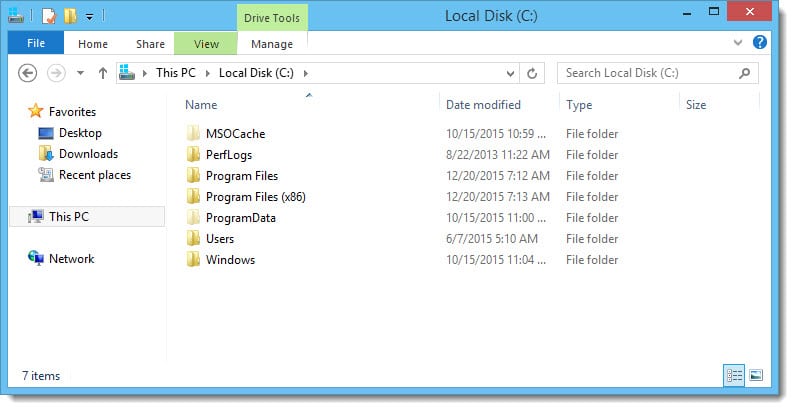
Folder Options View

Select Options >> Change folder and search options.
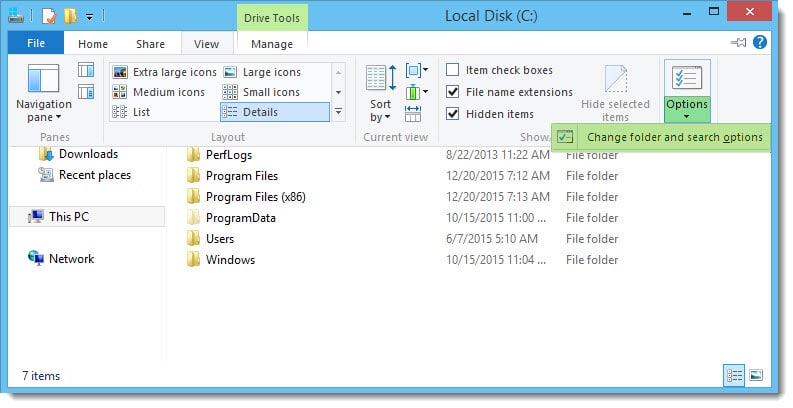
Folder Options View B

Click View tab. Deselect Hide extensions for known file types. Click Ok.
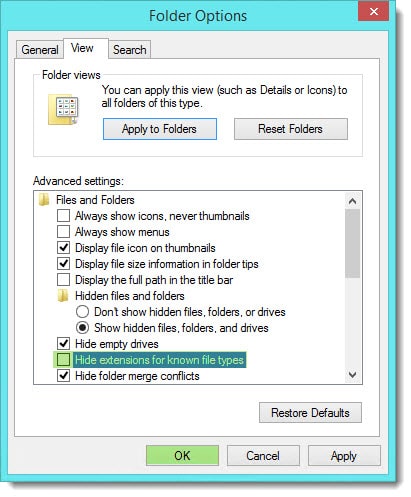
Folder Options View D

You are all set!

Share
Tweet
Share

Filed Under: Other Tech, Windows

Show hidden files in Windows 10

December 20, 2015 By Gareth Gudger Leave a Comment

Share
Tweet
Share

To show hidden files in Windows 10 is a relatively straightforward task. The process is the same as Windows 8.

From Windows Explorer click View.

Show hidden files in Windows 10

Select Options >> Change folder and search options.

Show hidden files in Windows 10

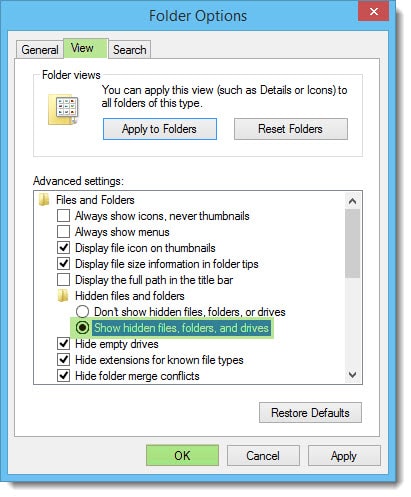
Click the View tab. Select Show hidden files, folders and drives. Click Ok.

Show hidden files in Windows 10

You are all set!

Twitter

Do you typically show your hidden files? Drop a comment below or join the conversation on Twitter @SuperTekBoy.

Share
Tweet
Share

Filed Under: Other Tech, Windows

Avoid this pitfall when upgrading to a Solid State Drive

March 31, 2015 By Gareth Gudger 16 Comments

Share
Tweet
Share

I normally don’t write blog posts about hardware. But this particular problem seemed blog-worthy.

The issue was around my wife’s PC. Her PC is almost 5 years old–it still performs incredibly well. That is one of the benefits of building a custom PC.

Tip: When you build a custom PC it’s not about saving money but getting more bang for your buck. If I were to give a PC manufacturer $1000 versus what I could do with $1000 myself the difference would be night and day. You’d think an economy of scale would kick in somewhere, but it doesn’t. If you can build your own, I recommend it.

With her PC still running Windows 7, it was time for an upgrade. I knew I wanted to take her to Windows 8.1. I figured if I was going to do a full reload, why not upgrade to a solid-state drive at the same time. Kill two birds with one stone. So I did.

The Problem

Everything went well enough at first. The BIOS recognized the new drive. I threw in my Windows 8.1 DVD and the OS installed like a charm.

But then I started to encounter peculiar symptoms. The PC would randomly reboot every few hours.

I checked the Event Logs. Sadly, they were devoid of any real clues. Aside from the Unexpected Shutdown messages, there was nothing else that would lead me in the right direction.

I quickly found no dumps were being created either. This was not good.

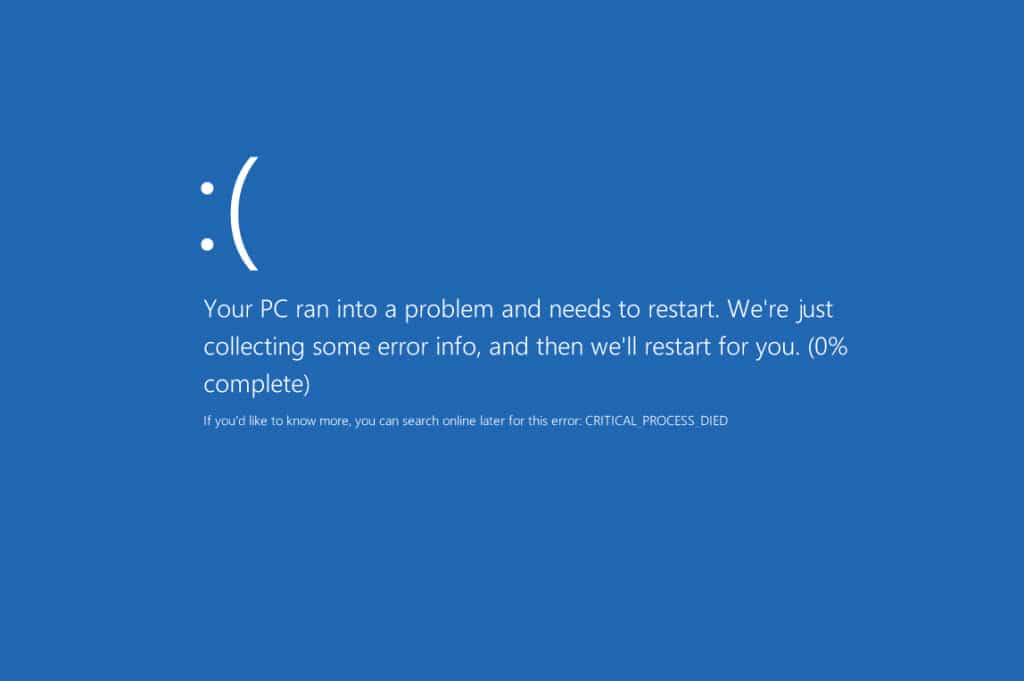
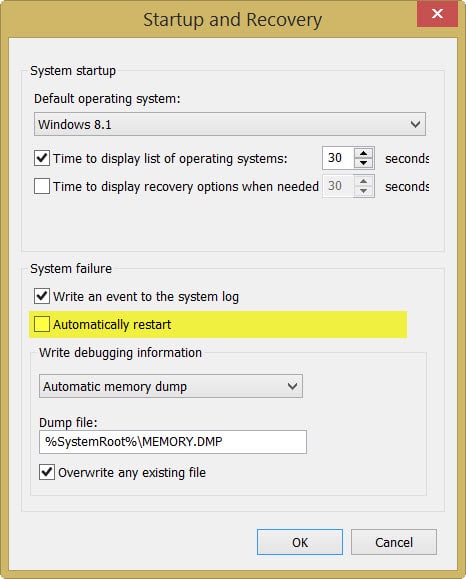
I disabled the automatic restart and received the following error the next time it occurred.

Windows 8 Critical Process Died

CRITICAL_PROCESS_DIED

Based on my research it seemed this error is fairly generic. To make matters worse the blue screen never got past 0%.

[Read more…] about Avoid this pitfall when upgrading to a Solid State Drive

Filed Under: Other Tech, Windows

131 funny, geeky and creepy questions to ask Cortana

March 2, 2015 By Gareth Gudger 364 Comments

Share
Tweet
Share
Questions to ask Cortana

With the Windows 10 keynote announcing that Cortana will be coming to the PC, we thought it would be really awesome to figure out all the fun things you can ask her.

Many of these are well documented around the web. Although, we found a few ourselves. Such as asking Cortana the famous Monty Python line, “What is the airspeed velocity of an unladen swallow?” or “Rock, Paper, Scissors”. At least, we can’t find anyone else that has discovered those yet.

Some questions are funny. Some questions are geeky. And some, just outright creepy.

We didn’t want to show her responses. That’s for you to enjoy. Besides, who likes spoilers anyway? (Okay, just one then. Look up.)

Let us know if we missed any good ones. Our community recommended section is growing like crazy! We are up over 160 questions to ask Cortana now. Plus, which one is your favorite?

Found any good questions to ask Alexa? Let us know by dropping a comment on the sister blog post 131 funny, geeky and creepy questions to ask Alexa.

(Check out the credits at the bottom for a list of our sources.)

[Read more…] about 131 funny, geeky and creepy questions to ask Cortana
Share
Tweet
Share

Filed Under: Other Tech, Windows

Windows Process Activation Service – Error 13: The data is invalid

February 16, 2015 By Gareth Gudger 29 Comments

Share
Tweet
Share

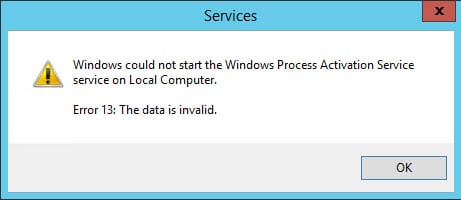
I ran into a strange error recently on an Exchange 2013 server. The WWW Publishing Service was stopped. When I tried to start the service it failed on a dependency. A quick check revealed the Windows Process Activation Service (WAS) was stopped. When I tried to start WAS, I received the following error.

Windows could not start the Windows Process Activation Service service on Local Computer Error 13 The data is invalid

Windows could not start the Windows Process Activation Service service on Local Computer. Error 13: The data is invalid.

The Event Viewer was littered with equally cryptic Event IDs, such as WAS 5005 and WAS 5036.

Not the first time

I’ve actually encountered an error like this before. I am not sure what causes it. But evidently, something in Internet Information Services (IIS) becomes corrupt. Thankfully this blog from GrinGod jogged my memory. It all came flooding back.

[Read more…] about Windows Process Activation Service – Error 13: The data is invalid

Filed Under: Exchange Solutions, Other Tech, Windows

Windows 10: Science fiction now science fact

January 26, 2015 By Gareth Gudger 2 Comments

Share
Tweet
Share

If you missed the Windows 10 keynote then you missed more than you can possibly imagine.

Going into the Microsoft event I expected the content to be solely focused on Windows 10 for the PC. But I was wrong. It was so much more than that!

Microsoft truly wowed us. My mind was completely blown. At a nuclear level.

My good friend Bill Macy and I were madly lighting up Lync Chat like two giddy children on Christmas morning. It was toys galore! (There may have geek hyperventilating as well).

But enough of that. Let’s discuss the highlights.

Open Development Process

Previously, when a new operating system shipped the mentality of many was to wait for at least one service pack level before mass adoption. The idea was that by the first service pack most bugs would be worked out.

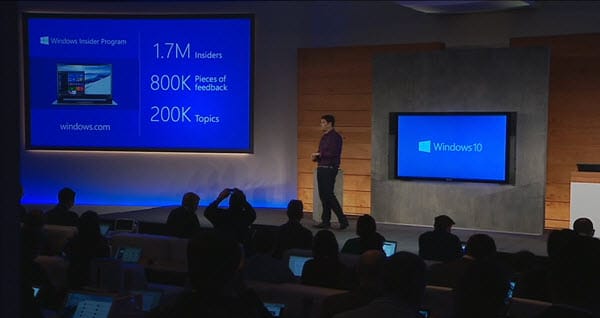
In the first few minutes of the keynote, Terry Myerson discussed the new Insider Program. Microsoft describes the program as an “Open Development Process”. This process puts technical previews into the hands of the end-users. As a result, Microsoft already has 3 million installs of Windows 10 on devices. A network of 1.7 million participants. A system that has already produced 800,000 pieces of feedback.

Windows 10 Insider Program

Microsoft Engineers describe the Insider Program as “co-creating the future of Windows with you” and “making sure the product matches your expectations”.

Is this early adoption and massive feedback the answer? Will Windows 10 be rock solid right out of the gate?

I think so!

Free Upgrade

Yep! You got it.

Windows 10 will be a free upgrade.

[Read more…] about Windows 10: Science fiction now science fact

Filed Under: Other Tech, Windows

  • « Go to Previous Page
  • Page 1
  • Page 2
  • Page 3
  • Page 4
  • Go to Next Page »

Primary Sidebar

Want to stay up to date?

Sidebar Form

Join thousands of IT professionals and get the latest Exchange & Office 365 tips and tutorials direct to your inbox

DigiCert Banner 300x348

(help support us using our affiliate link)

Footer

Site Navigation

  • Subscribe to blog
  • About SuperTekBoy
  • Disclaimer
  • Privacy & Cookies
  • Contact Us

Want to stay up to date?

Footer Form

Join thousands of IT professionals and get the latest Exchange & Office 365 tips and tutorials direct to your inbox

Join the conversation

  • Twitter
  • LinkedIn
  • Facebook
  • RSS

Copyright © 2026 · SuperTekBoy LLC