• Skip to primary navigation
  • Skip to main content
  • Skip to primary sidebar
  • Skip to footer

SuperTekBoy

Practical Help for Exchange & Office 365

  • Exchange
    • News
    • Tutorials
    • Solve a Problem
  • Office 365
    • News
    • Tutorials
    • Solve a Problem
  • Outlook
    • Tutorials
    • Solve a Problem
  • Books
  • Podcasts
  • Quick Links…
    • Generate or Renew SSL Certs for Exchange
    • Connect PowerShell to Exchange Online
    • Connect PowerShell to Office 365
    • Extend Schema for Exchange
    • Exchange Schema & Build Numbers
  • More…
    • Kemp Load Balancers
    • Other tech…
    • Videos
    • About SuperTekBoy
    • Contact Us

Awarded for a 3rd year as a Microsoft MVP (Thank you!)

July 1, 2018 By Gareth Gudger Leave a Comment

Share
Tweet
Share

On July 1st I had the great pleasure of being awarded for a third year as a Microsoft Most Valuable Professional (MVP). It is truly a great honor to be awarded for another year.
Microsoft MVP Logo Vertical

I want to give a special shout-out to everyone who supports this blog. Your comments, your follows, your likes and your shares–they have all got me to this point. Thank you.

I would like to offer special thanks to my family, friends, colleagues, and employer. Thank you for your continued support and for challenging me to the best I can be.

For me, the MVP program grants two fantastic benefits.

The first is being able to interact directly with the Microsoft product groups. Not only does this allow early access to new features but it also provides a forum for feedback and feature requests. As an MVP you get to help shape Microsoft products and services.

The second benefit is being able to collaborate with MVPs from all across the globe. I have had the great pleasure of becoming friends with MVPs from many different countries and cultures. It is truly an amazing experience and its always a pleasure to catch up with them at the MVP Global Summit.


Gareth at Microsoft's Redmond Campus during the 2018 Global MVP Summit
Gareth at Microsoft’s Redmond Campus during the 2018 Global MVP Summit
[Read more…] about Awarded for a 3rd year as a Microsoft MVP (Thank you!)
Print Friendly, PDF & Email

Filed Under: Site News

Exchange June 2018 Updates

June 19, 2018 By Gareth Gudger Leave a Comment

Share
Tweet
Share
Exchange 2016 CU10 Setup

Today was a big day for Exchange updates. Not only did we get Cumulative Update 10 for Exchange 2016, but we also got Cumulative Update 21 for Exchange 2013. Exchange 2010 also receives a critical update in rollup 22.

As always, test these updates in a lab first! I recommend checking out this 7-part guide on configuring Exchange in your lab. It doesn’t take much to get one going.

The updates are as follows:

Exchange 2016 Mini

Exchange 2016 Cumulative Update 10 | KB4099852 | UM Language Pack

Exchange 2013 Cumulative Update 9

Exchange 2013 Cumulative Update 21 | KB4099855 | UM Language Pack

Exchange 2010 Mini

Exchange 2010 SP3 Rollup 22 | KB4295699

Exchange 2013 enters extended support

In case you missed it Exchange 2013 entered into extended support on April 10th. Cumulative Update 21 is the last planned update for Exchange 2013 and no further product development is expected. Any cumulative update after 21 is at Microsoft’s discretion. However, security and timezone updates will continue to be available until April 11th, 2023, delivered primarily through the Windows Update Catalog.

As a reminder, Exchange 2010 has less than 18 months of extended support remaining. After January 10th, 2020, no further technical support or updates will be available. This includes security, bug, and time zone updates. If you are still on 2010, I would recommend planning a migration to Exchange 2016 or Office 365 as soon as possible.

So, what’s new in these Cumulative Updates?

One prerequisite change is the need to install Visual C++ 2013. This is required for a third party software component–that manages WebReady document viewing and data loss prevention–which ships in these updates. Visual C++ 2012 was the previous requirement for older cumulative updates. However, Visual C++ 2012 was installed automatically by the Unified Communication Management Agent (another Exchange prerequisite), so it never required administrator intervention. This means Visual C++ 2013 will also be a requirement for new server installations.

Exchange 2010 received a significant update in this release, which is the ability to leverage Windows 2016 domain controllers and global catalog servers. While 2016 DCs could exist in an Exchange 2010 environment, Exchange 2010 would simply not use them. With this update, 2010 will now leverage 2016 domain controllers and allow for the domain and forest functional levels to be raised to Windows Server 2016. This will allow you to eliminate all older domain controllers.

These updates contain a lot of security and bug fixes. Aside from the May 8th security update each cumulative update includes time zone updates and a dozen bug fixes. Check the appropriate KB article above for a list of issues each update resolves.

[Read more…] about Exchange June 2018 Updates
Print Friendly, PDF & Email

Filed Under: Exchange News, Office 365 News

​​​​​​​​​​​​​​​​​​​​​​​​​​​​​​​​​​​​​​​​​​​​​​​​​​​​​​​​​​​​​​​​​​​​​​​​​​​​​​​​​​​​​​​​​​​​​​​​​​​​​​​​​​​​​​​​​​​​​​​​​​​​​​​​​​​​​​​​​​​​​​​​​​​​​​​​​​​​​​​​​​​​​​​​​​​​​​​​​​​​​​​​​​​​​​​​​​​​​​​​​​​​​​​​​​​​​​​​​​​​​​​​​​​​​​​​​​​​​​​​​​​​​​​​​​​​​​​​Nullable object must have a value (when migrating mailboxes)

June 16, 2018 By Gareth Gudger 1 Comment

Share
Tweet
Share

When migrating mailboxes between Exchange versions using the Exchange Admin Center you may receive the error:

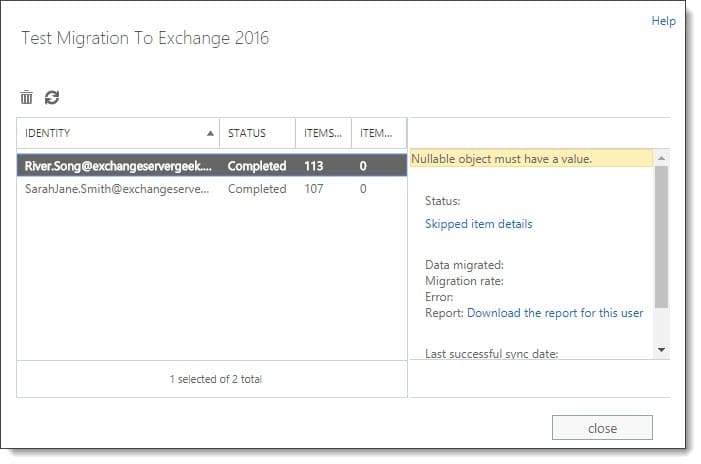
Nullable object must have a value.

This error will appear when you navigate to the Recipient > Migration tab and click View Details on a migration batch. In the screenshot below we are examining a migration batch named “Test Migration to Exchange 2016” which contains two users. We are attempting to move these two users from Exchange 2013 to Exchange 2016.

​​​​​​​​​​​​​​​​​​​​​​​​​​​​​​​​​​​​​​​​​​​​​​​​​​​​​​​​​​​​​​​​​​​​​​​​​​​​​​​​​​​​​​​​​​​​​​​​​​​​​​​​​​​​​​​​​​​​​​​​​​​​​​​​​​​​​​​​​​​​​​​​​​​​​​​​​​​​​​​​​​​​​​​​​​​​​​​​​​​​​​​​​​​​​​​​​​​​​​​​​​​​​​​​​​​​​​​​​​​​​​​​​​​​​​​​​​​​​​​​​​​​​​​​​​​​​​​​Nullable object must have a value

From this screenshot, you will notice the Status column reports both users as successfully migrated. However, the Data Migrated and Migration Rate attributes in the right-hand pane are missing values. For an executed migration batch these attributes should contain metrics.

[Read more…] about ​​​​​​​​​​​​​​​​​​​​​​​​​​​​​​​​​​​​​​​​​​​​​​​​​​​​​​​​​​​​​​​​​​​​​​​​​​​​​​​​​​​​​​​​​​​​​​​​​​​​​​​​​​​​​​​​​​​​​​​​​​​​​​​​​​​​​​​​​​​​​​​​​​​​​​​​​​​​​​​​​​​​​​​​​​​​​​​​​​​​​​​​​​​​​​​​​​​​​​​​​​​​​​​​​​​​​​​​​​​​​​​​​​​​​​​​​​​​​​​​​​​​​​​​​​​​​​​​Nullable object must have a value (when migrating mailboxes)
Print Friendly, PDF & Email

Filed Under: Exchange Solutions

RunAs Radio #588 – Exchange Updates with Gareth Gudger

June 13, 2018 By Gareth Gudger Leave a Comment

Share
Tweet
Share

On May 4th I had the great pleasure of being a guest on the RunAs Radio podcast. I joined host Richard Campbell to discuss the latest in Exchange and Office 365. We also discuss the deciding factors and roadblocks companies face when exploring the cloud.

It was great to be back on Richard’s show. We couldn’t believe our last recording together was one and a half years ago. Boy–time flies!

Gareth on Runas Radio #588 - Exchange Updates with Gareth Gudger
[Read more…] about RunAs Radio #588 – Exchange Updates with Gareth Gudger
Print Friendly, PDF & Email

Filed Under: Exchange, Exchange News, Office 365, Office 365 News, Podcasts

Exchange Server – There was a problem loading your options (“add-ins”)

May 18, 2018 By Gareth Gudger 1 Comment

Share
Tweet
Share

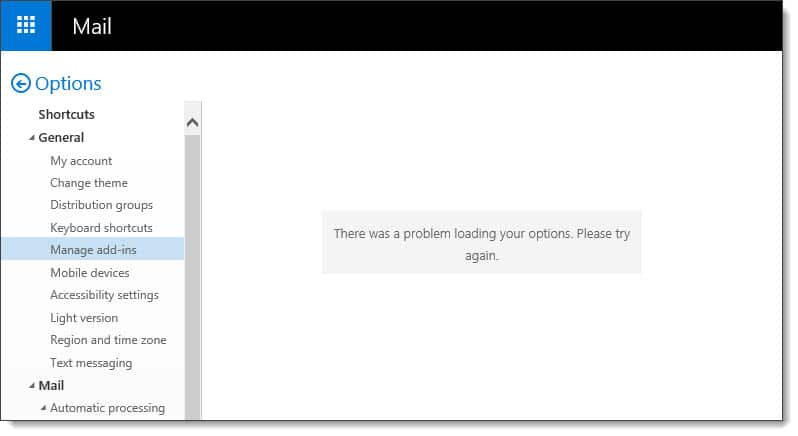
When upgrading to Exchange 2016 you may receive the errors, “There was a problem loading your options” & “Exchange Server doesn’t support the requested version”.

Both of these errors are centered around the add-ins feature.

What are add-ins?

First introduced in Exchange 2013, add-ins are apps that you can globally distribute to all your Outlook clients, whether they be the full Outlook client, Outlook Web App, or, Outlook for iOS and Android.

Add-ins include features such as Bing Maps, which will identify an address in an email and automatically load a web-part displaying a map. Or, simply the ability to identify action items within an email.

Exchange ships with a few add-ins out of the box. Additional add-ins can be downloaded through the Microsoft store or uploaded via a custom XML file.

The real beauty of an add-in is that you can centrally manage it via the Exchange Admin Center. Much easier than deploying Outlook add-ins with traditional endpoint management software. Plus it ensures everyone is always using the latest version of an app.

There was a problem loading your options (“add-ins”)

While in coexistence with an older version of Exchange your users may receive the error “There was a problem loading your options”. They receive this error when trying to manage their add-ins via Outlook Web App. This error prevents users from seeing or managing their add-ins.

Outlook Web App - There was a problem loading your options
[Read more…] about Exchange Server – There was a problem loading your options (“add-ins”)
Print Friendly, PDF & Email

Filed Under: Exchange Solutions

#MVPbuzzChat – Data residency, Hybrid Modern Authentication & Exchange 2019

March 29, 2018 By Gareth Gudger 2 Comments

Share
Tweet
Share

On March 24th I had the great pleasure of being a guest on #MVPBuzzChat. I joined host Christian Buckley to discuss data residency, hybrid modern authentication and new products shipping in 2018. We also discussed the importance of TAP, Windows Insider program and participating in UserVoice.

[Read more…] about #MVPbuzzChat – Data residency, Hybrid Modern Authentication & Exchange 2019
Print Friendly, PDF & Email

Filed Under: Exchange News, Office 365 News, Podcasts

  • « Go to Previous Page
  • Page 1
  • Interim pages omitted …
  • Page 14
  • Page 15
  • Page 16
  • Page 17
  • Page 18
  • Interim pages omitted …
  • Page 51
  • Go to Next Page »

Primary Sidebar

Want to stay up to date?

Sidebar Form

Join thousands of IT professionals and get the latest Exchange & Office 365 tips and tutorials direct to your inbox

DigiCert Banner 300x348

(help support us using our affiliate link)

Footer

Site Navigation

  • Subscribe to blog
  • About SuperTekBoy
  • Disclaimer
  • Privacy & Cookies
  • Contact Us

Want to stay up to date?

Footer Form

Join thousands of IT professionals and get the latest Exchange & Office 365 tips and tutorials direct to your inbox

Join the conversation

  • Twitter
  • LinkedIn
  • Facebook
  • RSS

Copyright © 2026 · SuperTekBoy LLC