• Skip to primary navigation
  • Skip to main content
  • Skip to primary sidebar
  • Skip to footer

SuperTekBoy

Practical Help for Exchange & Office 365

  • Exchange
    • News
    • Tutorials
    • Solve a Problem
  • Office 365
    • News
    • Tutorials
    • Solve a Problem
  • Outlook
    • Tutorials
    • Solve a Problem
  • Books
  • Podcasts
  • Quick Links…
    • Generate or Renew SSL Certs for Exchange
    • Connect PowerShell to Exchange Online
    • Connect PowerShell to Office 365
    • Extend Schema for Exchange
    • Exchange Schema & Build Numbers
  • More…
    • Kemp Load Balancers
    • Other tech…
    • Videos
    • About SuperTekBoy
    • Contact Us

Change the notification email for directory synchronization failures

January 1, 2017 By Gareth Gudger 3 Comments

Share
Tweet
Share

In this article, we explore how to change the email address that receives the Office 365 directory synchronization failure notifications. We will explore how to do this with PowerShell.

Let’s get started!

Getting connected

First, you will need to have access to the Windows Azure Active Directory Module for Windows PowerShell. An article detailing how to install this module and all prerequisites can be found here.

You should have an icon on your desktop named Windows Azure Active Directory Module for Windows PowerShell. Right-click on this icon and select Run As Administrator from the context menu.
Windows Azure Active Directory Module for Windows PowerShell Icon

At the PowerShell prompt enter the following command and hit enter.

 C:\> Set-ExecutionPolicy –ExecutionPolicy RemoteSigned

Execution Policy Change
The execution policy helps protect you from scripts that you do not trust. Changing the execution policy might expose you to the security risks described in the
about_Execution_Policies help topic at http://go.microsoft.com/fwlink/?LinkID=135170. Do you want to change the execution policy?
[Y] Yes [A] Yes to All [N] No [L] No to All [S] Suspend [?] Help (default is "N"):

Press Y for yes and hit Enter.

[Read more…] about Change the notification email for directory synchronization failures

Print Friendly, PDF & Email

Filed Under: Office 365 Tutorials

Unable to connect to the Synchronization Service

January 1, 2017 By Gareth Gudger 7 Comments

Share
Tweet
Share

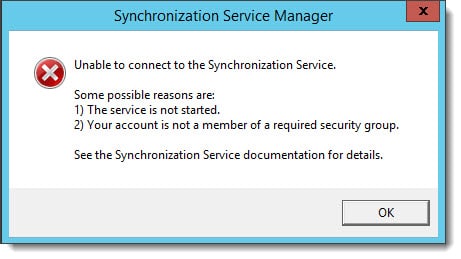
If you run into the following error after installing Azure AD Connect then the fix might be quite simple. There are certainly a number of in-depth articles out there concerning the synchronization service but this might be one quick step to try first.

Unable to connect to the Synchronization Service - Azure AD Connect
Unable to connect to the Synchronization Service.

Some possible reasons are:
1) The service is not started.
2) Your account is not a member of the required security group.

See the Synchronization Service documentation for details.

If you have just installed Azure AD Connect and attempt to launch the Synchronization Service Manager, you may receive the error above. It is likely that the second bullet point regarding membership to a required security group is somewhat true.

Chances are your account has this membership but not the associated token. The fix is possibly quite simple: Log off and log on again.

It’s possible your current login session does not have your updated group membership. Once you do this launch the Synchronization Service Manager again to see if you have access.

If that does not work, then make sure your account is a member of the local ADSyncAdmins group in Computer Management on the server where Azure AD Connect is installed. You will then need to log off and on again.

Twitter

Have you run into this problem? What was your fix? Drop a comment below or join the conversation on Twitter  @SuperTekBoy.

Print Friendly, PDF & Email

Filed Under: Office 365 Solutions

Separate email message counts on Windows Phone 10 lock screen

December 14, 2016 By Gareth Gudger Leave a Comment

Share
Tweet
Share

The notification area of the Windows Phone 10 lock screen is priceless. From an email workflow, the benefit of the lock screen is to quickly see if any new messages have come in. This is especially useful as it saves you time from keying in your passcode and checking your account for new messages.

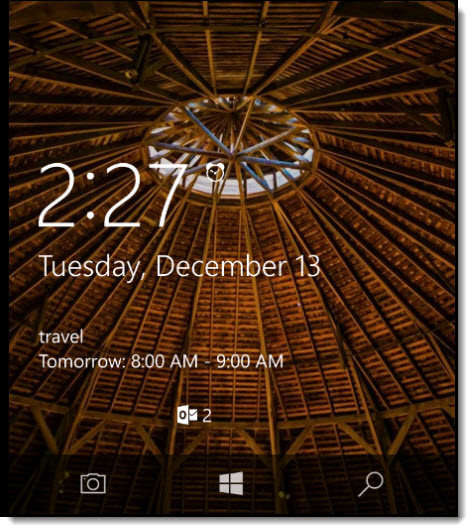
Windows Phone 10 Lock Screen Notifications A

If you are like me you may have multiple email accounts on your Windows phone. Like me, you may also prefer to track how many new messages each email account has received on your lock screen. By default Windows Phone isn’t configured this way. Rather it tells you the aggregate number of all email messages across all accounts in a single notification. In the picture above the number two is actually two email accounts that have received one message each. This may be good for some but when I have both work and personal email accounts on my phone I want to know which account has the new message to determine if it needs immediate attention.

In this guide, we show how to create a separate message count on your lock screen for two email accounts. In our example, one account will be a work account on Exchange and the other will be a personal account on Outlook.com.

Let’s get started!

[Read more…] about Separate email message counts on Windows Phone 10 lock screen
Print Friendly, PDF & Email

Filed Under: Outlook Tutorials, Windows

Patch and Switch – Episode 86 – Live from MVP Summit

December 13, 2016 By Gareth Gudger Leave a Comment

Share
Tweet
Share

While attending my first MVP Summit I had the great pleasure of being a guest on the Patch and Switch show. I joined hosts Rick Claus and Jared Shockley with fellow MVP Nick Westbrook for a light-hearted discussion on life as an IT professional.

(Originally posted at https://channel9.msdn.com/Shows/Patch-And-Switch/86-Convoy-Coconuts-CB)

[Read more…] about Patch and Switch – Episode 86 – Live from MVP Summit
Print Friendly, PDF & Email

Filed Under: Podcasts, Site News

RunAs Radio #504 – Favorite Exchange sessions at Microsoft Ignite

November 9, 2016 By Gareth Gudger Leave a Comment

Share
Tweet
Share

On October 4th I had the great pleasure of being a guest on the RunAs Radio podcast. I joined host Richard Campbell to discuss what we learned about the future of Exchange from Ignite 2016.

Gareth on Runas Radio #504 - Favorite Exchange Sessions From Microsoft Ignite
[Read more…] about RunAs Radio #504 – Favorite Exchange sessions at Microsoft Ignite
Print Friendly, PDF & Email

Filed Under: Exchange News, Office 365 News, Podcasts

The Current Status – Episode 43 – Live from IT/Dev Connections

October 26, 2016 By Gareth Gudger Leave a Comment

Share
Tweet
Share

During my recent visit to IT/Dev Connections, I had the great pleasure of being a guest on The Current Status – Episode 43. I joined hosts Phoummala Schmitt and Theresa Miller and special guests Michael Van Horenbeeck and Paul Cunningham.

In this episode, we discuss what we learned from Microsoft Ignite and IT/Dev Connections with regard to the future of Exchange and Office 365.

(Originally posted at https://soundcloud.com/thecurrentstatus/episode-43-exchange-uncut)

[Read more…] about The Current Status – Episode 43 – Live from IT/Dev Connections
Print Friendly, PDF & Email

Filed Under: Exchange News, Office 365 News, Podcasts

  • « Go to Previous Page
  • Page 1
  • Interim pages omitted …
  • Page 21
  • Page 22
  • Page 23
  • Page 24
  • Page 25
  • Interim pages omitted …
  • Page 51
  • Go to Next Page »

Primary Sidebar

Want to stay up to date?

Sidebar Form

Join thousands of IT professionals and get the latest Exchange & Office 365 tips and tutorials direct to your inbox

DigiCert Banner 300x348

(help support us using our affiliate link)

Footer

Site Navigation

  • Subscribe to blog
  • About SuperTekBoy
  • Disclaimer
  • Privacy & Cookies
  • Contact Us

Want to stay up to date?

Footer Form

Join thousands of IT professionals and get the latest Exchange & Office 365 tips and tutorials direct to your inbox

Join the conversation

  • Twitter
  • LinkedIn
  • Facebook
  • RSS

Copyright © 2026 · SuperTekBoy LLC