• Skip to primary navigation
  • Skip to main content
  • Skip to primary sidebar
  • Skip to footer

SuperTekBoy

Practical Help for Exchange & Office 365

  • Exchange
    • News
    • Tutorials
    • Solve a Problem
  • Office 365
    • News
    • Tutorials
    • Solve a Problem
  • Outlook
    • Tutorials
    • Solve a Problem
  • Books
  • Podcasts
  • Quick Links…
    • Generate or Renew SSL Certs for Exchange
    • Connect PowerShell to Exchange Online
    • Connect PowerShell to Office 365
    • Extend Schema for Exchange
    • Exchange Schema & Build Numbers
  • More…
    • Kemp Load Balancers
    • Other tech…
    • Videos
    • About SuperTekBoy
    • Contact Us

Errors accessing the Public Folder Hierarchy in Exchange 2003

February 11, 2014 By Gareth Gudger Leave a Comment

Share
Tweet
Share

I was helping someone decommission their Exchange 2003 server last week. They had not used this server in quite some time. But the time had come for the role to be removed.

During the decommissioning process I ran into a number of strange errors that I had never seen before. They all revolved around Public Folders. The error occurred when I tried to access the Public Folder hierarchy in Exchange System Manager.

Here was the first error I received when I just tried to expand the root level of the hierarchy.

Error while accessing the Public Folder Hierachy in ESM 2003 - A
The received certificate has expired.
 ID no: 80090328
 Exchange System Manager

The fix seemed quite obvious. I opened IIS Manager, went to the Properties of the Default Website, selected the Directory Security tab and clicked the View Certificate button. It was quickly apparent that the SSL certificate had expired some time ago.

[Read more…] about Errors accessing the Public Folder Hierarchy in Exchange 2003

Print Friendly, PDF & Email

Filed Under: Exchange Solutions

Internet Explorer 11 and Outlook Web App

February 6, 2014 By Gareth Gudger 2 Comments

Share
Tweet
Share

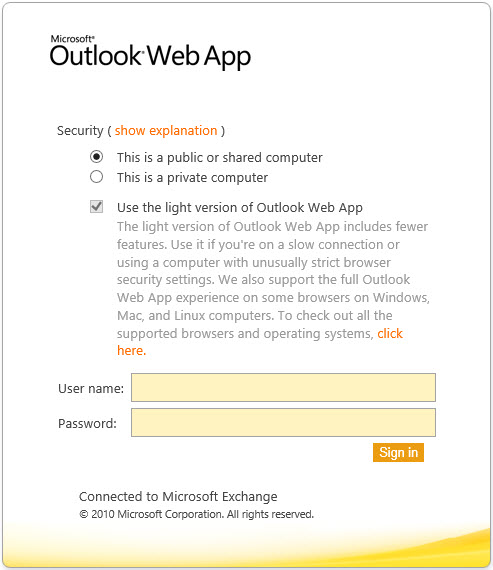
If you use Outlook Web App and have installed Internet Explorer 11 then you have probably noticed this problem.

Outlook Web App 2010 Stuck In Light Mode

You will then notice that the checkbox for “Use the light version of Outlook Web App” is checked and can not be changed. When you log in you receive the light version of Outlook Web App.

The problem is a compatibility issue between Outlook Web App 2010 and IE11. Luckily, the fix is quite simple. Complete the following steps:

[Read more…] about Internet Explorer 11 and Outlook Web App
Print Friendly, PDF & Email

Filed Under: Exchange Solutions

Common Calendar Sharing Errors in Outlook

February 2, 2014 By Gareth Gudger 18 Comments

Share
Tweet
Share

I ran into a strange issue recently where users could not share Outlook Calendars with one another. This problem spawned multiple symptoms and multiple errors. The environment was Exchange 2010. It affected every version of Outlook.

When users attempted to create a calendar sharing request they would receive the following error.

Error while preparing to send sharing message.

Sometimes the users could bypass this by sending through Outlook Web App. Although this was seldom a guaranteed workaround. Outlook users on the receiving side would get an error like this.

The folder you selected is not available.

If they tried to open that same message in OWA they would get this message.

This message has become corrupted. If the message is from someone else, ask the sender to send it again. If the message is in your Drafts folder, create a new message, copy text from the corrupted draft if you can, and click Save.

The fix actually turned out to be quite easy. The problem was that the Exchange 2010 migration had never been completed. When trying to open the Address Lists in the Exchange Management Console we received the following error.

[Read more…] about Common Calendar Sharing Errors in Outlook
Print Friendly, PDF & Email

Filed Under: Exchange Solutions

Password Crack Windows Server in under a minute!

January 30, 2014 By Gareth Gudger Leave a Comment

Share
Tweet
Share

Anyone knows that losing a password is a horrible feeling. Even more so when it is for a server.

In this tutorial video, I step you through the process of recovering the local administrator password on a Server 2008 R2 system (Note: This is an old video – this product does work with newer versions of Windows Server). A process that can be completed in under a minute, saving you both time and money.

[Read more…] about Password Crack Windows Server in under a minute!
Print Friendly, PDF & Email

Filed Under: Other Tech, Videos, Windows

Cisco VPN connects but cannot access inside resources

January 28, 2014 By Gareth Gudger 10 Comments

Share
Tweet
Share

I ran into an issue recently where I was configuring a new Remote Access VPN. The Cisco VPN client would connect successfully. However, I could not access any resources on the LAN behind the firewall.

The termination point was an older PIX 515 running IOS 8.0. I was using the latest version of the Cisco VPN Client software, which was running on Windows 8.1.

In my particular case I had the following line in my config:

NO CRYPTO ISAKMP NAT-TRAVERSAL

This line was singlehandedly preventing me from accessing internal LAN resources. To fix this, I entered the following commands:

[Read more…] about Cisco VPN connects but cannot access inside resources
Print Friendly, PDF & Email

Filed Under: Cisco, Other Tech

Cisco VPN – Reason 433: Reason Not Specified by Peer

January 23, 2014 By Gareth Gudger 1 Comment

Share
Tweet
Share

Secure VPN Connection terminated by Peer.
Reason 433: Reason Not Specified by Peer

I ran into this error recently when trying to set up a Remote Access VPN. This error could be caused by multiple problems. However, in my particular case, it was the settings under AAA authentication servers. Upon connection, the VPN client would prompt for logon credentials and then immediately return this error.

In my environment, I was using a Windows Server 2003 Domain Controller for LDAP authentication. The VPN termination point was an older PIX 515 firewall running IOS 8.0. I was also using the latest Cisco VPN client on Windows 8.1.

After some quick troubleshooting, it appeared that the domain account used to query LDAP was either buried too deep in the OU structure or, some of the OU names were causing problems (they had spaces and special characters).

[Read more…] about Cisco VPN – Reason 433: Reason Not Specified by Peer
Print Friendly, PDF & Email

Filed Under: Cisco, Other Tech

  • « Go to Previous Page
  • Page 1
  • Interim pages omitted …
  • Page 39
  • Page 40
  • Page 41
  • Page 42
  • Page 43
  • Interim pages omitted …
  • Page 51
  • Go to Next Page »

Primary Sidebar

Want to stay up to date?

Sidebar Form

Join thousands of IT professionals and get the latest Exchange & Office 365 tips and tutorials direct to your inbox

DigiCert Banner 300x348

(help support us using our affiliate link)

Footer

Site Navigation

  • Subscribe to blog
  • About SuperTekBoy
  • Disclaimer
  • Privacy & Cookies
  • Contact Us

Want to stay up to date?

Footer Form

Join thousands of IT professionals and get the latest Exchange & Office 365 tips and tutorials direct to your inbox

Join the conversation

  • Twitter
  • LinkedIn
  • Facebook
  • RSS

Copyright © 2026 · SuperTekBoy LLC