• Skip to primary navigation
  • Skip to main content
  • Skip to primary sidebar
  • Skip to footer

SuperTekBoy

Practical Help for Exchange & Office 365

  • Exchange
    • News
    • Tutorials
    • Solve a Problem
  • Office 365
    • News
    • Tutorials
    • Solve a Problem
  • Outlook
    • Tutorials
    • Solve a Problem
  • Books
  • Podcasts
  • Quick Links…
    • Generate or Renew SSL Certs for Exchange
    • Connect PowerShell to Exchange Online
    • Connect PowerShell to Office 365
    • Extend Schema for Exchange
    • Exchange Schema & Build Numbers
  • More…
    • Kemp Load Balancers
    • Other tech…
    • Videos
    • About SuperTekBoy
    • Contact Us

Other Tech

Disable Server Manager automatic launch

June 16, 2014 By Gareth Gudger Leave a Comment

Share
Tweet
Share

Do you find the automatic launch of the Server Manager a pest?

I do.

I admit it is a great tool. But, I rarely use it.

I spend most of my time knee-deep in Exchange consoles. That’s my focus. So, when I log in to a server to do something real quick that extra delay of launching and closing the Server Manager is a nuisance.

Thankfully, Microsoft lets you disable this.

[Read more…] about Disable Server Manager automatic launch
Filed Under: Other Tech, Videos, Windows

Disable Internet Explorer Enhanced Security Configuration

March 21, 2014 By Gareth Gudger Leave a Comment

Share
Tweet
Share

If you have used Windows Server products for some time, then you have probably run into Internet Explorer Enhanced Security Configuration.

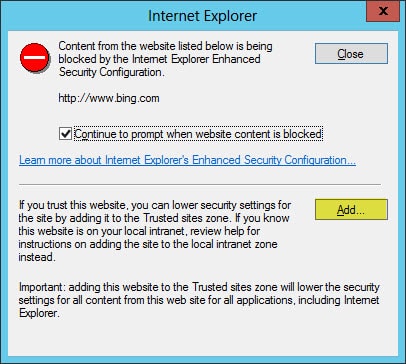
It’s that pesky feature that Content Blocks any site not in your Trusted Zone.

Internet Explorer Enhanced Security Configuration Content Block

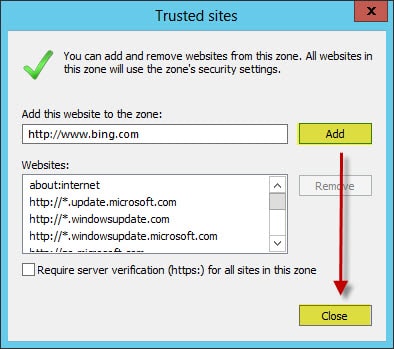
One workaround is to simply add every site that you trust. This is the preferred Microsoft way to allow access. When this dialog box appears, click the Add button.

Internet Explorer Trusted Sites Add

The Add this website field should already be populated with the site you are trying to access. Simply click the Add button, followed by Close.

The page will reload with the website you wish to trust.

Now, this can become quite tedious.

We could disable Enhanced Security Configuration altogether.

[Read more…] about Disable Internet Explorer Enhanced Security Configuration

Filed Under: Other Tech, Videos, Windows

Symantec ditches Backup Exec 2012 Release 2

February 28, 2014 By Gareth Gudger Leave a Comment

Share
Tweet
Share

Symantec Backup Exec 2012 was received with mixed reviews when it launched.

Many complained about the new GUI. Others did not like the new server-centric mindset that had replaced the traditional job-centric method. The list was extensive.

The good news was that Symantec listened very closely to their user base. And kudos to Symantec for doing this! They realized they had made a mistake and promised to bring back everything users had loved about previous versions.

They dubbed this project Backup Exec 2012 Release 2.

Release 2 would also include added support for Exchange 2013 and SharePoint 2013, such as allowing granular restores. At present, only full database restores can be performed on these two products. It would also add support for Server 2012 as a Media Server.

Release 2 went into beta late last year. It had a proposed release date of June 2014.

‘So, what’s all this ditching Release 2?’ you may ask.

[Read more…] about Symantec ditches Backup Exec 2012 Release 2

Filed Under: Other Tech, Symantec

Password Crack a Domain Controller in under a minute

February 13, 2014 By Gareth Gudger Leave a Comment

Share
Tweet
Share

So, we thought it would be awesome to do a quick follow up to our previous video titled: Password Crack Windows Server 2008 R2 in under a minute!

In the previous video, we password cracked the Local Administrator account. Well, we decided to take it one step further.

In this video, we will be password cracking the built-in Domain Admin account. Scary huh?

[Read more…] about Password Crack a Domain Controller in under a minute

Filed Under: Other Tech, Videos, Windows

Password Crack Windows Server in under a minute!

January 30, 2014 By Gareth Gudger Leave a Comment

Share
Tweet
Share

Anyone knows that losing a password is a horrible feeling. Even more so when it is for a server.

In this tutorial video, I step you through the process of recovering the local administrator password on a Server 2008 R2 system (Note: This is an old video – this product does work with newer versions of Windows Server). A process that can be completed in under a minute, saving you both time and money.

[Read more…] about Password Crack Windows Server in under a minute!

Filed Under: Other Tech, Videos, Windows

Cisco VPN connects but cannot access inside resources

January 28, 2014 By Gareth Gudger 10 Comments

Share
Tweet
Share

I ran into an issue recently where I was configuring a new Remote Access VPN. The Cisco VPN client would connect successfully. However, I could not access any resources on the LAN behind the firewall.

The termination point was an older PIX 515 running IOS 8.0. I was using the latest version of the Cisco VPN Client software, which was running on Windows 8.1.

In my particular case I had the following line in my config:

NO CRYPTO ISAKMP NAT-TRAVERSAL

This line was singlehandedly preventing me from accessing internal LAN resources. To fix this, I entered the following commands:

[Read more…] about Cisco VPN connects but cannot access inside resources

Filed Under: Cisco, Other Tech

  • « Go to Previous Page
  • Page 1
  • Interim pages omitted …
  • Page 3
  • Page 4
  • Page 5
  • Page 6
  • Page 7
  • Interim pages omitted …
  • Page 12
  • Go to Next Page »

Primary Sidebar

Want to stay up to date?

Sidebar Form

Join thousands of IT professionals and get the latest Exchange & Office 365 tips and tutorials direct to your inbox

DigiCert Banner 300x348

(help support us using our affiliate link)

Footer

Site Navigation

  • Subscribe to blog
  • About SuperTekBoy
  • Disclaimer
  • Privacy & Cookies
  • Contact Us

Want to stay up to date?

Footer Form

Join thousands of IT professionals and get the latest Exchange & Office 365 tips and tutorials direct to your inbox

Join the conversation

  • Twitter
  • LinkedIn
  • Facebook
  • RSS

Copyright © 2026 · SuperTekBoy LLC