• Skip to primary navigation
  • Skip to main content
  • Skip to primary sidebar
  • Skip to footer

SuperTekBoy

Practical Help for Exchange & Office 365

  • Exchange
    • News
    • Tutorials
    • Solve a Problem
  • Office 365
    • News
    • Tutorials
    • Solve a Problem
  • Outlook
    • Tutorials
    • Solve a Problem
  • Books
  • Podcasts
  • Quick Links…
    • Generate or Renew SSL Certs for Exchange
    • Connect PowerShell to Exchange Online
    • Connect PowerShell to Office 365
    • Extend Schema for Exchange
    • Exchange Schema & Build Numbers
  • More…
    • Kemp Load Balancers
    • Other tech…
    • Videos
    • About SuperTekBoy
    • Contact Us

Other Tech

Release Update 4 for Symantec EndPoint 12.1 now available!

November 7, 2013 By Gareth Gudger Leave a Comment

Share
Tweet
Share

Release Update 4 for Symantec EndPoint 12.1 is now available. It can be downloaded from FileConnect by customers with current maintenance and as a trial from the public site for those that wish to try it out.

Symantec Endpoint Protection 12.1.4 has added support for a number of new operating systems including:

  • Windows Server 2012 Release 2 (R2)
  • Windows 8.1
  • Mac OSX 10.9

In addition to this, there have been a lot of features added on the Mac OS side. Symantec had seen a dramatic rise in malware targeted towards the Mac and 12.1.4 is the response to that. One such example was the Flashback virus which affected approximately 600,000 Mac computers back in 2012. In fact, Symantec reports that the number of malware variants in 2012 almost doubled for the Mac. Symantec proposes that this huge increase in Mac malware coincides with Apple’s continued market share growth, especially in the enterprise. As this market share continues to grow Symantec estimates so will the malware variants.

To combat this growing threat Symantec now offers Network Threat Protection for the Mac. This was previously a feature that was only available on the PC. The inclusion of Network Threat Protection now gives Mac users a powerful best-in-class Intrusion Prevention System. This provides an additional layer of security to the already powerful antivirus and anti-malware engines.

[Read more…] about Release Update 4 for Symantec EndPoint 12.1 now available!
Filed Under: Other Tech, Symantec

Cisco VPN on Windows 8.1/10 – Reason 442: Failed to enable Virtual Adapter

October 19, 2013 By Gareth Gudger 455 Comments

Share
Tweet
Share
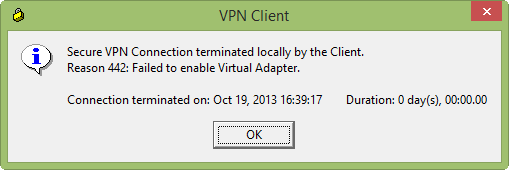
Cisco VPN on Windows 8.1 - Reason 442: Failed to enable Virtual Adapter

Secure VPN Connection terminated locally by the Client.
Reason 442: Failed to enable Virtual Adapter.

UPDATE: Works with Windows 10: A number of readers have reported this works for Windows 10.

If you receive this error on Windows 8.1 or Windows 10 while trying to connect with the Cisco VPN Client then the solution is a simple registry fix.

[Read more…] about Cisco VPN on Windows 8.1/10 – Reason 442: Failed to enable Virtual Adapter
Share
Tweet
Share

Filed Under: Cisco, Other Tech, Videos

V-79-57344-38273 – Cannot get the virtual machine XML information

October 18, 2013 By Gareth Gudger 1 Comment

Share
Tweet
Share

V-79-57344-38273 – Final error: 0xe0009581 – Cannot get the virtual machine XML information.

This error can be caused by a number of problems but in my case, it was a very simple fix and, it may be for you too. This error occurred after I renamed one of my virtual machines. However, selections for both the new name and the old name still existed in the Backup Exec job. These selections did not show in the GUI. To fix this issue I had to remove the old names from the Backup Details tab. This is the text-based representation of the Backup Selections.

[Read more…] about V-79-57344-38273 – Cannot get the virtual machine XML information

Filed Under: Other Tech, Symantec

Block spambots on compromised PCs

October 15, 2013 By Gareth Gudger Leave a Comment

Share
Tweet
Share

If you have ever been blacklisted for sending spam there is a good chance the source of those emails was not your mail server but a compromised computer inside your network. So, how do you combat this? Well, the easiest way is to create access lists on your firewall to only permit your mail server to send out on port 25 (SMTP). For a Cisco ASA, this can be easily accomplished with 4 lines of code.

[Read more…] about Block spambots on compromised PCs

Filed Under: Cisco, Other Tech

V-79-10000-11226 – VSS Snapshot error

October 14, 2013 By Gareth Gudger 2 Comments

Share
Tweet
Share

V-79-10000-11226 – VSS Snapshot error. The Microsoft Volume Shadow Copy Service (VSS) snapshot provider selected returned: “Unexpected provider error”.

I was receiving this error in Backup Exec 2010 R3 while trying to back up a virtualized Exchange 2010 server. This error seemed a little odd, so first I ran VSSADMIN LIST WRITERS from the command prompt  I verified all my writers were listed as “Stable” and all reported “No Errors”. I then ran VSSADMIN LIST PROVIDERS and immediately identified my problem.

[Read more…] about V-79-10000-11226 – VSS Snapshot error

Filed Under: Other Tech, Symantec

Icons missing in Remote Desktop Services Web Access

October 5, 2013 By Gareth Gudger Leave a Comment

Share
Tweet
Share

If you are missing the pictures of the icons in Remote Desktop Services Web Access, but you can still see the icon text, then it is a compatibility issue with Internet Explorer 10.

While there appears to be no actual fix there is a very easy workaround. Simply switch your RDS Web Access portal page into compatibility mode.

You can do this by clicking the icon of the torn page in Internet Explorer’s Address Bar. The page will reload in compatibility mode and you should now have matching pictures to go with the text descriptions. As long as you don’t clear your browser cache, Internet Explorer will remember the compatibility mode setting.

Filed Under: Other Tech, Windows

  • « Go to Previous Page
  • Page 1
  • Interim pages omitted …
  • Page 6
  • Page 7
  • Page 8
  • Page 9
  • Page 10
  • Interim pages omitted …
  • Page 12
  • Go to Next Page »

Primary Sidebar

Want to stay up to date?

Sidebar Form

Join thousands of IT professionals and get the latest Exchange & Office 365 tips and tutorials direct to your inbox

DigiCert Banner 300x348

(help support us using our affiliate link)

Footer

Site Navigation

  • Subscribe to blog
  • About SuperTekBoy
  • Disclaimer
  • Privacy & Cookies
  • Contact Us

Want to stay up to date?

Footer Form

Join thousands of IT professionals and get the latest Exchange & Office 365 tips and tutorials direct to your inbox

Join the conversation

  • Twitter
  • LinkedIn
  • Facebook
  • RSS

Copyright © 2026 · SuperTekBoy LLC