• Skip to primary navigation
  • Skip to main content
  • Skip to primary sidebar
  • Skip to footer

SuperTekBoy

Practical Help for Exchange & Office 365

  • Exchange
    • News
    • Tutorials
    • Solve a Problem
  • Office 365
    • News
    • Tutorials
    • Solve a Problem
  • Outlook
    • Tutorials
    • Solve a Problem
  • Books
  • Podcasts
  • Quick Links…
    • Generate or Renew SSL Certs for Exchange
    • Connect PowerShell to Exchange Online
    • Connect PowerShell to Office 365
    • Extend Schema for Exchange
    • Exchange Schema & Build Numbers
  • More…
    • Kemp Load Balancers
    • Other tech…
    • Videos
    • About SuperTekBoy
    • Contact Us

Office 365 RSS

Incompatible Office products are installed on your machine

February 16, 2016 By Gareth Gudger 3 Comments

Share
Tweet
Share
OneDrive for Business Incompatible Office Products are installed on your machine
Sorry, we can't perform this action. Incompatible Office products are installed on your machine.

This error is caused when you have a mix of differently licensed Office products on your computer. For example, you may have Office 365 ProPlus which is the click-to-run version that operates off a subscription. On the same computer, you may also have a volume licensed Office product, such as Visio or Project, that may have been delivered by ISO or MSI. If this is the case you will constantly receive this nag message from OneDrive for Business. This will likely also cause transfer issues if you are using sync libraries.

Unfortunately, the only way to remedy this is to uninstall either one of the competing products (or remove OneDrive for Business). In probably all cases I would expect the Office 365 suite to be the victor. That said you will need to license the offending software–Visio or Project–through an Office 365 subscription.

Not good news I’m afraid. I doubt Microsoft will remedy this as I suspect all products will eventually become a subscription. But this is the fix.

Twitter

Join the conversation on Twitter @SuperTekBoy.

Share
Tweet
Share

Filed Under: Office 365 RSS, Office 365 Solutions, Other Tech

Add a legal disclaimer to all outbound email (Exchange/O365)

January 7, 2016 By Gareth Gudger 7 Comments

Share
Tweet
Share

Adding a legal disclaimer to all outbound email is an important task. Thankfully, this is a simple process in Exchange on-premises and Office 365. In fact, the instructions are identical for Exchange 2013, Exchange 2016 and Office 365.

For this article, our example company, Time Travel Research, wishes that all email leaving the organization have a legal disclaimer. Time Travel Research is not concerned about applying a disclaimer if the message remains inside the organization. For example, a disclaimer between two employees is not necessary. However, they would like all external messages, whether it be to a customer or a vendor, to have this disclaimer.

Let’s get started!

Add a legal disclaimer to all outbound email

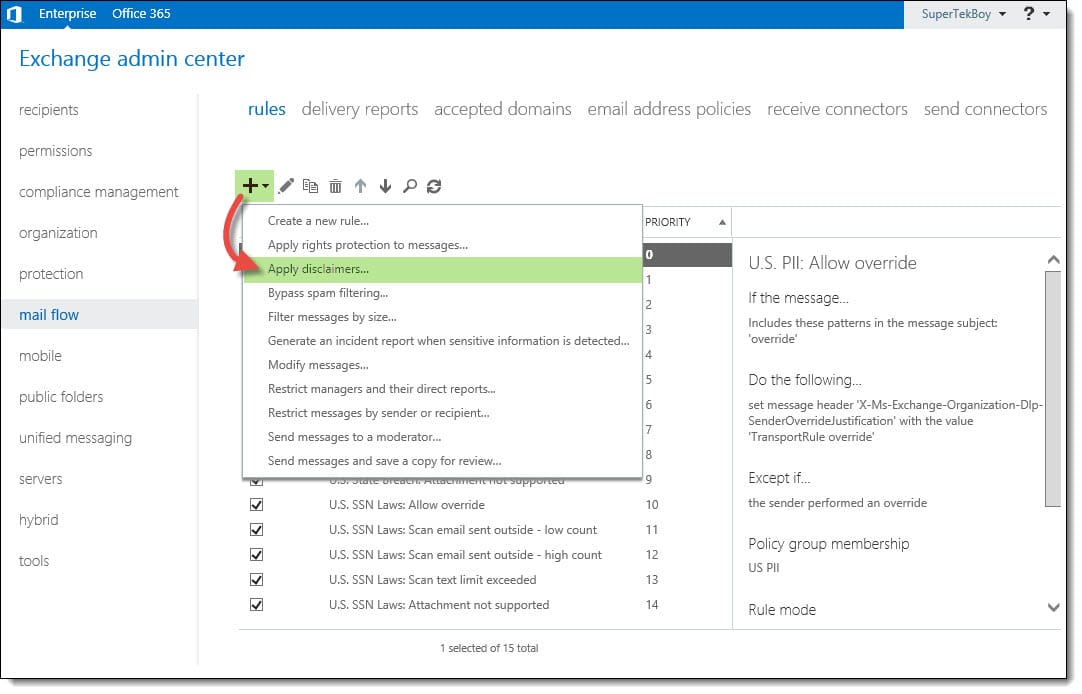
Log in to the Exchange Admin Center. Once logged in, navigate to Mail Flow >> Rules. Click the New (Excchange 2016 New) button.

From the drop-down menu, you will notice several choices. These choices are rule templates. We could just select Create a new rule. That would start us with a blank rule with no conditions. However, to give us a head start lets pick the Apply disclaimers template. This will configure a couple of items for us.

Add a legal disclaimer to all outbound email Exchange Office 365
[Read more…] about Add a legal disclaimer to all outbound email (Exchange/O365)
Share
Tweet
Share

Filed Under: Exchange Tutorials, Office 365 RSS, Office 365 Tutorials

‘Unread Mail’ – The attempted operation failed. An object could not be found.

October 20, 2015 By Gareth Gudger 7 Comments

Share
Tweet
Share

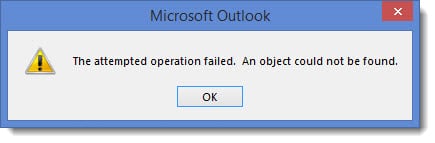
While working on a Cutover migration for Office 365 I ran into an error with the default search folders in Outlook. The data had migrated successfully. The Outlook profiles were recreated. Mail was flowing. However, when clicking on the Unread Mail folder it resulted in the following error.

'Unread Mail' - The attempted operation failed. An object could not be found.

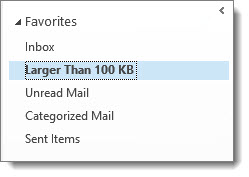
This same error occurred when clicking on other search folders; such as Categorized Mail, or, Large Mail.

Outlook Favorites

Thankfully the fix was incredibly simple.

[Read more…] about ‘Unread Mail’ – The attempted operation failed. An object could not be found.

Filed Under: Office 365 RSS, Office 365 Solutions, Outlook Solutions

Fatal error MrsHttpUnauthorizedException

August 6, 2015 By Gareth Gudger 2 Comments

Share
Tweet
Share

Recently I encountered the following error when completing a mailbox move from Exchange to Office 365.

  8/1/2015 12:00:00 AM [CY1PR11MB0001] Fatal error MrsHttpUnauthorizedException has occurred.

The initial sync had worked fine. The mailbox was AutoSuspended at 95%. It was ready to be completed. Yet, it did not want to go. I repeated a Resume-MoveRequest on a similar mailbox–same exact error.

Sadly, the interwebs seemed devoid of any real information. Luckily a good friend and colleague alerted me to the root cause. This error will occur if the password has changed on the account used to create the move request.

In my case, this had indeed happened.

The remedy for MrsHttpUnauthorizedException

To fix the issue we need to update the credentials on the move request. To do this we need to enlist the help of the Set-MoveRequest cmdlet. Let’s get started.

[Read more…] about Fatal error MrsHttpUnauthorizedException

Filed Under: Exchange, Exchange Solutions, Office 365, Office 365 RSS, Office 365 Solutions

Slow Document Editing when using SharePoint Sync

August 4, 2015 By Gareth Gudger Leave a Comment

Share
Tweet
Share

Recently I ran into an issue where editing a Word document was painfully slow. Every time I typed a letter it was followed by an unbearable lag. Typing a sentence would sputter in dribs and drabs. This was not going to work.

SharePoint Online Document Library Sync

The document in question was stored in SharePoint Online. I was using the Sync feature for easy access from my local computer.

The fix was actually quite simple.

Fix Slow Document Editing

Check the bottom-right of your Word document. If you see something that says Updates Available click it. If successful the Updates Available notice will disappear and Word will perform at its normal speed.

If you hover over Updates Available before you click it, you will see a description of what is actually going on.

[Read more…] about Slow Document Editing when using SharePoint Sync
Share
Tweet
Share

Filed Under: Office 365 RSS, Office 365 Solutions

RBAC hides the Office 365 Mailbox creation link

July 21, 2015 By Gareth Gudger 23 Comments

Share
Tweet
Share

If you have configured Exchange 2013 in hybrid mode then you have probably noticed the appearance of this link. It’s the Office 365 Mailbox creation link.

New Office 365 Mailbox link

However, if you have implemented RBAC this link may not show when you’d expect it to.

I ran into this recently when upgrading an Exchange 2010 hybrid environment to 2013. Previously the client had implemented RBAC where members of the helpdesk team were added to the Recipient Management group. In 2010 this allowed the helpdesk team to create and manage mail recipients; both on-premise and in the cloud. However, when this group attempted to use the 2013 management tools the Office 365 Mailbox link was absent.

After some digging–plus some trial and error–we quickly found an oddity. The short answer–it’s all based around one missing role entry. To see that link you need access to the Get-RemoteDomain command. Members of Recipient Management do not have this.

[Read more…] about RBAC hides the Office 365 Mailbox creation link

Filed Under: Exchange, Exchange Solutions, Office 365, Office 365 RSS, Office 365 Solutions

  • « Go to Previous Page
  • Page 1
  • Page 2
  • Page 3
  • Go to Next Page »

Primary Sidebar

Want to stay up to date?

Sidebar Form

Join thousands of IT professionals and get the latest Exchange & Office 365 tips and tutorials direct to your inbox

DigiCert Banner 300x348

(help support us using our affiliate link)

Footer

Site Navigation

  • Subscribe to blog
  • About SuperTekBoy
  • Disclaimer
  • Privacy & Cookies
  • Contact Us

Want to stay up to date?

Footer Form

Join thousands of IT professionals and get the latest Exchange & Office 365 tips and tutorials direct to your inbox

Join the conversation

  • Twitter
  • LinkedIn
  • Facebook
  • RSS

Copyright © 2026 · SuperTekBoy LLC