• Skip to primary navigation
  • Skip to main content
  • Skip to primary sidebar
  • Skip to footer

SuperTekBoy

Practical Help for Exchange & Office 365

  • Exchange
    • News
    • Tutorials
    • Solve a Problem
  • Office 365
    • News
    • Tutorials
    • Solve a Problem
  • Outlook
    • Tutorials
    • Solve a Problem
  • Books
  • Podcasts
  • Quick Links…
    • Generate or Renew SSL Certs for Exchange
    • Connect PowerShell to Exchange Online
    • Connect PowerShell to Office 365
    • Extend Schema for Exchange
    • Exchange Schema & Build Numbers
  • More…
    • Kemp Load Balancers
    • Other tech…
    • Videos
    • About SuperTekBoy
    • Contact Us

Awarded for a 4th year as a Microsoft MVP (Thank you!)

July 1, 2019 By Gareth Gudger 1 Comment

Share
Tweet
Share

On July 1st I had the great pleasure of being awarded for a fourth year as a Microsoft Most Valuable Professional (MVP). It is truly a great honor to be awarded for another year.

Microsoft MVP Logo Vertical

I want to give a special shout-out to everyone who supports this blog. Your comments, your follows, your likes and your shares–they have all got me to this point. Thank you.

I would like to offer special thanks to my family, friends, colleagues, and employer. Thank you for your continued support and for challenging me to the best I can be.

I want to congratulate all MVPs who were awarded and renewed today. Your contributions and commitment to helping others are inspirational.

If you were not awarded or renewed then keep trying. MVPs are now being awarded on a monthly basis. So, there are twelve opportunities to become an MVP versus four.

[Read more…] about Awarded for a 4th year as a Microsoft MVP (Thank you!)

Print Friendly, PDF & Email

Filed Under: Site News

Using Exchange Cmdlets in Azure Cloud Shell

June 25, 2019 By Gareth Gudger Leave a Comment

Share
Tweet
Share

The Exchange Team has announced the general availability of the Exchange Online PowerShell Module in Azure Cloud Shell.

Azure Cloud Shell is a web-based version of PowerShell that can be launched from within any web browser by navigating to shell.azure.com, or, clicking the PowerShell icon in the Azure portal (portal.azure.com).

In this article, we will explore how to initially configure Azure Cloud Shell, cover the basics of the interface, connect to Exchange Online, and perform some basic Cloud Shell tasks, such as managing files and running some Exchange cmdlets.

Let’s get started!

Running the Azure Cloud Shell for the first time

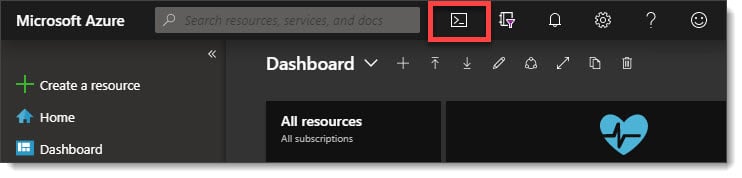
To get started with Azure Cloud Shell you can either navigate to shell.azure.com or, click the PowerShell icon in the Azure Portal. The icon is at the top of the screen, to the right of the search box (pictured in the screenshot below)

Access Azure Cloud Shell

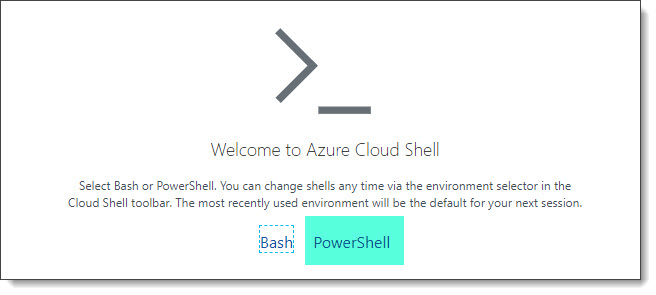
The first time you open Cloud Shell you will be asked if you want to connect to PowerShell or Bash. Click PowerShell.

Cloud Shell PowerShell or Bash

You will then be prompted to create storage for use with Cloud Shell. You will be given a drop down of all your available Azure subscriptions. Pick an Azure subscription with active credit and click Create Storage.

[Read more…] about Using Exchange Cmdlets in Azure Cloud Shell
Print Friendly, PDF & Email

Filed Under: Exchange Tutorials, Office 365 Tutorials

Exchange June 2019 Updates

June 20, 2019 By Gareth Gudger Leave a Comment

Share
Tweet
Share
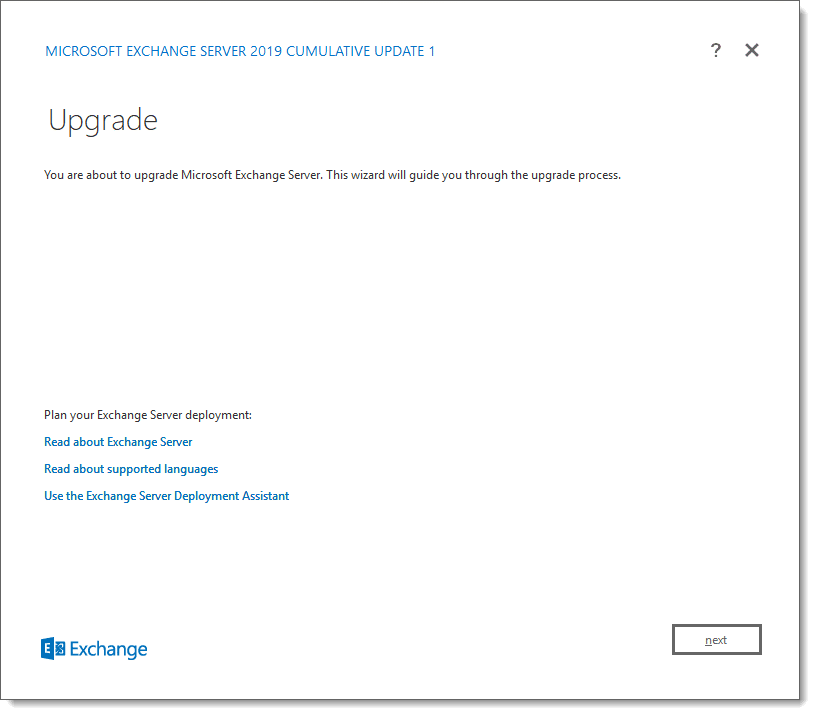
Exchange 2019 Cumulative Update 1

This week was a big week for Exchange. Microsoft released its second cumulative update for Exchange 2019 as well as cumulative updates for Exchange 2016 and 2013.

As always, test these updates in a lab first! I recommend checking out this 7-part guide on configuring Exchange in your lab. It doesn’t take much to get one going.

The updates are as follows:

Exchange 2013 Cumulative Update 9

Exchange 2019 Cumulative Update 2 (VLSC)| KB4488401

Exchange 2016 Mini

Exchange 2016 Cumulative Update 13 | KB4488406 | UM Language Pack

Exchange 2013 Cumulative Update 9

Exchange 2013 Cumulative Update 23 | KB4489622 | UM Language Pack

Exchange 2010 Mini

Exchange 2010 SP3 Rollup 27 | KB4491413

The final countdown – 208 days left for Exchange 2010

Here is a quick reminder that extended support for Exchange 2010 is coming to an end. After January 14th, 2020, no further technical support or updates will be available. This includes security, bug and time zone updates.

Unfortunately, there is no direct path to Exchange 2019 from 2010. If you do plan to stay on-prem you will need to migrate to either 2013 or 2016 (I’d recommend 2016 as 2013 is now in extended support). From there you can migrate to 2019. Alternatively, you can migrate to Office 365.

For more information about the Exchange 2010 life-cycle check out the Exchange Team blog.

So, what’s new in these Cumulative Updates?

In the last set of cumulative updates, Microsoft reduced the number of permissions Exchange had in Active Directory. In an ongoing effort to further tighten the security posture of Exchange, Microsoft has further reduced Exchange’s permissions in Active Directory.

This includes two notable changes. The first is that Exchange can no longer assign service principal names (SPN). Second, a deny attribute has been added to the DNS Admins group. The Exchange Team determined neither of these rights was necessary for the operation of Exchange.

In the previous Exchange 2019 cumulative update, you could disable legacy protocols on a per-user basis. In cumulative update 2, you can now globally disable legacy authentication at the organization level.

This series of updates also introduces support for .NET Framework 4.8. While optional now, 4.8 will be mandatory as part of the December 2019 updates.

[Read more…] about Exchange June 2019 Updates
Print Friendly, PDF & Email

Filed Under: Exchange News, Office 365 News

Revoke your guest access to an Office 365 tenant (and Teams)

April 13, 2019 By Gareth Gudger 3 Comments

Share
Tweet
Share

As a consultant, I am often invited to collaborate in other Office 365 tenants. This is often presented in the form of guest access into that tenant, which allows me to access applications such as Microsoft Teams or share files with SharePoint Online.

The benefit of guest access is that I can collaborate as if I were a member of that organization without consuming a license, or, requiring an identity in that tenant. For example, my guest access into that tenant could easily be attached to a personal email account hosted at outlook.com.

I often see guest access granted in mergers and acquisitions where the two companies need to collaborate at a business level well before any technology to integrate the two companies has been implemented.

But other scenarios that drive guest access include a company needing to collaborate with its vendors or partners, or, a consultant working with a customer on a project.

But what happens when that guest access is no longer needed?

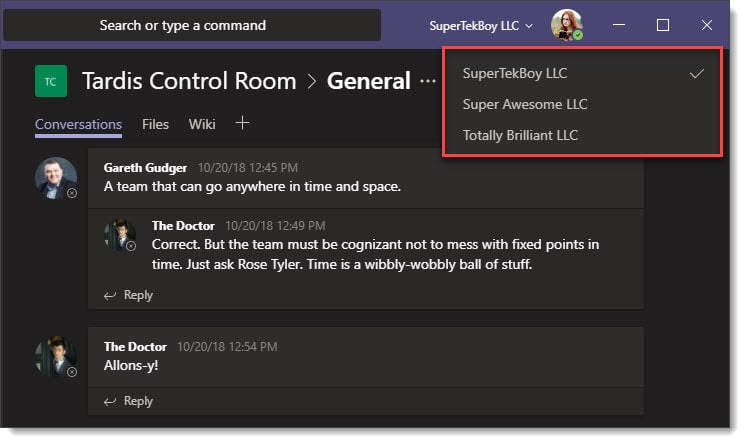
For our example, Amy Pond successfully completed a project at Super Awesome LLC. Amy collaborated with Super Awesome employees using Microsoft Teams and would like to remove Super Awesome from her Microsoft Teams client. Amy needs to maintain access to Totally Brilliant LLC, which is her new project, and SuperTekBoy LLC, which is her employer. The screenshot below is how Amy’s Microsoft Teams client looks today.

Guest Access to other Microsoft Teams

In this article, Amy will leave Super Awesome’s Office 365 tenant by revoking her own guest access. After she revokes her access she will no longer have any access to any Super Awesome apps or data.

Let’s get started!

[Read more…] about Revoke your guest access to an Office 365 tenant (and Teams)
Print Friendly, PDF & Email

Filed Under: Office 365 Solutions

Setting Windows 10 to Dark Mode

April 7, 2019 By Gareth Gudger Leave a Comment

Share
Tweet
Share

If you are like me and like to work on a computer at night, or, just work with the lights off, then dark mode is for you. I find dark mode helps with eye strain. In addition, many sources also report that a dark color scheme helps conserve battery power on mobile devices.

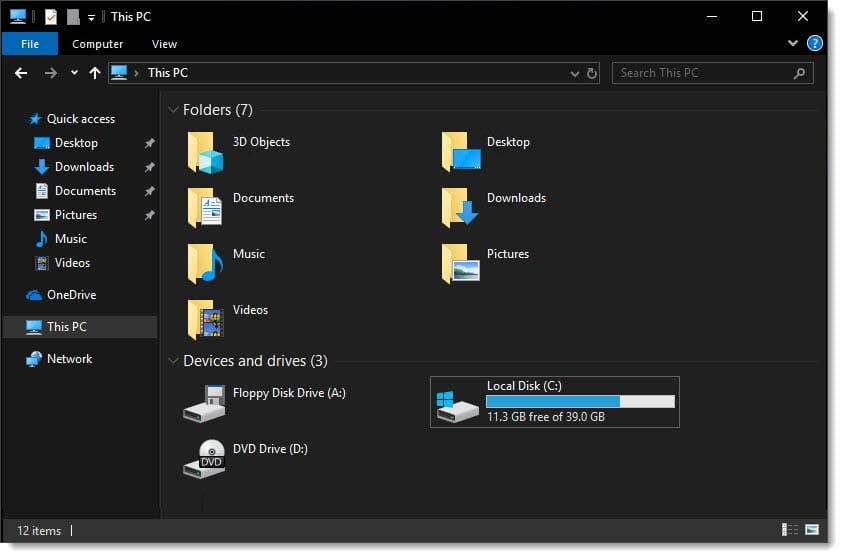
With build 1809, you can now set Windows 10 to a dark color scheme. Previous builds offered this option as well, but 1809 was the first version that also adopted this color scheme in File Explorer.

The process to enable dark mode is super easy. It only takes 5 clicks and one scroll of the mouse wheel.

Let’s get started!

Enabling Dark Mode in Windows 10

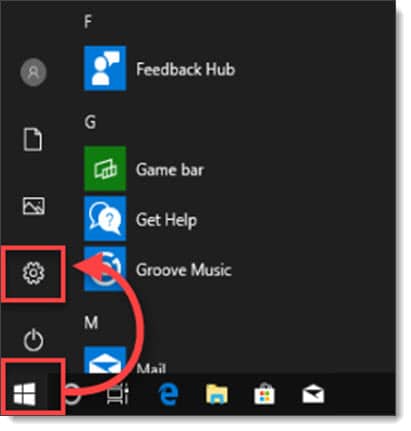
To enable dark mode in Windows 10, click the Start button and then Settings.

Windows 10 1809 Dark Mode

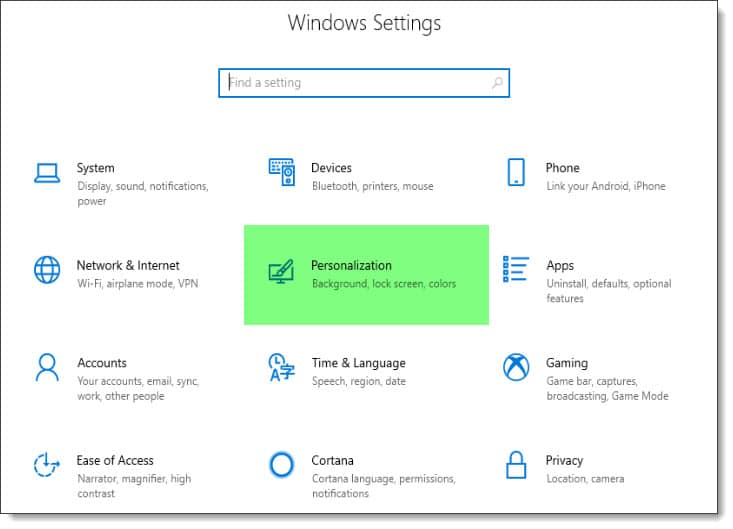
This will launch the Windows Settings page. Click Personalization.

Windows 10 1809 Dark Mode Personalization

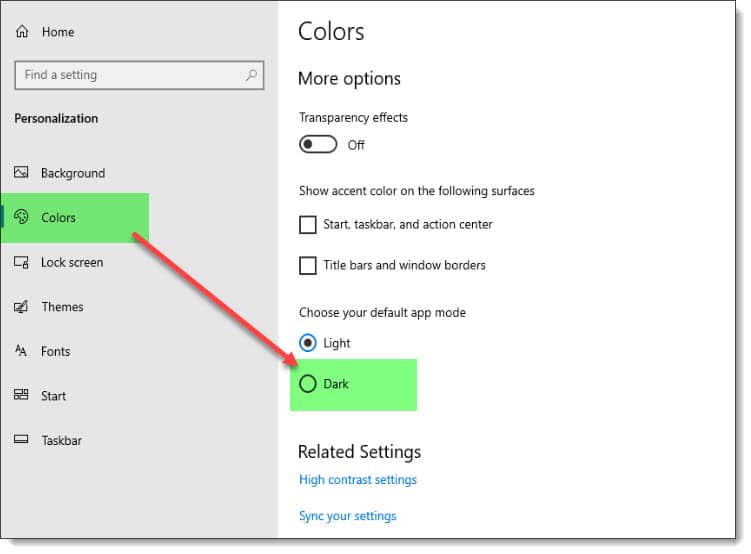
From the Personalization page, select the Colors tab on the left side.

From the Colors page scroll to the bottom of the page. Under Choose your default app mode select Dark.

Windows 10 1809 Dark Mode Personalization Colors Dark Mode
[Read more…] about Setting Windows 10 to Dark Mode
Print Friendly, PDF & Email

Filed Under: Other Tech, Windows

Set your time zone to follow your location

March 2, 2019 By Gareth Gudger 2 Comments

Share
Tweet
Share

If you travel a lot with a laptop you may find yourself working in many different time zones. The challenge is that your laptop will display the incorrect time. This can make it particularly challenging when scheduling or attending meetings.

Rather than manually updating your time as you step foot into each new geography, one solution is to configure your time settings to update based on your location. This process is quite simple.

Let’s get started!

Note: This solution requires Windows 10

Configure Automatic Time Zone

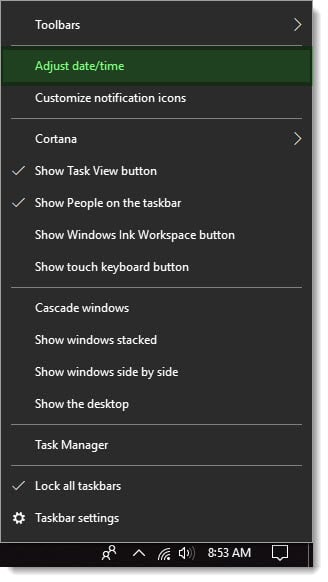
Adjust Date Time in Windows 10

From your Windows 10 desktop, right click on the time in the bottom right-hand corner of your screen.

From the context menu select Adjust Date/Time.

From the Date & Time settings window flip the toggle under Set Time Zone Automatically to the On position.

Your time zone (and time) will update automatically based on your location in the world.

You will also notice that once you configured your PC to use an automatic time zone, all other manual zone settings, such as the drop-down box to set the time zone are now grayed out.

[Read more…] about Set your time zone to follow your location
Print Friendly, PDF & Email

Filed Under: Other Tech, Windows

  • « Go to Previous Page
  • Page 1
  • Interim pages omitted …
  • Page 10
  • Page 11
  • Page 12
  • Page 13
  • Page 14
  • Interim pages omitted …
  • Page 51
  • Go to Next Page »

Primary Sidebar

Want to stay up to date?

Sidebar Form

Join thousands of IT professionals and get the latest Exchange & Office 365 tips and tutorials direct to your inbox

DigiCert Banner 300x348

(help support us using our affiliate link)

Footer

Site Navigation

  • Subscribe to blog
  • About SuperTekBoy
  • Disclaimer
  • Privacy & Cookies
  • Contact Us

Want to stay up to date?

Footer Form

Join thousands of IT professionals and get the latest Exchange & Office 365 tips and tutorials direct to your inbox

Join the conversation

  • Twitter
  • LinkedIn
  • Facebook
  • RSS

Copyright © 2026 · SuperTekBoy LLC