• Skip to primary navigation
  • Skip to main content
  • Skip to primary sidebar
  • Skip to footer

SuperTekBoy

Practical Help for Exchange & Office 365

  • Exchange
    • News
    • Tutorials
    • Solve a Problem
  • Office 365
    • News
    • Tutorials
    • Solve a Problem
  • Outlook
    • Tutorials
    • Solve a Problem
  • Books
  • Podcasts
  • Quick Links…
    • Generate or Renew SSL Certs for Exchange
    • Connect PowerShell to Exchange Online
    • Connect PowerShell to Office 365
    • Extend Schema for Exchange
    • Exchange Schema & Build Numbers
  • More…
    • Kemp Load Balancers
    • Other tech…
    • Videos
    • About SuperTekBoy
    • Contact Us

Windows 10: Science fiction now science fact

January 26, 2015 By Gareth Gudger 2 Comments

Share
Tweet
Share

If you missed the Windows 10 keynote then you missed more than you can possibly imagine.

Going into the Microsoft event I expected the content to be solely focused on Windows 10 for the PC. But I was wrong. It was so much more than that!

Microsoft truly wowed us. My mind was completely blown. At a nuclear level.

My good friend Bill Macy and I were madly lighting up Lync Chat like two giddy children on Christmas morning. It was toys galore! (There may have geek hyperventilating as well).

But enough of that. Let’s discuss the highlights.

Open Development Process

Previously, when a new operating system shipped the mentality of many was to wait for at least one service pack level before mass adoption. The idea was that by the first service pack most bugs would be worked out.

In the first few minutes of the keynote, Terry Myerson discussed the new Insider Program. Microsoft describes the program as an “Open Development Process”. This process puts technical previews into the hands of the end-users. As a result, Microsoft already has 3 million installs of Windows 10 on devices. A network of 1.7 million participants. A system that has already produced 800,000 pieces of feedback.
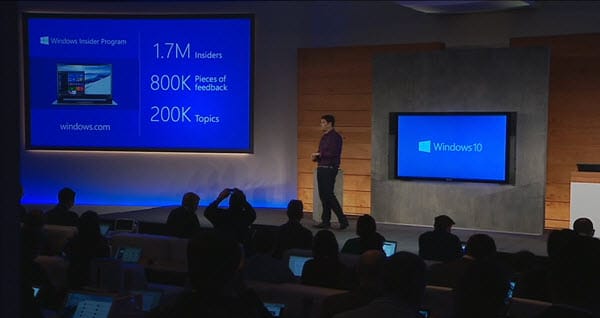
Windows 10 Insider Program

Microsoft Engineers describe the Insider Program as “co-creating the future of Windows with you” and “making sure the product matches your expectations”.

Is this early adoption and massive feedback the answer? Will Windows 10 be rock solid right out of the gate?

I think so!

Free Upgrade

Yep! You got it.

Windows 10 will be a free upgrade.

[Read more…] about Windows 10: Science fiction now science fact


Print Friendly, PDF & Email

Filed Under: Other Tech, Windows

2014: What a crazy year!

January 7, 2015 By Gareth Gudger Leave a Comment

Share
Tweet
Share

How was your 2014?

For me, it was a crazy rollercoaster of peaks and valleys. But, what a ride! And I’d surely do it again.

Valleys?

You might think that doesn’t sound too good. But you have to ask yourself; can you truly appreciate the peaks without the valleys?

Blog Success
SuperTekBoy

I want to thank everyone for making this site such a wonderful success. We had 280,000 views in 2014! That’s truly amazing!

With your continued support–your shares, your likes, your follows–I am sure we can continue this upward trend.

Never could I have imagined that 12 months ago, when I was writing my first post at 12:39 am on January 1st, 2014, that this site would grow to the extent it has. Thank you!

Without you, there is no need for me. So, as always, I desire your feedback. Good or bad.

MVE Award

Experts-Exchange

As many of you know I am a huge fan of Experts Exchange. I truly believe the massive exposure to more problems and more solutions makes me a sharper consultant. There have been plenty of times I have resolved a customer issue as a direct result of my participation on Experts Exchange (and vice versa).

I also want to commend Brian Clausen (and the rest of the team) for all the great work they are doing. We have seen countless hours of development pour into Experts Exchange this past year. As well as the establishment of a new community management team. This team, along with all others at E-E, is truly creating a sense of family and community. It is a joy to volunteer at Experts Exchange. I am sure 2015 will be the best year yet!

So, what’s this MVE Award thing?

[Read more…] about 2014: What a crazy year!
Print Friendly, PDF & Email
Share
Tweet
Share

Filed Under: Site News

Exchange December 2014 Updates

December 10, 2014 By Gareth Gudger Leave a Comment

Share
Tweet
Share

The Exchange Team announced yesterday it has released updates for all editions of Exchange currently under support.

As always, test these updates in a lab first!

It doesn’t have to be anything elaborate. In fact, I do a lot of testing from my own Windows 8.1 laptop where I have Hyper-V installed. Hyper-V comes included with Windows 8. It’s comparable to VMware Workstation in functionality (and I run 3 Exchange Servers from it)

Enough about labs! What are these updates and where can I get them?

The updates are as follows:

Exchange 2013 Mini

 Exchange Server 2013 Cumulative Update 7

Exchange 2013 Mini

 UM Language Packs for Cumulative Update 7

Exchange 2010 Mini

 Exchange Server 2010 SP3 Update Rollup 8 (withdrawn due to a bug)

Exchange 2007 Mini

 Exchange Server 2007 SP3 Update Rollup 15

So what’s new?

All these updates are a culmination of bug fixes, security patches, and minor feature tweaks. But the security patches it does include are big.

It includes fixes for MS14-075. This security bulletin identifies that an attacker could conceivably gain elevation of privileges in the Outlook Web App. Not good!

Standalone fixes for MS14-075 have also been released for Exchange 2013 SP1 and 2013 CU6.

[Read more…] about Exchange December 2014 Updates
Print Friendly, PDF & Email

Filed Under: Exchange News

Symantec announces Backup Exec 15

November 30, 2014 By Gareth Gudger 2 Comments

Share
Tweet
Share
Symantec Backup Exec 15

Symantec has announced Backup Exec 15. This product will go into beta in the first quarter of 2015. Although no date has been specified.

One of the biggest changes is that Symantec has dropped 32-bit support for its Media Server. This means that your media server can only run on a 64-bit operating system.

This won’t be a big shock for the Microsoft Exchange community. Exchange Server has required a 64-bit media server for some time.

Whether Symantec will support a media server on Windows 2003 is left to be seen. My guess, sometime between the beta and general release, Symantec will make 2008 a minimum requirement. Especially with Server 2003 going end-of-life in less than 8 months.

The other big news—Cumulative Update 6—this version will officially add support for the latest release of Exchange 2013. Although by the time this goes beta, I expect CU7 to be released.

[Read more…] about Symantec announces Backup Exec 15
Print Friendly, PDF & Email

Filed Under: Other Tech, Symantec

Barracuda blocks Exchange updates

October 31, 2014 By Gareth Gudger Leave a Comment

Share
Tweet
Share

I was helping a friend patch Exchange 2010 recently. They were getting up to speed with Service Pack 3.

Every time we ran through setup we encountered this error.

Setup cannot continue with the upgrade because the ‘bbwinsdr’ process has open files. Close the process and restart Setup.

This error can be found in the Exchange Setup log. (Located at %SYSTEMDRIVE%\ExchangeSetupLogs\ExchangeSetup.log.)

A quick Bing search determined the process belonged to Barracuda’s backup solution.

Backups Running?

Unfortunately, we didn’t have visibility into Barracuda’s dashboard. What we did have was much better. Event Viewer.

[Read more…] about Barracuda blocks Exchange updates
Print Friendly, PDF & Email

Filed Under: Exchange Solutions

Exchange 2013: Public Folder migration made easy

October 13, 2014 By Gareth Gudger 42 Comments

Share
Tweet
Share

Update: If you are migrating to the modern public folders in Exchange 2013 you may want to check out this article instead. This is the new and improved method for migrating public folders. However, it requires Exchange 2013 CU7 or later. As of CU11 the method below still works if you prefer to use it. But it will eventually be deprecated.

If you are in the planning stages for migration to Exchange 2013, then you have probably seen this TechNet article.

At first, it may seem daunting.

So many scripts. So many PowerShell commands.

If you are not comfortable with PowerShell it may seem a bit overwhelming.

Plus, it is vastly different than any previous migration process.

Why the change?

Architecture

Public Folders underwent a major architectural change in Exchange 2013.

Gone is the Public Folder database. And hello are the new Public Folder Mailboxes.

The benefit?

No more Public Folder Replication. Boy, did that used to be a pain!

With Public Folders stored as a mailbox, that mailbox can now be part of a Database Availability Group (DAG). And with that, all the benefits of Windows Failover Clustering.

This makes the migration process vastly different.

On a high level, it is the process of moving all data out of a database and into a special mailbox. That is where the scripts come in. I’ll explain along the way.

Let’s get started!

[Read more…] about Exchange 2013: Public Folder migration made easy
Print Friendly, PDF & Email
Share
Tweet
Share

Filed Under: Exchange, Exchange Tutorials

  • « Go to Previous Page
  • Page 1
  • Interim pages omitted …
  • Page 34
  • Page 35
  • Page 36
  • Page 37
  • Page 38
  • Interim pages omitted …
  • Page 51
  • Go to Next Page »

Primary Sidebar

Want to stay up to date?

Sidebar Form

Join thousands of IT professionals and get the latest Exchange & Office 365 tips and tutorials direct to your inbox

DigiCert Banner 300x348

(help support us using our affiliate link)

Footer

Site Navigation

  • Subscribe to blog
  • About SuperTekBoy
  • Disclaimer
  • Privacy & Cookies
  • Contact Us

Want to stay up to date?

Footer Form

Join thousands of IT professionals and get the latest Exchange & Office 365 tips and tutorials direct to your inbox

Join the conversation

  • Twitter
  • LinkedIn
  • Facebook
  • RSS

Copyright © 2026 · SuperTekBoy LLC