• Skip to primary navigation
  • Skip to main content
  • Skip to primary sidebar
  • Skip to footer

SuperTekBoy

Practical Help for Exchange & Office 365

  • Exchange
    • News
    • Tutorials
    • Solve a Problem
  • Office 365
    • News
    • Tutorials
    • Solve a Problem
  • Outlook
    • Tutorials
    • Solve a Problem
  • Books
  • Podcasts
  • Quick Links…
    • Generate or Renew SSL Certs for Exchange
    • Connect PowerShell to Exchange Online
    • Connect PowerShell to Office 365
    • Extend Schema for Exchange
    • Exchange Schema & Build Numbers
  • More…
    • Kemp Load Balancers
    • Other tech…
    • Videos
    • About SuperTekBoy
    • Contact Us

Skype for Desktop: Can’t change Primary Email

May 14, 2015 By Gareth Gudger 15 Comments

Share
Tweet
Share

Recently I was trying to change the primary email address on my Skype account. The challenge? When I tried to change the primary email address I kept getting an invalid password prompt.
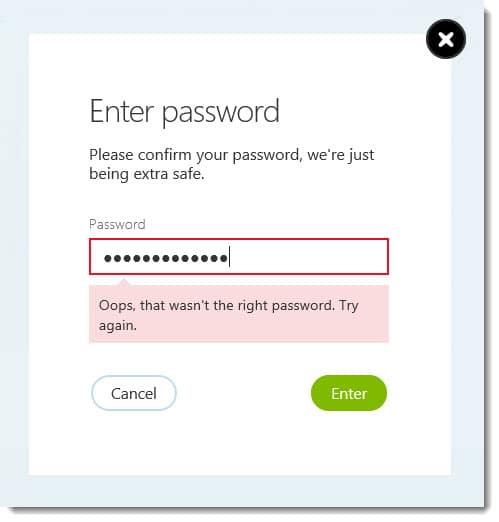
Changing Primary Email Address Skype Oops that wasn't the right password error

Oops, that wasn’t the right password. Try again.

I spent an hour going round in circles with Skype Live Chat support. Eventually, I was told that because it was linked to my Microsoft account I could not change my primary email address. I was told that the only option was to delete and recreate my Skype account.

The challenge with that option is that I would lose my Skype number (which was also on my business cards). Support informed me that a Skype number could not be transferred between accounts.

I was in a quandary. On the one hand, my old email was going away. If Skype would not let me change my primary email address, then I now had a security problem should anyone else pick up that email address. If I did recreate my account, then I had the challenge of potentially losing my business phone number.

I scoured the Skype community forums. Luckily, I found this great solution from community contributor Sunqan.

[Read more…] about Skype for Desktop: Can’t change Primary Email

Print Friendly, PDF & Email

Filed Under: Other Tech

Microsoft Ignite : Did your 2016 just get busier?

May 5, 2015 By Gareth Gudger Leave a Comment

Share
Tweet
Share

If you weren’t aware Microsoft is hosting its Ignite conference this week in Chicago (May 4th-8th).

Microsoft Ignite is the convergence of several Microsoft conferences into one mammoth event. And, it makes sense. With so much cross-product integration there was a growing amount of duplicate content. To quote the Microsoft Blog;

It will bring together the best of previously individual events – the Management Summit, the Exchange, SharePoint, Lync, Project, and TechEd conferences – and then take it to the next levelThe Official Microsoft Blog

So how popular is Ignite? Joe Belfiore (@joebelfiore) revealed during the Cortana Power BI demo that over 23,000 people were in attendance. Unfortunately, I couldn’t make this conference. But luckily Microsoft has not forgotten us. You can watch the on-demand recording of the keynote here. Furthermore, Channel 9 is live-streaming several of the sessions at http://channel9.msdn.com/. Their featured session guide is on the front page.

UPDATE: Channel 9 has all the Ignite recordings available here. There are 688 recorded sessions!!

Your 2016 may have just gotten a little busier

If you saw the keynote then you know there was a slew of product announcements made. Microsoft CEO, Satya Nadella (@satyanadella), announced several new product releases. Many of which are already available for preview, or, will be second-half 2015.

Products included:

  • Windows Server 10
  • Exchange 2016
  • System Center 2016
  • SQL Server 2016
  • Windows 10
  • Office 2016

Also highlighted were:

  • Azure for your Datacenter
  • Skype for Business Broadcast
  • Windows Update for Business
  • Cortana improvements
  • Continuum for Windows Phone
  • Hello feature
  • Skype for HoloLens
  • Microsoft Advanced Threat Analytics
  • Operations Management Suite
  • Device Guard
  • Azure Rights Management and Data Loss Prevention

One message from Satya’s presentation was very clear.

[Read more…] about Microsoft Ignite : Did your 2016 just get busier?
Print Friendly, PDF & Email

Filed Under: Exchange News, Office 365 News, Other Tech

Easily Connect to Exchange Online with PowerShell

April 30, 2015 By Gareth Gudger 8 Comments

Share
Tweet
Share

In a previous article, I explained how to connect to Office 365 with PowerShell. In this article, we explore how to use PowerShell to connect to Exchange Online.

Note: This article only covers the PowerShell v2 and v3 modules. Exchange Online PowerShell v1 module was removed from this article as it is deprecated as of October 1st, 2022, with the deprecation of basic authentication.

Let’s get started!

Exchange Online PowerShell Module

One of the challenges of a large Exchange Online organization is that PowerShell commands can take a very long time to run. The Exchange Team released the Exchange Online PowerShell V2 module to combat this problem, which ships with all new Exchange cmdlets while still supporting the old cmdlets. Microsoft has determined that these new cmdlets are up to eight times faster in certain instances. I highly recommend using this module over the V1 module. The V2 module has been generally available since June 2020.

To use the new Exchange Online module, launch PowerShell as an administrator and run the following command.

 C:\> Install-Module ExchangeOnlineManagement

If you did not have NuGet previously installed from another PowerShell library you will be prompted to install it. Press Y and hit Enter.

 NuGet provider is required to continue.
PowerShellGet requires NuGet provider version '2.8.5.201' or newer to 
interact with NuGet-based repositories. The NuGet provider must be 
available in 'C:\Program Files\PackageManagement\ProviderAssemblies' or
'C:\Users\<user>\AppData\Local\PackageManagement\ProviderAssemblies'. 

You can also install the NuGet provider by running 'Install-PackageProvider 
-Name NuGet -MinimumVersion 2.8.5.201 -Force'. 

Do you want PowerShellGet to install and import the NuGet provider now?
[Y] Yes [N] No [S] Suspend [?] Help (default is "Y"): Y
[Read more…] about Easily Connect to Exchange Online with PowerShell
Print Friendly, PDF & Email
Share
Tweet
Share

Filed Under: Office 365, Office 365 RSS, Office 365 Tutorials

Avoid this pitfall when upgrading to a Solid State Drive

March 31, 2015 By Gareth Gudger 16 Comments

Share
Tweet
Share

I normally don’t write blog posts about hardware. But this particular problem seemed blog-worthy.

The issue was around my wife’s PC. Her PC is almost 5 years old–it still performs incredibly well. That is one of the benefits of building a custom PC.

Tip: When you build a custom PC it’s not about saving money but getting more bang for your buck. If I were to give a PC manufacturer $1000 versus what I could do with $1000 myself the difference would be night and day. You’d think an economy of scale would kick in somewhere, but it doesn’t. If you can build your own, I recommend it.

With her PC still running Windows 7, it was time for an upgrade. I knew I wanted to take her to Windows 8.1. I figured if I was going to do a full reload, why not upgrade to a solid-state drive at the same time. Kill two birds with one stone. So I did.

The Problem

Everything went well enough at first. The BIOS recognized the new drive. I threw in my Windows 8.1 DVD and the OS installed like a charm.

But then I started to encounter peculiar symptoms. The PC would randomly reboot every few hours.

I checked the Event Logs. Sadly, they were devoid of any real clues. Aside from the Unexpected Shutdown messages, there was nothing else that would lead me in the right direction.

I quickly found no dumps were being created either. This was not good.

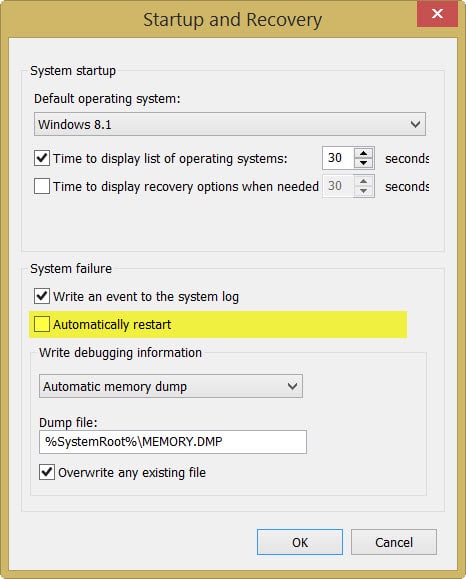
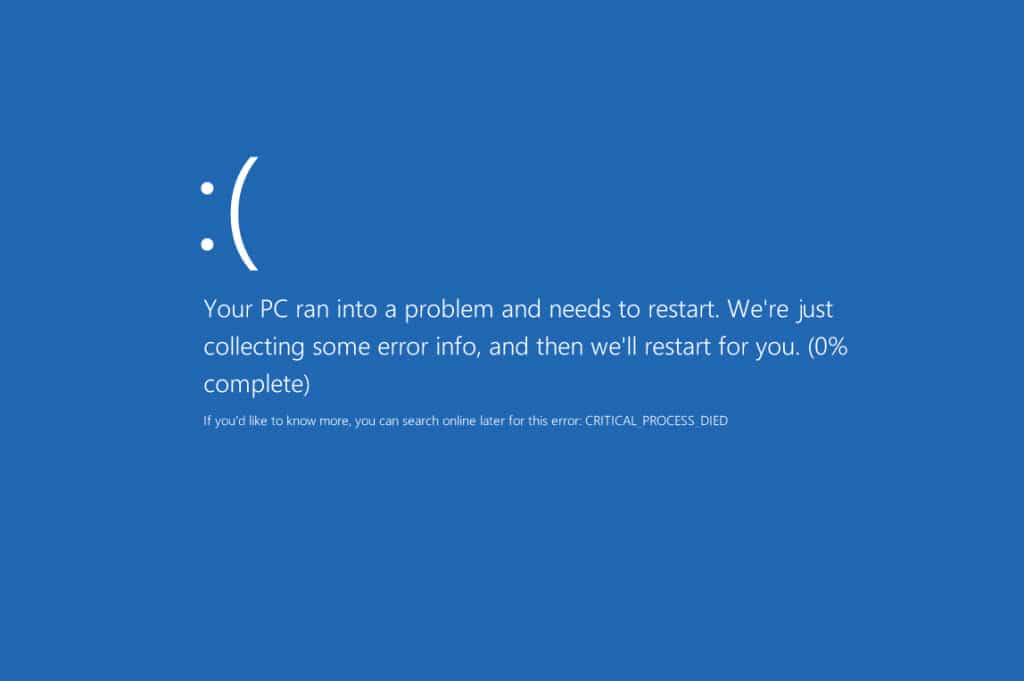
I disabled the automatic restart and received the following error the next time it occurred.

Windows 8 Critical Process Died

CRITICAL_PROCESS_DIED

Based on my research it seemed this error is fairly generic. To make matters worse the blue screen never got past 0%.

[Read more…] about Avoid this pitfall when upgrading to a Solid State Drive
Print Friendly, PDF & Email

Filed Under: Other Tech, Windows

Exchange March 2015 Updates

March 28, 2015 By Gareth Gudger Leave a Comment

Share
Tweet
Share
Exchange 2013 Big Logo

The Exchange Team announced Cumulative Update 8 earlier this month.

As always, test these updates in a lab first!

It doesn’t have to be anything elaborate. In fact, I used to do a lot of testing from a Windows 8.1 laptop where I had Hyper-V installed. My laptop ran 3 VMs–Exchange 2010, 2013 and a DC. Hyper-V comes included with Windows 8. It’s comparable to VMware Workstation in functionality.

Enough about labs! What are these updates and where can I get them?

The updates are as follows:

Exchange 2013 Mini

Exchange Server 2013 Cumulative Update 8

Exchange 2013 Mini

UM Language Packs for Cumulative Update 8

Exchange 2010 Mini

Exchange Server 2010 SP3 Update Rollup 9

Exchange 2007 Mini

Exchange Server 2007 SP3 Update Rollup 16

So what’s new?

This update is a culmination of bug fixes and feature tweaks. This update also includes Daylight Saving Time changes. Microsoft reports there are no security patches included in this update.

[Read more…] about Exchange March 2015 Updates
Print Friendly, PDF & Email

Filed Under: Exchange News

Symantec Endpoint Protection Pending System Changes Reboot

March 19, 2015 By Gareth Gudger 6 Comments

Share
Tweet
Share

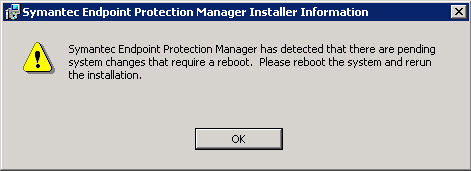
Ever run into this error? You may see it when attempting to install or upgrade the Symantec Endpoint Protection Manager. I ran across it recently when upgrading to SEPM 12.1.5, but I’ve seen it on previous versions as well.

Symantec EndPoint Protection Pending System Changes Reboot

Symantec Endpoint Protection Manager has detected that there are pending system changes that require a reboot. Please reboot the system and rerun the installation.

This may seem like an easy fix. Just reboot the server right? But oddly it never works. Regardless of how many times you reboot this message will always crop up.

When the installer runs it checks for a key in the registry. It’s this key that can cause this error. Thankfully this is an easy fix. For this, we need to modify the registry.

[Read more…] about Symantec Endpoint Protection Pending System Changes Reboot
Print Friendly, PDF & Email

Filed Under: Other Tech, Symantec

  • « Go to Previous Page
  • Page 1
  • Interim pages omitted …
  • Page 32
  • Page 33
  • Page 34
  • Page 35
  • Page 36
  • Interim pages omitted …
  • Page 51
  • Go to Next Page »

Primary Sidebar

Want to stay up to date?

Sidebar Form

Join thousands of IT professionals and get the latest Exchange & Office 365 tips and tutorials direct to your inbox

DigiCert Banner 300x348

(help support us using our affiliate link)

Footer

Site Navigation

  • Subscribe to blog
  • About SuperTekBoy
  • Disclaimer
  • Privacy & Cookies
  • Contact Us

Want to stay up to date?

Footer Form

Join thousands of IT professionals and get the latest Exchange & Office 365 tips and tutorials direct to your inbox

Join the conversation

  • Twitter
  • LinkedIn
  • Facebook
  • RSS

Copyright © 2026 · SuperTekBoy LLC