• Skip to primary navigation
  • Skip to main content
  • Skip to primary sidebar
  • Skip to footer

SuperTekBoy

Practical Help for Exchange & Office 365

  • Exchange
    • News
    • Tutorials
    • Solve a Problem
  • Office 365
    • News
    • Tutorials
    • Solve a Problem
  • Outlook
    • Tutorials
    • Solve a Problem
  • Books
  • Podcasts
  • Quick Links…
    • Generate or Renew SSL Certs for Exchange
    • Connect PowerShell to Exchange Online
    • Connect PowerShell to Office 365
    • Extend Schema for Exchange
    • Exchange Schema & Build Numbers
  • More…
    • Kemp Load Balancers
    • Other tech…
    • Videos
    • About SuperTekBoy
    • Contact Us

Exchange

Upgrade Recipient Update Policy to Email Address Policy

October 5, 2013 By Gareth Gudger 2 Comments

Share
Tweet
Share
Exchange 2010 Upgrade Recipient Update Policy from 2003 Error.

With Exchange 2003 end-of-life deadline looming ever closer I thought it would be a good time to revisit the syntax for upgrading the Recipient Update Policies in Exchange 2003 to the Email Address Policies in Exchange 2010.

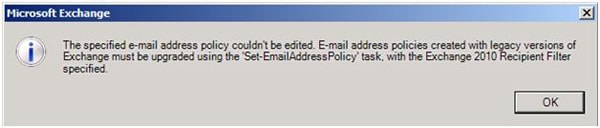
If you have received the error below when you try to double-click or edit an Email Address Policy in the Exchange Management Console, then your Recipient Update Policy still needs to be updated.

The specified e-mail address policy couldn't be edited. E-mail address policies created with legacy versions of Exchange must be upgraded using the 'Set-EmailAddressPolicy' task, with the Exchange 2010 Recipient Filter specified.

To update the Email Address Policy open Exchange Management Shell and issue the command below. This command finds all the current legacy Email Address Policies (Recipient Update Policies from Exchange 2003) and pipes those findings directly into the Set-EmailAddressPolicy cmdlet. This cmdlet converts those Recipient Update Policies into Email Address Policies. You will be prompted to confirm.

[Read more…] about Upgrade Recipient Update Policy to Email Address Policy

Filed Under: Exchange, Exchange Tutorials

  • « Go to Previous Page
  • Page 1
  • Interim pages omitted …
  • Page 3
  • Page 4
  • Page 5

Primary Sidebar

Want to stay up to date?

Sidebar Form

Join thousands of IT professionals and get the latest Exchange & Office 365 tips and tutorials direct to your inbox

DigiCert Banner 300x348

(help support us using our affiliate link)

Footer

Site Navigation

  • Subscribe to blog
  • About SuperTekBoy
  • Disclaimer
  • Privacy & Cookies
  • Contact Us

Want to stay up to date?

Footer Form

Join thousands of IT professionals and get the latest Exchange & Office 365 tips and tutorials direct to your inbox

Join the conversation

  • Twitter
  • LinkedIn
  • Facebook
  • RSS

Copyright © 2026 · SuperTekBoy LLC