• Skip to primary navigation
  • Skip to main content
  • Skip to primary sidebar
  • Skip to footer

SuperTekBoy

Practical Help for Exchange & Office 365

  • Exchange
    • News
    • Tutorials
    • Solve a Problem
  • Office 365
    • News
    • Tutorials
    • Solve a Problem
  • Outlook
    • Tutorials
    • Solve a Problem
  • Books
  • Podcasts
  • Quick Links…
    • Generate or Renew SSL Certs for Exchange
    • Connect PowerShell to Exchange Online
    • Connect PowerShell to Office 365
    • Extend Schema for Exchange
    • Exchange Schema & Build Numbers
  • More…
    • Kemp Load Balancers
    • Other tech…
    • Videos
    • About SuperTekBoy
    • Contact Us

Exchange

Install Exchange 2016 in your lab (Part 2)

September 9, 2015 By Gareth Gudger 1 Comment

Share
Tweet
Share
Exchange 2013 & 2016 Big Logo

In part one of our Exchange 2016 lab series we:

  • Explored the options for building an Exchange lab
  • Reviewed the requirements for Exchange 2016
  • Built the Exchange 2016 virtual machine
  • Installed the base operating system with all updates

In the second part of our Exchange lab series we will:

  • Install Exchange 2016 mailbox server prerequisites
  • Extend the Active Directory schema for Exchange 2016

Let’s get started!

Exchange 2016 Mailbox Server Prerequisites

First, let’s get the operating system core components installed. To do this open a PowerShell console as the administrator.
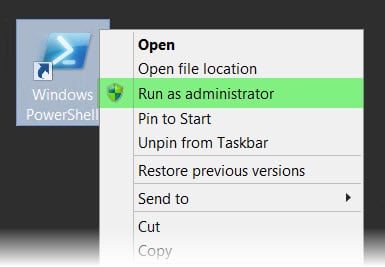
PowerShell Run As Administrator

Then issue the following command.

Update: If using Windows Server 2016, drop the AS-HTTP-Activation component from the command.

 C:\> Install-WindowsFeature AS-HTTP-Activation, Server-Media-Foundation, NET-Framework-45-Features, RPC-over-HTTP-proxy, RSAT-Clustering, RSAT-Clustering-CmdInterface, RSAT-Clustering-Mgmt, RSAT-Clustering-PowerShell, Web-Mgmt-Console, WAS-Process-Model, Web-Asp-Net45, Web-Basic-Auth, Web-Client-Auth, Web-Digest-Auth, Web-Dir-Browsing, Web-Dyn-Compression, Web-Http-Errors, Web-Http-Logging, Web-Http-Redirect, Web-Http-Tracing, Web-ISAPI-Ext, Web-ISAPI-Filter, Web-Lgcy-Mgmt-Console, Web-Metabase, Web-Mgmt-Console, Web-Mgmt-Service, Web-Net-Ext45, Web-Request-Monitor, Web-Server, Web-Stat-Compression, Web-Static-Content, Web-Windows-Auth, Web-WMI, Windows-Identity-Foundation

This command may seem like a lot but in essence, it can be grouped into 4 sets of components being installed.

  • .NET 4.5 support
  • Internet Information Service (IIS)
  • Windows Failover Clustering
[Read more…] about Install Exchange 2016 in your lab (Part 2)

Filed Under: Exchange, Exchange Tutorials

Fatal error MrsHttpUnauthorizedException

August 6, 2015 By Gareth Gudger 2 Comments

Share
Tweet
Share

Recently I encountered the following error when completing a mailbox move from Exchange to Office 365.

  8/1/2015 12:00:00 AM [CY1PR11MB0001] Fatal error MrsHttpUnauthorizedException has occurred.

The initial sync had worked fine. The mailbox was AutoSuspended at 95%. It was ready to be completed. Yet, it did not want to go. I repeated a Resume-MoveRequest on a similar mailbox–same exact error.

Sadly, the interwebs seemed devoid of any real information. Luckily a good friend and colleague alerted me to the root cause. This error will occur if the password has changed on the account used to create the move request.

In my case, this had indeed happened.

The remedy for MrsHttpUnauthorizedException

To fix the issue we need to update the credentials on the move request. To do this we need to enlist the help of the Set-MoveRequest cmdlet. Let’s get started.

[Read more…] about Fatal error MrsHttpUnauthorizedException

Filed Under: Exchange, Exchange Solutions, Office 365, Office 365 RSS, Office 365 Solutions

RBAC hides the Office 365 Mailbox creation link

July 21, 2015 By Gareth Gudger 23 Comments

Share
Tweet
Share

If you have configured Exchange 2013 in hybrid mode then you have probably noticed the appearance of this link. It’s the Office 365 Mailbox creation link.

New Office 365 Mailbox link

However, if you have implemented RBAC this link may not show when you’d expect it to.

I ran into this recently when upgrading an Exchange 2010 hybrid environment to 2013. Previously the client had implemented RBAC where members of the helpdesk team were added to the Recipient Management group. In 2010 this allowed the helpdesk team to create and manage mail recipients; both on-premise and in the cloud. However, when this group attempted to use the 2013 management tools the Office 365 Mailbox link was absent.

After some digging–plus some trial and error–we quickly found an oddity. The short answer–it’s all based around one missing role entry. To see that link you need access to the Get-RemoteDomain command. Members of Recipient Management do not have this.

[Read more…] about RBAC hides the Office 365 Mailbox creation link

Filed Under: Exchange, Exchange Solutions, Office 365, Office 365 RSS, Office 365 Solutions

Unleashing the power of the AdminAuditLog

February 18, 2015 By Gareth Gudger 1 Comment

Share
Tweet
Share

Ever wonder, Who made that modification to my Exchange environment?

I have.

So how do we answer that question?

Behold! The great and powerful Admin Audit Log!

The Admin Audit Log was introduced in Exchange 2010. But, it still seems a best-kept secret. There are a couple of ways to get to it.

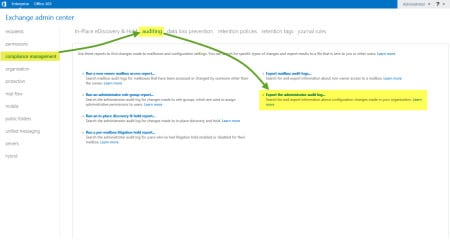
First, you can go through the EAC >> Compliance >> Auditing tabs. Then select Export Administrator Audit Log.

EAC Admin Audit Log

The second is via the Exchange Management Shell (EMS) through the Search-AdminAuditLog cmdlet. Let’s explore this method a little more.

[Read more…] about Unleashing the power of the AdminAuditLog

Filed Under: Exchange, Exchange Tutorials, Office 365

Exchange 2013: Public Folder migration made easy

October 13, 2014 By Gareth Gudger 42 Comments

Share
Tweet
Share

Update: If you are migrating to the modern public folders in Exchange 2013 you may want to check out this article instead. This is the new and improved method for migrating public folders. However, it requires Exchange 2013 CU7 or later. As of CU11 the method below still works if you prefer to use it. But it will eventually be deprecated.

If you are in the planning stages for migration to Exchange 2013, then you have probably seen this TechNet article.

At first, it may seem daunting.

So many scripts. So many PowerShell commands.

If you are not comfortable with PowerShell it may seem a bit overwhelming.

Plus, it is vastly different than any previous migration process.

Why the change?

Architecture

Public Folders underwent a major architectural change in Exchange 2013.

Gone is the Public Folder database. And hello are the new Public Folder Mailboxes.

The benefit?

No more Public Folder Replication. Boy, did that used to be a pain!

With Public Folders stored as a mailbox, that mailbox can now be part of a Database Availability Group (DAG). And with that, all the benefits of Windows Failover Clustering.

This makes the migration process vastly different.

On a high level, it is the process of moving all data out of a database and into a special mailbox. That is where the scripts come in. I’ll explain along the way.

Let’s get started!

[Read more…] about Exchange 2013: Public Folder migration made easy
Share
Tweet
Share

Filed Under: Exchange, Exchange Tutorials

Decommission Exchange 2010 Database Availability Group

September 23, 2014 By Gareth Gudger 3 Comments

Share
Tweet
Share

So what exactly is that title all about?

Aren’t DAGs a good thing?

Why would I ever want to decommission them?

Well, yes. You are correct. They are a good thing. And I always recommend putting them in place.

This article is for the organization that has migrated to Exchange 2013. It assumes you have successfully moved all user, shared & resource mailboxes. That you have migrated and removed all Public Folder content. That you are ready to delete your 2010 DAG.

So, what’s first?

Verify databases are empty

Before we can delete a database we need to check that no objects are homed to 2010 anymore. The easiest way to do this is PowerShell.

[Read more…] about Decommission Exchange 2010 Database Availability Group

Filed Under: Exchange, Exchange Tutorials

  • « Go to Previous Page
  • Page 1
  • Page 2
  • Page 3
  • Page 4
  • Page 5
  • Go to Next Page »

Primary Sidebar

Want to stay up to date?

Sidebar Form

Join thousands of IT professionals and get the latest Exchange & Office 365 tips and tutorials direct to your inbox

DigiCert Banner 300x348

(help support us using our affiliate link)

Footer

Site Navigation

  • Subscribe to blog
  • About SuperTekBoy
  • Disclaimer
  • Privacy & Cookies
  • Contact Us

Want to stay up to date?

Footer Form

Join thousands of IT professionals and get the latest Exchange & Office 365 tips and tutorials direct to your inbox

Join the conversation

  • Twitter
  • LinkedIn
  • Facebook
  • RSS

Copyright © 2026 · SuperTekBoy LLC