I was helping a fellow expert on Experts-Exchange recently. They were needing help with a PowerShell script. The task was to allow a user account Full Mailbox Access overall members that belonged to a certain distribution group. After a little reworking of PowerShell, this is what we came up with; and it worked!
[Read more…] about Bulk Add for Full Mailbox AccessExchange
Errors accessing the Public Folder Hierarchy in Exchange 2003
I was helping someone decommission their Exchange 2003 server last week. They had not used this server in quite some time. But the time had come for the role to be removed.
During the decommissioning process I ran into a number of strange errors that I had never seen before. They all revolved around Public Folders. The error occurred when I tried to access the Public Folder hierarchy in Exchange System Manager.
Here was the first error I received when I just tried to expand the root level of the hierarchy.

The received certificate has expired.
 ID no: 80090328
 Exchange System Manager
The fix seemed quite obvious. I opened IIS Manager, went to the Properties of the Default Website, selected the Directory Security tab and clicked the View Certificate button. It was quickly apparent that the SSL certificate had expired some time ago.
[Read more…] about Errors accessing the Public Folder Hierarchy in Exchange 2003Internet Explorer 11 and Outlook Web App
If you use Outlook Web App and have installed Internet Explorer 11 then you have probably noticed this problem.
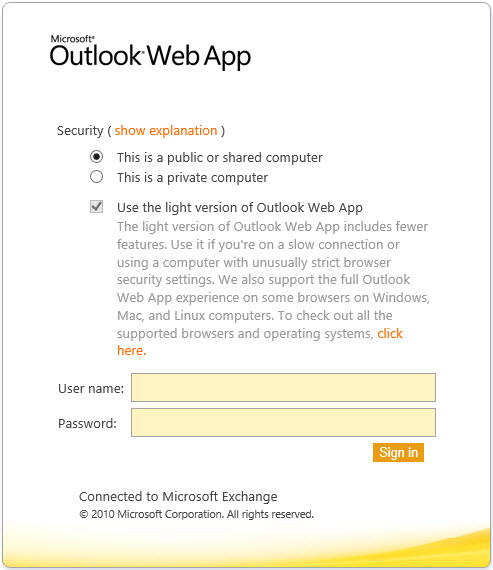
You will then notice that the checkbox for “Use the light version of Outlook Web App” is checked and can not be changed. When you log in you receive the light version of Outlook Web App.
The problem is a compatibility issue between Outlook Web App 2010 and IE11. Luckily, the fix is quite simple. Complete the following steps:
[Read more…] about Internet Explorer 11 and Outlook Web AppCommon Calendar Sharing Errors in Outlook
I ran into a strange issue recently where users could not share Outlook Calendars with one another. This problem spawned multiple symptoms and multiple errors. The environment was Exchange 2010. It affected every version of Outlook.
When users attempted to create a calendar sharing request they would receive the following error.
Error while preparing to send sharing message.
Sometimes the users could bypass this by sending through Outlook Web App. Although this was seldom a guaranteed workaround. Outlook users on the receiving side would get an error like this.
The folder you selected is not available.
If they tried to open that same message in OWA they would get this message.
This message has become corrupted. If the message is from someone else, ask the sender to send it again. If the message is in your Drafts folder, create a new message, copy text from the corrupted draft if you can, and click Save.
The fix actually turned out to be quite easy. The problem was that the Exchange 2010 migration had never been completed. When trying to open the Address Lists in the Exchange Management Console we received the following error.
[Read more…] about Common Calendar Sharing Errors in OutlookUsers experience problems using Outlook Web App (OWA)
Exception type: Microsoft.Exchange.Data.Storage.StoragePermanentException
Exception message: Could not get properties.
If your users are getting this error when they are accessing Outlook Web App (OWA) the problem may be caused by your antivirus solution.
A quick way to determine this is to modify the following registry key on the Exchange Server.
[Read more…] about Users experience problems using Outlook Web App (OWA)Local Move Request from Exchange 2003 to 2010 fails with database offline
Error: Mailbox database <database name> is offline.
MapiExceptionLogonFailed: Unable to make connection to the server (HR=0x80040111, EC=1010)
I ran into this error recently when I tried to move a user from Exchange 2003 to Exchange 2010. I was issuing a Local Move Request command using the Exchange Management Console. I had tried multiple users, that existed on different databases, but the same error always persisted. I double-checked that my account had all the relevant permissions to make this move happen. I did a little research and this was my fix. Relatively simple in fact. Ultimately, I assigned full permissions for the Exchange 2010 computer accounts to each Information Store on the Exchange 2003 server. Once I did this, the local move request worked immediately. The steps are below.
- Log onto the Exchange 2003 server
- Open Exchange System Manager
- Expand Administrative Groups
- Expand the name of your administrative group (possibly First Administrative Group)
- Expand Servers
- Expand the name of your Exchange 2003 server
- Expand the name of your Storage Group (possibly First Storage Group)
- Left-click the name of your database
- Right-click the name of your database and pick Properties from the context menu
- Select the Security tab.
- Click the Add button
- Click the Object Types button
- Check the box next to Computers so it has a checkmark in it.
- Click Ok
- In the text box that is titled Enter the object names to select type the name of your Exchange 2010 server
- Click Ok
- The Exchange 2010 server should appear in the Groups or user names section. Select the name of the server.
- By default, all checkboxes in the Permissions For section should already be checked. Verify they are and Click Ok.
- Repeat these steps for any other legacy Exchange 2003 mailbox databases.
- Retry your Local Move Request in the Exchange Management Console on Exchange 2010.