• Skip to primary navigation
  • Skip to main content
  • Skip to primary sidebar
  • Skip to footer

SuperTekBoy

Practical Help for Exchange & Office 365

  • Exchange
    • News
    • Tutorials
    • Solve a Problem
  • Office 365
    • News
    • Tutorials
    • Solve a Problem
  • Outlook
    • Tutorials
    • Solve a Problem
  • Books
  • Podcasts
  • Quick Links…
    • Generate or Renew SSL Certs for Exchange
    • Connect PowerShell to Exchange Online
    • Connect PowerShell to Office 365
    • Extend Schema for Exchange
    • Exchange Schema & Build Numbers
  • More…
    • Kemp Load Balancers
    • Other tech…
    • Videos
    • About SuperTekBoy
    • Contact Us

Exchange Solutions

Two Prereqs for Exchange 2013 CU11 on 2012 RTM

February 12, 2016 By Gareth Gudger 1 Comment

Share
Tweet
Share

For those of you with Exchange 2013 on Server 2012 RTM (not R2), you will run across two additional prerequisites while upgrading to the latest cumulative update.

The first prerequisite is a hotfix for the Resilient File System (KB 2894875). While it was only with the advent of Exchange 2016 that ReFS made it into the preferred architecture, ReFS was supported in Exchange 2013. Whether or not you are using ReFS you are still required to get the update. The hotfix addresses an issue where the operating system can freeze while trying to perform a DIR command on a ReFS volume. Nuts huh?

The second prerequisite is a hotfix for the Virtual Disk Service (KB 2884597). To quote Microsoft.

When you use certain applications that use the Virtual Disk Service (Vds.exe) on a computer that is running Windows Server 2012, the Virtual Disk Service or the applications that use the Virtual Disk Service crash or freeze. 

That does not sound good!

Download the fixes

For more information and to download both hotfixes check these links:

Hotfix Download Available

Windows Server 2012-based computer freezes when you run the “dir” command on a ReFS volume

Hotfix Download Available

Virtual Disk Service or applications that use the Virtual Disk Service crash or freeze in Windows Server 2012

The hotfixes are only available by registering an email address to download.

Both fixes will require a reboot once you install them. The installer will also stop you from continuing until you have them.
Share
Tweet
Share

Filed Under: Exchange Solutions

Cannot import certificate. A certificate with the thumbprint already exists.

October 23, 2015 By Gareth Gudger 28 Comments

Share
Tweet
Share

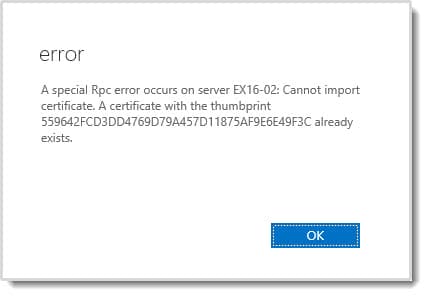
While trying to import a 3rd-party SSL certificate into Exchange I received the following error.

A special Rpc error occurs on server. Cannot import certificate. A certificate with the thumbprint already exists.

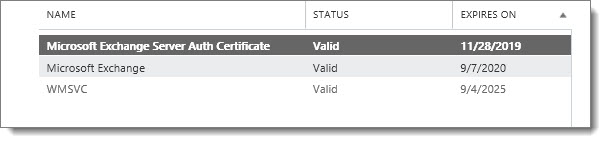
This was odd because it was my first time running through the import process on this server. Puzzled, I refreshed the Exchange Admin Center. As expected, no new certificates showed up. Just the default out-of-the-box certificates that come preinstalled with Exchange.

A special Rpc error occurs on server. Cannot import certificate. A certificate with the thumbprint already exists. B

As a sanity check, I confirmed with PowerShell.

 C:\> Get-ExchangeCertificate

Thumbprint                                Services   Subject
----------                                --------   -------
87957CA95B833615C71F7735853CE811F96E6117  IP.WS..    CN=EX16-02
40B938448B42F1D596E9DBB0EC666D8666725E07  .......    CN=WMSvc-EX16-02
1C6E03C3BDCBFD76FAA1375B7D2B4ED1291A0FCF  ....S..    CN=Microsoft Exchange Server Auth Certificate

But as expected 559642FCD3DD4769D79A457D11875AF9E6E49F3C was not returned.

[Read more…] about Cannot import certificate. A certificate with the thumbprint already exists.

Filed Under: Exchange Solutions

Fatal error MrsHttpUnauthorizedException

August 6, 2015 By Gareth Gudger 2 Comments

Share
Tweet
Share

Recently I encountered the following error when completing a mailbox move from Exchange to Office 365.

  8/1/2015 12:00:00 AM [CY1PR11MB0001] Fatal error MrsHttpUnauthorizedException has occurred.

The initial sync had worked fine. The mailbox was AutoSuspended at 95%. It was ready to be completed. Yet, it did not want to go. I repeated a Resume-MoveRequest on a similar mailbox–same exact error.

Sadly, the interwebs seemed devoid of any real information. Luckily a good friend and colleague alerted me to the root cause. This error will occur if the password has changed on the account used to create the move request.

In my case, this had indeed happened.

The remedy for MrsHttpUnauthorizedException

To fix the issue we need to update the credentials on the move request. To do this we need to enlist the help of the Set-MoveRequest cmdlet. Let’s get started.

[Read more…] about Fatal error MrsHttpUnauthorizedException

Filed Under: Exchange, Exchange Solutions, Office 365, Office 365 RSS, Office 365 Solutions

RBAC hides the Office 365 Mailbox creation link

July 21, 2015 By Gareth Gudger 23 Comments

Share
Tweet
Share

If you have configured Exchange 2013 in hybrid mode then you have probably noticed the appearance of this link. It’s the Office 365 Mailbox creation link.

New Office 365 Mailbox link

However, if you have implemented RBAC this link may not show when you’d expect it to.

I ran into this recently when upgrading an Exchange 2010 hybrid environment to 2013. Previously the client had implemented RBAC where members of the helpdesk team were added to the Recipient Management group. In 2010 this allowed the helpdesk team to create and manage mail recipients; both on-premise and in the cloud. However, when this group attempted to use the 2013 management tools the Office 365 Mailbox link was absent.

After some digging–plus some trial and error–we quickly found an oddity. The short answer–it’s all based around one missing role entry. To see that link you need access to the Get-RemoteDomain command. Members of Recipient Management do not have this.

[Read more…] about RBAC hides the Office 365 Mailbox creation link

Filed Under: Exchange, Exchange Solutions, Office 365, Office 365 RSS, Office 365 Solutions

Exchange Install Hangs on Languages Step

July 7, 2015 By Gareth Gudger 13 Comments

Share
Tweet
Share
Exchangr 2013 Hangs on Languages Step During Setup

One of the common problems we see with antivirus is that it sends Exchange installs to a painful crawl. It becomes particularly apparent during the Languages step. I have personally witnessed this behavior during both Exchange 2010 and 2013 upgrades. The issue is the file-level antivirus. In particular real-time protection. If enabled it can cause Exchange installs to take several hours.

The solution–disable real-time protection before installing or upgrading Exchange.

In fact, make sure you have all the exceptions in place as outlined by this Microsoft TechNet article. At a very minimum I recommend to exclude–from all scans–the entire Exchange install directory, transport files, IIS files and, the entire drive (or mount point) where each database and its associated log files reside. If you have a DAG exclude the witness directory and the cluster database files.

Note: With all the hooks that antivirus has into the OS disabling real-time protection might not be enough. In some cases temporarily uninstalling antivirus might be the answer.

But how do we know its antivirus?

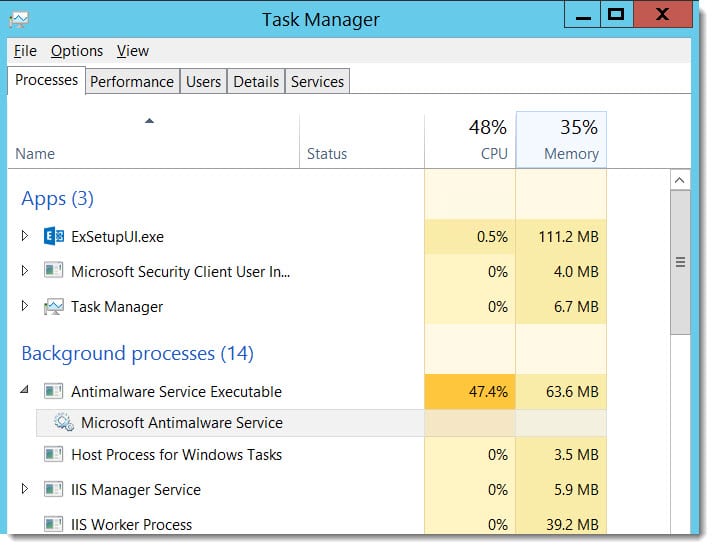
One of the common symptoms is high CPU utilization. Bringing up task manager we can see that antivirus is very active during the Exchange install.

System Center Endpoint Protection High CPU

As soon as we disable real-time protection CPU utilization drops and the Languages step completes in a few minutes.

Below are the instructions on disabling real-time protection for Microsoft SCEP.

Disable real-time protection (System Center Endpoint Protection)

To disable real-time protection in System Center Endpoint Protection (SCEP) perform the following steps:

Double-click the EndPoint Protection (System Center EndPoint Protection Taskbar Icon) icon in the taskbar.

Select the Settings tab. Select Real-time protection.

Uncheck Turn on Real-time Protection (recommended).

System Center Endpoint Protection Real-Time Protection

Click Save Changes.

How about you? Have you experienced upgrade slowdowns from real-time protection? Do you think we need file-level antivirus on Exchange servers at all? Drop a comment below.

Filed Under: Exchange Solutions

CU Fails: Unable to remove product. Error code is 2330

July 1, 2015 By Gareth Gudger 1 Comment

Share
Tweet
Share

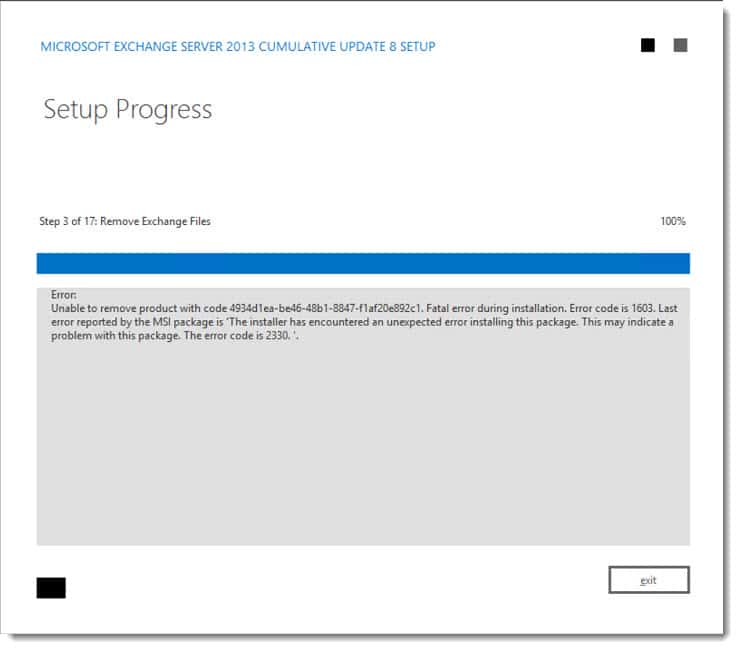
I was helping a friend recently update his Exchange servers. When we launched the cumulative update we ran into this error.

Exchange CU Fails Unable to remove product. Error code is 1603. Error code is 2330.
Unable to remove product with code 4934d1ea-be46-48b1-8847-f1af20e892c1. Fatal error during installation. Error code is 1603. Last error reported by the MSI package is 'The installer has encountered an unexpected error installing this package. This may indicate a problem with this package. The error code is 2330.'

According to this reference guide from DesktopEngineer.com Error Code 2330 translates to ‘Error getting file attributes’.

Ruh-roh! That sounds like file corruption.

When exploring the Application Log we discovered a number of 10005 MSIINSTALLER errors.

[Read more…] about CU Fails: Unable to remove product. Error code is 2330

Filed Under: Exchange Solutions

  • « Go to Previous Page
  • Page 1
  • Interim pages omitted …
  • Page 6
  • Page 7
  • Page 8
  • Page 9
  • Page 10
  • Page 11
  • Go to Next Page »

Primary Sidebar

Want to stay up to date?

Sidebar Form

Join thousands of IT professionals and get the latest Exchange & Office 365 tips and tutorials direct to your inbox

DigiCert Banner 300x348

(help support us using our affiliate link)

Footer

Site Navigation

  • Subscribe to blog
  • About SuperTekBoy
  • Disclaimer
  • Privacy & Cookies
  • Contact Us

Want to stay up to date?

Footer Form

Join thousands of IT professionals and get the latest Exchange & Office 365 tips and tutorials direct to your inbox

Join the conversation

  • Twitter
  • LinkedIn
  • Facebook
  • RSS

Copyright © 2026 · SuperTekBoy LLC