• Skip to primary navigation
  • Skip to main content
  • Skip to primary sidebar
  • Skip to footer

SuperTekBoy

Practical Help for Exchange & Office 365

  • Exchange
    • News
    • Tutorials
    • Solve a Problem
  • Office 365
    • News
    • Tutorials
    • Solve a Problem
  • Outlook
    • Tutorials
    • Solve a Problem
  • Books
  • Podcasts
  • Quick Links…
    • Generate or Renew SSL Certs for Exchange
    • Connect PowerShell to Exchange Online
    • Connect PowerShell to Office 365
    • Extend Schema for Exchange
    • Exchange Schema & Build Numbers
  • More…
    • Kemp Load Balancers
    • Other tech…
    • Videos
    • About SuperTekBoy
    • Contact Us

Exchange Solutions

The delegation token is NULL – Hybrid Free/Busy

February 11, 2017 By Gareth Gudger 1 Comment

Share
Tweet
Share

Ran into a strange issue recently where on-premises users could not see the free/busy information for test users I had migrated to Exchange Online. Exchange Online, on the other hand, had no problem seeing the free/busy of the on-premises users. I had just run the hybrid configuration wizard and it completed without incident. The environment had not been previously enabled for the Microsoft Federation Gateway so I let the wizard take care of that step as well.

When we tested the trust with the federation gateway we received the following error on Step 5 of 6: Requesting delegation token.

 C:\> Test-FederationTrust -UserIdentity rsong@exchangeservergeek.com

<...edited...>

RunspaceId : e4e42cab-62f4-4d70-be15-69143b273823
Id : TokenRequest
Type : Error
Message : Failed to request delegation token.

Error. Attempted to get delegation token, but token came back as null.

The token coming back as null seemed to be the key here. Unfortunately, the web seemed to lack any real way to fix the existing trust. We resolved to delete and recreate the trust with the federation gateway.

Recreating the Federation Trust

Warning: Before we get started with the process you will need access to external DNS zone. Recreating the trust voids the current TXT record that was used for domain validation.

To delete the federation trust navigate to the Organization > Sharing tabs in the Exchange Admin Center. Under the section titled Federation Trust click the Remove button. Click Yes to confirm.
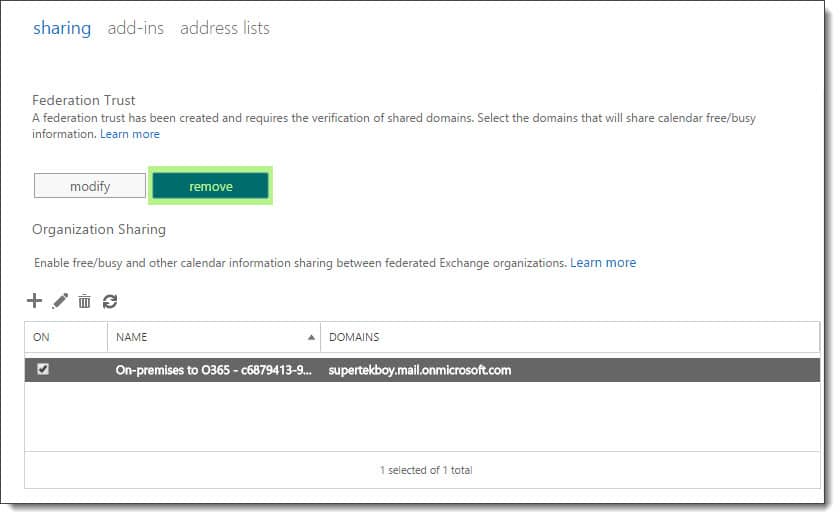
Removing the trust with the Microsoft Federation Gateway
[Read more…] about The delegation token is NULL – Hybrid Free/Busy

Filed Under: Exchange Solutions, Office 365 RSS, Office 365 Solutions

McAfee VirusScan Enterprise blocks outbound SMTP on Exchange

August 29, 2016 By Gareth Gudger 2 Comments

Share
Tweet
Share

If you install McAfee VirusScan Enterprise on an Exchange Server you will find that your outbound mail is being blocked. By default McAfee only allows certain processes to send out on port 25. Exchange isn’t one of them.

The block is caused by the Access Protection component. Disabling this component entirely would allow your mail to flow again. However, disabling an entire protection component may not be ideal. Instead, we list a couple of options below to allow Exchange through without sacrificing security.

Tip: Microsoft documents all the mandatory Exchange exclusions here. In addition, McAfee also details Exchange exclusions in this article.

Option 1

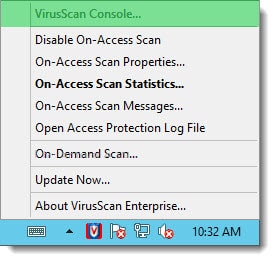
Right-click on the McAfee taskbar icon and select VirusScan console from the context menu.

McAfee VirusScan Enterprise Exchange 2013 2016
[Read more…] about McAfee VirusScan Enterprise blocks outbound SMTP on Exchange

Filed Under: Exchange Solutions

Internal 500 server error after fresh Exchange 2016 install

August 15, 2016 By Gareth Gudger 17 Comments

Share
Tweet
Share

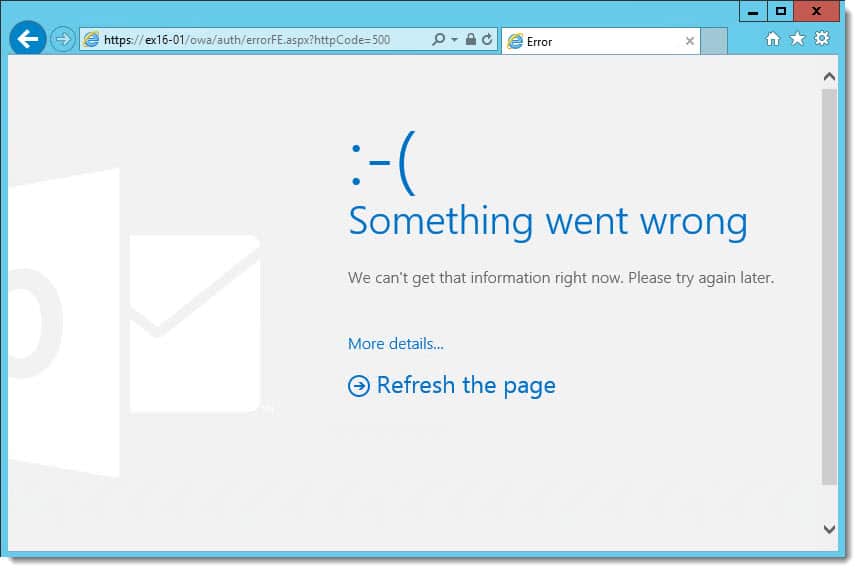
Ran into a strange problem recently. I installed Exchange 2016 CU2 onto a brand new machine. This was the first Exchange 2016 server in the environment. Exchange 2010 SP3 RU14 was in coexistence. I could access the Exchange Control Panel fine. But when I accessed Outlook on the Web (formerly Outlook Web App) I received an Internal 500 server error. Not good. Especially on a brand new install.

Outlook Web App Internal 500 server error

Checking the application log revealed a ton of ASP.NET warnings. The warning had a source ASP.NET with Event ID 1310. Inside each warning was internal code 3008 with event message, A configuration error has occurred. The specifics are below.

ASP.NET Event ID 1310 Event Code 3008
Event code: 3008
Event message: A configuration error has occurred.
Event time: 9/1/2016 7:00:00 PM
Event time (UTC): 9/1/2016 11:00:00 PM
Event ID: 33cf7da9abe544e8b562fe0ab5437b57
Event sequence: 1
Event occurrence: 1
Event detail code: 0

We quickly found our answer in the exception message. In many instances the Microsoft.Exchange.Security assembly was missing. Other missing assemblies were referenced in separate warnings as well. I’ve highlighted the section below.

[Read more…] about Internal 500 server error after fresh Exchange 2016 install

Filed Under: Exchange Solutions

Errors Migrating to Modern Public Folders

March 14, 2016 By Gareth Gudger Leave a Comment

Share
Tweet
Share

Recently while crafting an article to describe the migration process to Modern Public Folders I ran into some strange errors. They both occurred while the migration batch was attempting to copy data.

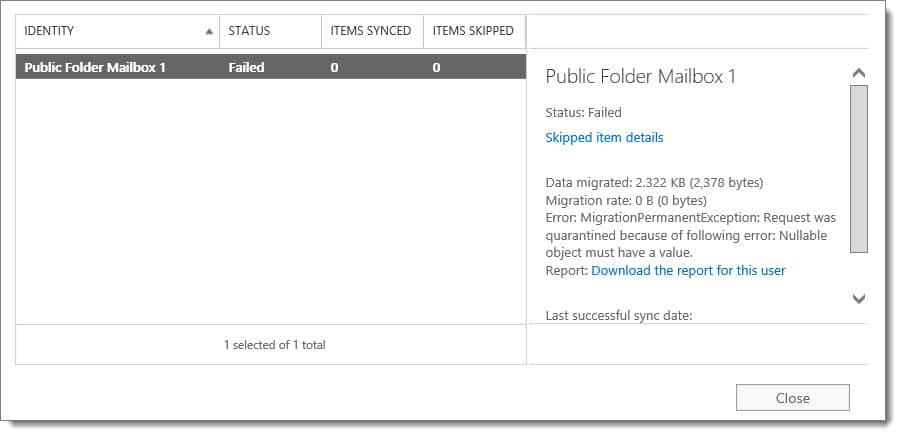
Here is the first.

Request was quarantined because of following error Nullable object must have a value
Error: MigrationPermanentException: Request was quarantined because of the following error: Nullable object must have a value.

Cryptic huh? Nothing much on the interwebs either.

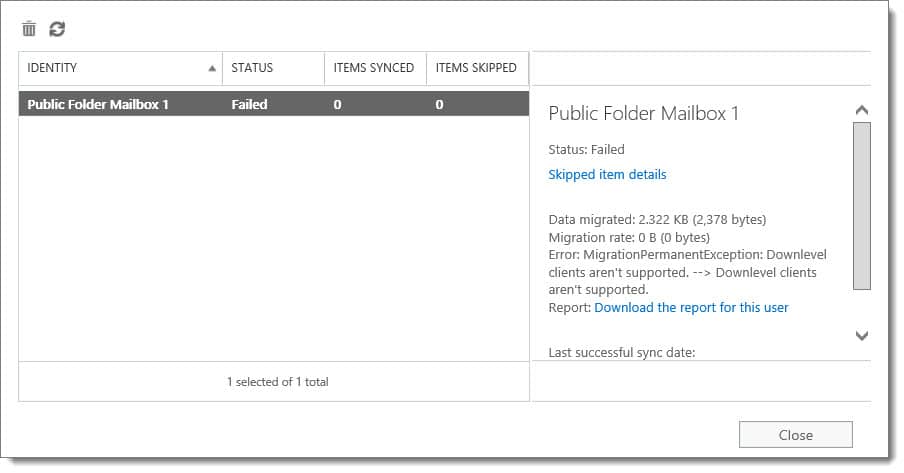
When I attempted to resume the batch I then received this error.

Downlevel clients aren't supported.
Error: MigrationPermanentException: Downlevel clients aren't supported. --> Downlevel clients aren't supported.

This one got me thinking. I suddenly wondered if I had ever upgraded Exchange 2016 in my lab from preview to RTM. A quick check of the build numbers revealed I had not. D’oh!

If you get this error make sure you are not still on the preview of 2016. In addition, once you upgrade and reboot your 2016 lab server, you will need to delete and recreate the batch. Then you should be able to test the migration process successfully.

Twitter

Join the conversation on Twitter @SuperTekBoy.

Share
Tweet
Share

Filed Under: Exchange Solutions

RemoteExchange.ps1 cannot be loaded

March 7, 2016 By Gareth Gudger 1 Comment

Share
Tweet
Share
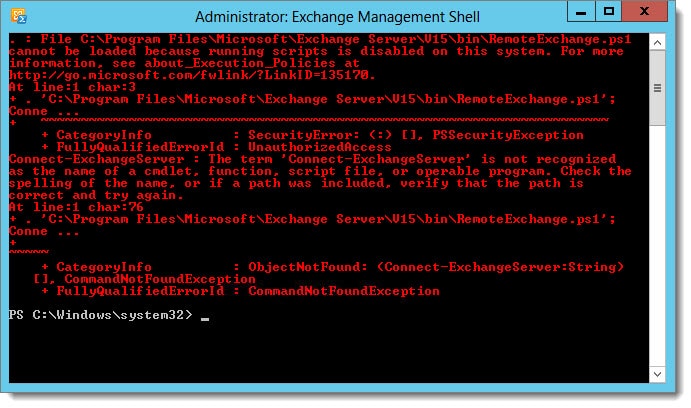
Cannot be loaded because running scripts is disabled on this system
File .\RemoteExchange.ps1 cannot be loaded because running scripts is disabled on this system. For more information, see about_Execution_Policies at http://go.microsoft.com/fwlink/?LinkID=135170.

If you see the above error the fix is actually quite simple. The error is caused when your execution policy in PowerShell is too restrictive. You can determine the level of restriction by typing Get-ExecutionPolicy cmdlet. You may see a response similar to that of the following:

 C:\> Get-ExecutionPolicy
Restricted

By default, Exchange needs its execution policy to be at RemoteSigned. Remote signed implies the following characteristics.

[Read more…] about RemoteExchange.ps1 cannot be loaded
Share
Tweet
Share

Filed Under: Exchange, Exchange Solutions

Exchange 2013 won’t update after installing Exchange 2016 Preview

February 15, 2016 By Gareth Gudger Leave a Comment

Share
Tweet
Share

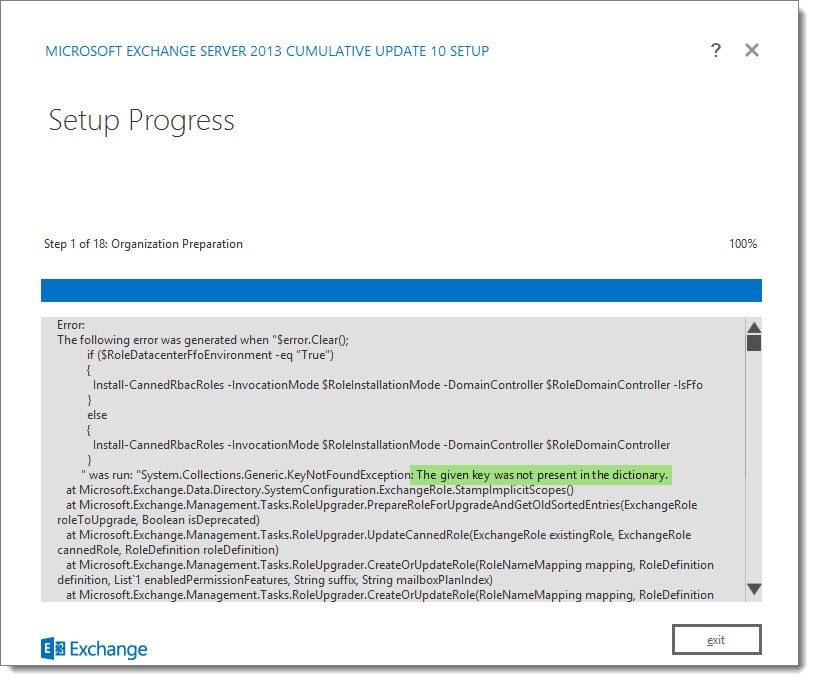
If you are like me and eagerly deployed Exchange 2016 Preview in your 2013 lab (before official support was available) then you will likely have encountered this error when you upgraded to CU 10 and beyond.

The given key was not present in the dictionary.
[ERROR] The given key was not present in the dictionary.

If we review the Exchange setup log let’s see the last thing the installer was working on.

[2] Used domain controller DC.SKARO.LOCAL to read object CN=My Custom Apps,CN=Roles,CN=RBAC,CN=SKARO,CN=Microsoft Exchange,CN=Sevices,CN=Configuration,DC=SKARO,DC=LOCAL.
[2] Used domain controller DC.SKARO.LOCAL to write object CN=My Custom Apps,CN=Roles,CN=RBAC,CN=SKARO,CN=Microsoft Exchange,CN=Services,CN=Configuration,DC=SKARO,DC=LOCAL.
[2] Saving object "My Custom Apps" of type "ExchangeRole" and state "Unchanged".
[2] Used domain controller DC.SKARO.LOCAL to read object CN=My Marketplace Apps,CN=Roles,CN=RBAC,CN=SKARO,CN=Microsoft Exchange,CN=Services,CN=Configuration,DC=SKARO,DC=LOCAL.
[2] Used domain controller DC.SKARO.LOCAL to write object CN=My Marketplace Apps,CN=Roles,CN=RBAC,CN=SKARO,CN=Microsoft Exchange,CN=Services,CN=Configuration,DC=SKARO,DC=LOCAL.
[2] Saving object "My Marketplace Apps" of type "ExchangeRole" and state "Unchanged".
[2] Used domain controller DC.SKARO.LOCAL to read object CN=My ReadWriteMailbox Apps,CN=Roles,CN=RBAC,CN=SKARO,CN=Microsoft Exchange,CN=Services,CN=Configuration,DC=SKARO,DC=LOCAL.
[ERROR] The given key was not present in the dictionary.
[WARNING] An unexpected error has occurred and a Watson dump is being generated: The given key was not present in the dictionary.
[1] The following 1 error(s) occurred during task execution:
[1] 0. ErrorRecord: The given key was not present in the dictionary.
[1] 0. ErrorRecord: System.Collections.Generic.KeyNotFoundException: The given key was not present in the dictionary.

I have color-coded the setup log to help illustrate the process. During the organization preparation, Exchange is making changes to the RBAC roles.  This is where it is failing.

In blue, it reads in each RBAC role from our DC named dc.skaro.local.
In green, it specifies which DC it will use to write any changes.
In orange, it identifies what, if any, changes were made.

We can see it successfully completes its configuration on the “My Custom Apps” and “My Marketplace Apps” user roles. Yet the error occurs immediately after reading in “My ReadWrite Mailbox Apps”.

Something is preventing the Exchange 2013 setup from reading this role from Active Directory. Let’s check it out in ADSI Edit. The setup log gives us a direct path to the object.

[Read more…] about Exchange 2013 won’t update after installing Exchange 2016 Preview
Share
Tweet
Share

Filed Under: Exchange Solutions

  • « Go to Previous Page
  • Page 1
  • Interim pages omitted …
  • Page 5
  • Page 6
  • Page 7
  • Page 8
  • Page 9
  • Interim pages omitted …
  • Page 11
  • Go to Next Page »

Primary Sidebar

Want to stay up to date?

Sidebar Form

Join thousands of IT professionals and get the latest Exchange & Office 365 tips and tutorials direct to your inbox

DigiCert Banner 300x348

(help support us using our affiliate link)

Footer

Site Navigation

  • Subscribe to blog
  • About SuperTekBoy
  • Disclaimer
  • Privacy & Cookies
  • Contact Us

Want to stay up to date?

Footer Form

Join thousands of IT professionals and get the latest Exchange & Office 365 tips and tutorials direct to your inbox

Join the conversation

  • Twitter
  • LinkedIn
  • Facebook
  • RSS

Copyright © 2026 · SuperTekBoy LLC