• Skip to primary navigation
  • Skip to main content
  • Skip to primary sidebar
  • Skip to footer

SuperTekBoy

Practical Help for Exchange & Office 365

  • Exchange
    • News
    • Tutorials
    • Solve a Problem
  • Office 365
    • News
    • Tutorials
    • Solve a Problem
  • Outlook
    • Tutorials
    • Solve a Problem
  • Books
  • Podcasts
  • Quick Links…
    • Generate or Renew SSL Certs for Exchange
    • Connect PowerShell to Exchange Online
    • Connect PowerShell to Office 365
    • Extend Schema for Exchange
    • Exchange Schema & Build Numbers
  • More…
    • Kemp Load Balancers
    • Other tech…
    • Videos
    • About SuperTekBoy
    • Contact Us

Exchange

An error occurred while testing the Mail Store (Mailbox logon returned ecLoginFailure -2147221231)

February 27, 2017 By Gareth Gudger 2 Comments

Share
Tweet
Share

Ran into a strange issue recently when a client upgraded from Exchange 2010 to Exchange 2016. The client had already decommissioned Exchange 2010 so coexistence was not a factor. Their configuration was a single-server running Exchange 2016. All mailboxes were located on a single database.

Outlook clients would work fine internally. Externally Outlook would never connect. The status bar would simply report ‘Trying to connect’. Outlook on the Web and all ActiveSync clients were working fine. In addition, the Autodiscover test on the Microsoft Remote Connectivity website was passing.

In contrast, the Outlook Connectivity test from the same site was failing. The following error was reported.

Testing the MAPI Mail Store endpoint on the Exchange server.
  An error occurred while testing the Mail Store.

Additional Details

Elapsed Time: 919 ms.

Test Steps

Attempting to log on to the Mailbox.
  An error occurred while logging on to the Mailbox.

Additional Details

Mailbox logon returned ecLoginFailure -2147221231. Possible causes are:

1. The user doesn't have any access to a private mailbox or public folder messaging data.

2. There are no private mailboxes or public folders on the server.

3. The server is exiting or is about to exit.

StatusCode: -2147221231

The possible causes identified by the error were equally vague. We confirmed these user credentials were working fine with Outlook on the Web and internally for the user. In addition, this was the only server hosting all the mailboxes and we could access them just fine with Outlook internally. As part of our troubleshooting, we disabled MAPI over HTTP in favor of the older RPC over HTTP connection method. Unfortunately, this provided the exact same result.

Fixing logon returned ecLoginFailure -2147221231

The remedy for us was to move all users to a new database. We tested this first by creating a new database and moving a single user over. When that user passed the Outlook connectivity test (and Outlook also connected externally) we moved all other users and system mailboxes to this database.

It is uncertain what was wrong with the original database. It was barely a week old and was the default database installed by Exchange. In any case, the fix was quite simple and it was easier to move the users than to continue troubleshooting for a root cause.

Twitter

Have you run into this error? What was your solution? Drop a comment below or join the conversation on Twitter @SuperTekBoy.
Filed Under: Exchange Solutions

Unexpected result from Windows Live. 1007 Access Denied – Federation Trust

February 11, 2017 By Gareth Gudger Leave a Comment

Share
Tweet
Share

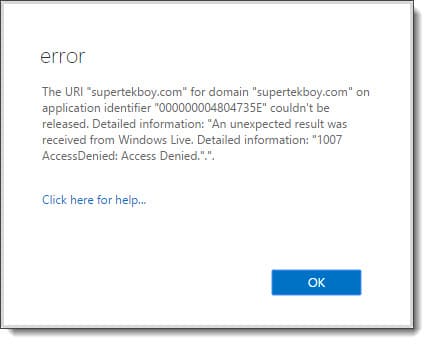
Recently while trying to remove a domain from the federation trust I received the following error.

The URI couldn't be released. An unexpected results was received from Windows Live 1007 Access Denied
The URI "supertekboy.com" for domain "supertekboy.com" on application identifier "000000004804735E" couldn't be released. Detailed information: "An unexpected result was received from Windows Live. Detailed information: "1007 AccessDenied: Access Denied.".".

Despite the almost cryptic error, this one is actually quite simple to fix. In this particular case, the time in my domain was 5 minutes behind the rest of the world. Or more importantly, 5 minutes offset from the Microsoft Federation Gateway. As soon as I brought my time forward I was able to immediately release the shared domain from the federation trust.

Error 1007 can occur while making other configuration changes to the federation trust. It is not just linked to releasing a domain. So if you see this error while performing any task with the federation trust, check the time on your Exchange boxes.

Twitter

Have you run into this error? What was your solution? Drop a comment below or join the conversation on Twitter @SuperTekBoy.
Filed Under: Exchange Solutions, Office 365 RSS, Office 365 Solutions

The delegation token is NULL – Hybrid Free/Busy

February 11, 2017 By Gareth Gudger 1 Comment

Share
Tweet
Share

Ran into a strange issue recently where on-premises users could not see the free/busy information for test users I had migrated to Exchange Online. Exchange Online, on the other hand, had no problem seeing the free/busy of the on-premises users. I had just run the hybrid configuration wizard and it completed without incident. The environment had not been previously enabled for the Microsoft Federation Gateway so I let the wizard take care of that step as well.

When we tested the trust with the federation gateway we received the following error on Step 5 of 6: Requesting delegation token.

 C:\> Test-FederationTrust -UserIdentity rsong@exchangeservergeek.com

<...edited...>

RunspaceId : e4e42cab-62f4-4d70-be15-69143b273823
Id : TokenRequest
Type : Error
Message : Failed to request delegation token.

Error. Attempted to get delegation token, but token came back as null.

The token coming back as null seemed to be the key here. Unfortunately, the web seemed to lack any real way to fix the existing trust. We resolved to delete and recreate the trust with the federation gateway.

Recreating the Federation Trust

Warning: Before we get started with the process you will need access to external DNS zone. Recreating the trust voids the current TXT record that was used for domain validation.

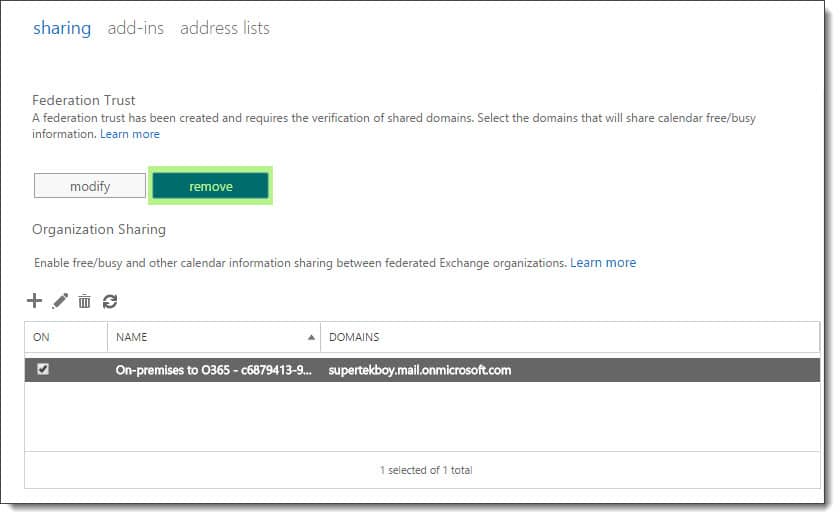
To delete the federation trust navigate to the Organization > Sharing tabs in the Exchange Admin Center. Under the section titled Federation Trust click the Remove button. Click Yes to confirm.

Removing the trust with the Microsoft Federation Gateway
[Read more…] about The delegation token is NULL – Hybrid Free/Busy

Filed Under: Exchange Solutions, Office 365 RSS, Office 365 Solutions

Exchange December 2016 Updates

January 2, 2017 By Gareth Gudger Leave a Comment

Share
Tweet
Share
Exchange 2013 Big Logo

It was a big month for Exchange updates. Not only did we get Cumulative Update 15 for Exchange 2013, but we also got Cumulative Update 4 for Exchange 2016.

As always, test these updates in a lab first! I recommend checking out this 7-part guide on configuring Exchange in your lab. It doesn’t take much to get one going.

The updates are as follows:

Exchange 2016 Mini

Exchange Server 2016 Cumulative Update 4 | KB3177106 | UM Language Pack

Exchange 2013 Cumulative Update 9

Exchange Server 2013 Cumulative Update 15 | KB3197044 | UM Language Pack

Exchange 2010 Mini

Exchange Server 2010 SP3 Update Rollup 16 | KB3184730

Exchange 2007 Mini

Exchange Server 2007 SP3 Update Rollup 22 | KB3184712

A quick word on Exchange 2007

It’s time to update. Exchange 2007 will go end of life on April 11th, 2017. That’s a little over 4 months. If you are counting the days from this blog post that is exactly 100 days before Microsoft drops all support for Exchange 2007. On April 12th you will receive no more patches and no more telephone support.

If the lack of security updates from Microsoft isn’t convincing enough, check this article for a list of cool things Exchange 2013 can do. (P.S. Like the fact Exchange 2013 uses fewer IOPS per mailbox than 2007…say what?)

Windows Server 2016 was breaking Exchange 2016

Cumulative Update 3 for Exchange 2016 officially added support for deployment on Windows Server 2016. Unfortunately, it was quickly realized that a bug existed that would crash the IIS Application Pools after a reboot of a freshly installed DAG member. The Server Team’s official response can be found here.

If you attempt to run Microsoft Exchange 2016 CU3 on Windows Server 2016, you will experience errors in the IIS host process W3WP.exe. There is no workaround at this time. You should postpone deployment of Exchange 2016 CU3 on Windows Server 2016 until a supported fix is available.Windows Server Team

This issue has since been resolved in an update provided by the Windows Server team. The update can be downloaded here (KB3206632).

It is worth noting that Exchange 2016 CU4 will not install on Windows Server 2016 unless this update is present.

[Read more…] about Exchange December 2016 Updates

Filed Under: Exchange News

RunAs Radio #504 – Favorite Exchange sessions at Microsoft Ignite

November 9, 2016 By Gareth Gudger Leave a Comment

Share
Tweet
Share

On October 4th I had the great pleasure of being a guest on the RunAs Radio podcast. I joined host Richard Campbell to discuss what we learned about the future of Exchange from Ignite 2016.

Gareth on Runas Radio #504 - Favorite Exchange Sessions From Microsoft Ignite
[Read more…] about RunAs Radio #504 – Favorite Exchange sessions at Microsoft Ignite

Filed Under: Exchange News, Office 365 News, Podcasts

The Current Status – Episode 43 – Live from IT/Dev Connections

October 26, 2016 By Gareth Gudger Leave a Comment

Share
Tweet
Share

During my recent visit to IT/Dev Connections, I had the great pleasure of being a guest on The Current Status – Episode 43. I joined hosts Phoummala Schmitt and Theresa Miller and special guests Michael Van Horenbeeck and Paul Cunningham.

In this episode, we discuss what we learned from Microsoft Ignite and IT/Dev Connections with regard to the future of Exchange and Office 365.

(Originally posted at https://soundcloud.com/thecurrentstatus/episode-43-exchange-uncut)

[Read more…] about The Current Status – Episode 43 – Live from IT/Dev Connections

Filed Under: Exchange News, Office 365 News, Podcasts

  • « Go to Previous Page
  • Page 1
  • Interim pages omitted …
  • Page 14
  • Page 15
  • Page 16
  • Page 17
  • Page 18
  • Interim pages omitted …
  • Page 31
  • Go to Next Page »

Primary Sidebar

Want to stay up to date?

Sidebar Form

Join thousands of IT professionals and get the latest Exchange & Office 365 tips and tutorials direct to your inbox

DigiCert Banner 300x348

(help support us using our affiliate link)

Footer

Site Navigation

  • Subscribe to blog
  • About SuperTekBoy
  • Disclaimer
  • Privacy & Cookies
  • Contact Us

Want to stay up to date?

Footer Form

Join thousands of IT professionals and get the latest Exchange & Office 365 tips and tutorials direct to your inbox

Join the conversation

  • Twitter
  • LinkedIn
  • Facebook
  • RSS

Copyright © 2026 · SuperTekBoy LLC