• Skip to primary navigation
  • Skip to main content
  • Skip to primary sidebar
  • Skip to footer

SuperTekBoy

Practical Help for Exchange & Office 365

  • Exchange
    • News
    • Tutorials
    • Solve a Problem
  • Office 365
    • News
    • Tutorials
    • Solve a Problem
  • Outlook
    • Tutorials
    • Solve a Problem
  • Books
  • Podcasts
  • Quick Links…
    • Generate or Renew SSL Certs for Exchange
    • Connect PowerShell to Exchange Online
    • Connect PowerShell to Office 365
    • Extend Schema for Exchange
    • Exchange Schema & Build Numbers
  • More…
    • Kemp Load Balancers
    • Other tech…
    • Videos
    • About SuperTekBoy
    • Contact Us

Office 365 Solutions

Unexpected result from Windows Live. 1007 Access Denied – Federation Trust

February 11, 2017 By Gareth Gudger Leave a Comment

Share
Tweet
Share

Recently while trying to remove a domain from the federation trust I received the following error.
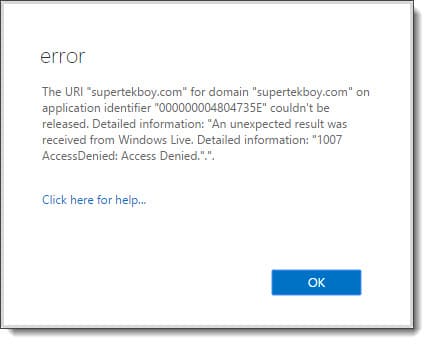
The URI couldn't be released. An unexpected results was received from Windows Live 1007 Access Denied
The URI "supertekboy.com" for domain "supertekboy.com" on application identifier "000000004804735E" couldn't be released. Detailed information: "An unexpected result was received from Windows Live. Detailed information: "1007 AccessDenied: Access Denied.".".

Despite the almost cryptic error, this one is actually quite simple to fix. In this particular case, the time in my domain was 5 minutes behind the rest of the world. Or more importantly, 5 minutes offset from the Microsoft Federation Gateway. As soon as I brought my time forward I was able to immediately release the shared domain from the federation trust.

Error 1007 can occur while making other configuration changes to the federation trust. It is not just linked to releasing a domain. So if you see this error while performing any task with the federation trust, check the time on your Exchange boxes.

Twitter

Have you run into this error? What was your solution? Drop a comment below or join the conversation on Twitter @SuperTekBoy.
Filed Under: Exchange Solutions, Office 365 RSS, Office 365 Solutions

The delegation token is NULL – Hybrid Free/Busy

February 11, 2017 By Gareth Gudger 1 Comment

Share
Tweet
Share

Ran into a strange issue recently where on-premises users could not see the free/busy information for test users I had migrated to Exchange Online. Exchange Online, on the other hand, had no problem seeing the free/busy of the on-premises users. I had just run the hybrid configuration wizard and it completed without incident. The environment had not been previously enabled for the Microsoft Federation Gateway so I let the wizard take care of that step as well.

When we tested the trust with the federation gateway we received the following error on Step 5 of 6: Requesting delegation token.

 C:\> Test-FederationTrust -UserIdentity rsong@exchangeservergeek.com

<...edited...>

RunspaceId : e4e42cab-62f4-4d70-be15-69143b273823
Id : TokenRequest
Type : Error
Message : Failed to request delegation token.

Error. Attempted to get delegation token, but token came back as null.

The token coming back as null seemed to be the key here. Unfortunately, the web seemed to lack any real way to fix the existing trust. We resolved to delete and recreate the trust with the federation gateway.

Recreating the Federation Trust

Warning: Before we get started with the process you will need access to external DNS zone. Recreating the trust voids the current TXT record that was used for domain validation.

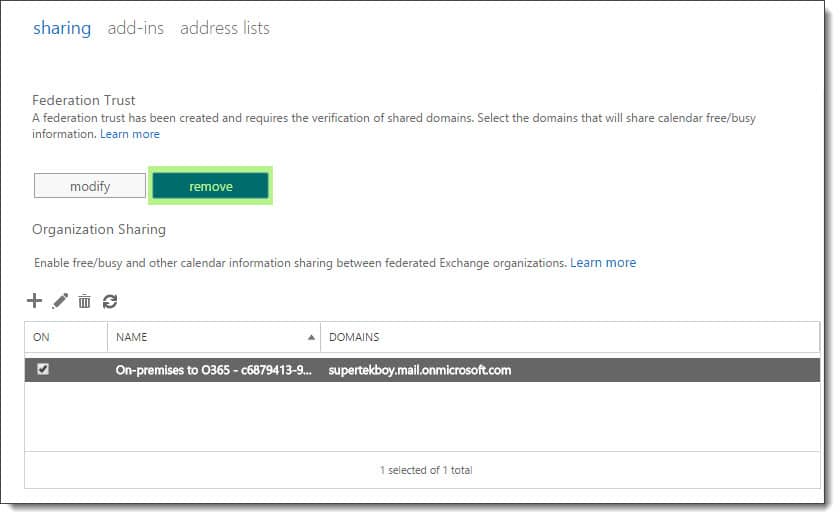
To delete the federation trust navigate to the Organization > Sharing tabs in the Exchange Admin Center. Under the section titled Federation Trust click the Remove button. Click Yes to confirm.

Removing the trust with the Microsoft Federation Gateway
[Read more…] about The delegation token is NULL – Hybrid Free/Busy

Filed Under: Exchange Solutions, Office 365 RSS, Office 365 Solutions

Unable to connect to the Synchronization Service

January 1, 2017 By Gareth Gudger 7 Comments

Share
Tweet
Share

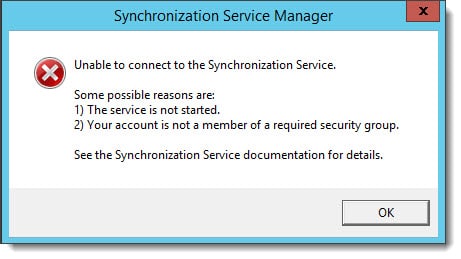
If you run into the following error after installing Azure AD Connect then the fix might be quite simple. There are certainly a number of in-depth articles out there concerning the synchronization service but this might be one quick step to try first.

Unable to connect to the Synchronization Service - Azure AD Connect
Unable to connect to the Synchronization Service.

Some possible reasons are:
1) The service is not started.
2) Your account is not a member of the required security group.

See the Synchronization Service documentation for details.

If you have just installed Azure AD Connect and attempt to launch the Synchronization Service Manager, you may receive the error above. It is likely that the second bullet point regarding membership to a required security group is somewhat true.

Chances are your account has this membership but not the associated token. The fix is possibly quite simple: Log off and log on again.

It’s possible your current login session does not have your updated group membership. Once you do this launch the Synchronization Service Manager again to see if you have access.

If that does not work, then make sure your account is a member of the local ADSyncAdmins group in Computer Management on the server where Azure AD Connect is installed. You will then need to log off and on again.

Twitter

Have you run into this problem? What was your fix? Drop a comment below or join the conversation on Twitter  @SuperTekBoy.
Filed Under: Office 365 Solutions

Incompatible Office products are installed on your machine

February 16, 2016 By Gareth Gudger 3 Comments

Share
Tweet
Share
OneDrive for Business Incompatible Office Products are installed on your machine
Sorry, we can't perform this action. Incompatible Office products are installed on your machine.

This error is caused when you have a mix of differently licensed Office products on your computer. For example, you may have Office 365 ProPlus which is the click-to-run version that operates off a subscription. On the same computer, you may also have a volume licensed Office product, such as Visio or Project, that may have been delivered by ISO or MSI. If this is the case you will constantly receive this nag message from OneDrive for Business. This will likely also cause transfer issues if you are using sync libraries.

Unfortunately, the only way to remedy this is to uninstall either one of the competing products (or remove OneDrive for Business). In probably all cases I would expect the Office 365 suite to be the victor. That said you will need to license the offending software–Visio or Project–through an Office 365 subscription.

Not good news I’m afraid. I doubt Microsoft will remedy this as I suspect all products will eventually become a subscription. But this is the fix.

Twitter

Join the conversation on Twitter @SuperTekBoy.

Share
Tweet
Share

Filed Under: Office 365 RSS, Office 365 Solutions, Other Tech

‘Unread Mail’ – The attempted operation failed. An object could not be found.

October 20, 2015 By Gareth Gudger 7 Comments

Share
Tweet
Share

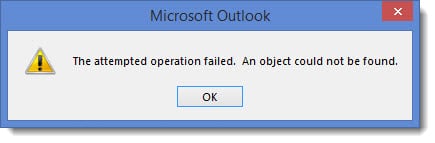
While working on a Cutover migration for Office 365 I ran into an error with the default search folders in Outlook. The data had migrated successfully. The Outlook profiles were recreated. Mail was flowing. However, when clicking on the Unread Mail folder it resulted in the following error.

'Unread Mail' - The attempted operation failed. An object could not be found.

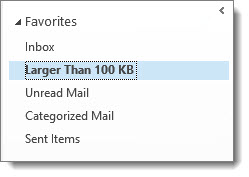
This same error occurred when clicking on other search folders; such as Categorized Mail, or, Large Mail.

Outlook Favorites

Thankfully the fix was incredibly simple.

[Read more…] about ‘Unread Mail’ – The attempted operation failed. An object could not be found.

Filed Under: Office 365 RSS, Office 365 Solutions, Outlook Solutions

Fatal error MrsHttpUnauthorizedException

August 6, 2015 By Gareth Gudger 2 Comments

Share
Tweet
Share

Recently I encountered the following error when completing a mailbox move from Exchange to Office 365.

  8/1/2015 12:00:00 AM [CY1PR11MB0001] Fatal error MrsHttpUnauthorizedException has occurred.

The initial sync had worked fine. The mailbox was AutoSuspended at 95%. It was ready to be completed. Yet, it did not want to go. I repeated a Resume-MoveRequest on a similar mailbox–same exact error.

Sadly, the interwebs seemed devoid of any real information. Luckily a good friend and colleague alerted me to the root cause. This error will occur if the password has changed on the account used to create the move request.

In my case, this had indeed happened.

The remedy for MrsHttpUnauthorizedException

To fix the issue we need to update the credentials on the move request. To do this we need to enlist the help of the Set-MoveRequest cmdlet. Let’s get started.

[Read more…] about Fatal error MrsHttpUnauthorizedException

Filed Under: Exchange, Exchange Solutions, Office 365, Office 365 RSS, Office 365 Solutions

  • « Go to Previous Page
  • Page 1
  • Page 2
  • Page 3
  • Page 4
  • Page 5
  • Go to Next Page »

Primary Sidebar

Want to stay up to date?

Sidebar Form

Join thousands of IT professionals and get the latest Exchange & Office 365 tips and tutorials direct to your inbox

DigiCert Banner 300x348

(help support us using our affiliate link)

Footer

Site Navigation

  • Subscribe to blog
  • About SuperTekBoy
  • Disclaimer
  • Privacy & Cookies
  • Contact Us

Want to stay up to date?

Footer Form

Join thousands of IT professionals and get the latest Exchange & Office 365 tips and tutorials direct to your inbox

Join the conversation

  • Twitter
  • LinkedIn
  • Facebook
  • RSS

Copyright © 2026 · SuperTekBoy LLC