• Skip to primary navigation
  • Skip to main content
  • Skip to primary sidebar
  • Skip to footer

SuperTekBoy

Practical Help for Exchange & Office 365

  • Exchange
    • News
    • Tutorials
    • Solve a Problem
  • Office 365
    • News
    • Tutorials
    • Solve a Problem
  • Outlook
    • Tutorials
    • Solve a Problem
  • Books
  • Podcasts
  • Quick Links…
    • Generate or Renew SSL Certs for Exchange
    • Connect PowerShell to Exchange Online
    • Connect PowerShell to Office 365
    • Extend Schema for Exchange
    • Exchange Schema & Build Numbers
  • More…
    • Kemp Load Balancers
    • Other tech…
    • Videos
    • About SuperTekBoy
    • Contact Us

Office 365

‘Unread Mail’ – The attempted operation failed. An object could not be found.

October 20, 2015 By Gareth Gudger 7 Comments

Share
Tweet
Share

While working on a Cutover migration for Office 365 I ran into an error with the default search folders in Outlook. The data had migrated successfully. The Outlook profiles were recreated. Mail was flowing. However, when clicking on the Unread Mail folder it resulted in the following error.
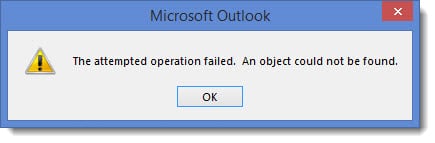
'Unread Mail' - The attempted operation failed. An object could not be found.

This same error occurred when clicking on other search folders; such as Categorized Mail, or, Large Mail.
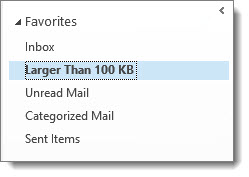
Outlook Favorites

Thankfully the fix was incredibly simple.

[Read more…] about ‘Unread Mail’ – The attempted operation failed. An object could not be found.

Filed Under: Office 365 RSS, Office 365 Solutions, Outlook Solutions

Fatal error MrsHttpUnauthorizedException

August 6, 2015 By Gareth Gudger 2 Comments

Share
Tweet
Share

Recently I encountered the following error when completing a mailbox move from Exchange to Office 365.

  8/1/2015 12:00:00 AM [CY1PR11MB0001] Fatal error MrsHttpUnauthorizedException has occurred.

The initial sync had worked fine. The mailbox was AutoSuspended at 95%. It was ready to be completed. Yet, it did not want to go. I repeated a Resume-MoveRequest on a similar mailbox–same exact error.

Sadly, the interwebs seemed devoid of any real information. Luckily a good friend and colleague alerted me to the root cause. This error will occur if the password has changed on the account used to create the move request.

In my case, this had indeed happened.

The remedy for MrsHttpUnauthorizedException

To fix the issue we need to update the credentials on the move request. To do this we need to enlist the help of the Set-MoveRequest cmdlet. Let’s get started.

[Read more…] about Fatal error MrsHttpUnauthorizedException

Filed Under: Exchange, Exchange Solutions, Office 365, Office 365 RSS, Office 365 Solutions

Slow Document Editing when using SharePoint Sync

August 4, 2015 By Gareth Gudger Leave a Comment

Share
Tweet
Share

Recently I ran into an issue where editing a Word document was painfully slow. Every time I typed a letter it was followed by an unbearable lag. Typing a sentence would sputter in dribs and drabs. This was not going to work.

SharePoint Online Document Library Sync

The document in question was stored in SharePoint Online. I was using the Sync feature for easy access from my local computer.

The fix was actually quite simple.

Fix Slow Document Editing

Check the bottom-right of your Word document. If you see something that says Updates Available click it. If successful the Updates Available notice will disappear and Word will perform at its normal speed.

If you hover over Updates Available before you click it, you will see a description of what is actually going on.

[Read more…] about Slow Document Editing when using SharePoint Sync
Share
Tweet
Share

Filed Under: Office 365 RSS, Office 365 Solutions

RBAC hides the Office 365 Mailbox creation link

July 21, 2015 By Gareth Gudger 23 Comments

Share
Tweet
Share

If you have configured Exchange 2013 in hybrid mode then you have probably noticed the appearance of this link. It’s the Office 365 Mailbox creation link.

New Office 365 Mailbox link

However, if you have implemented RBAC this link may not show when you’d expect it to.

I ran into this recently when upgrading an Exchange 2010 hybrid environment to 2013. Previously the client had implemented RBAC where members of the helpdesk team were added to the Recipient Management group. In 2010 this allowed the helpdesk team to create and manage mail recipients; both on-premise and in the cloud. However, when this group attempted to use the 2013 management tools the Office 365 Mailbox link was absent.

After some digging–plus some trial and error–we quickly found an oddity. The short answer–it’s all based around one missing role entry. To see that link you need access to the Get-RemoteDomain command. Members of Recipient Management do not have this.

[Read more…] about RBAC hides the Office 365 Mailbox creation link

Filed Under: Exchange, Exchange Solutions, Office 365, Office 365 RSS, Office 365 Solutions

Microsoft Ignite : Did your 2016 just get busier?

May 5, 2015 By Gareth Gudger Leave a Comment

Share
Tweet
Share

If you weren’t aware Microsoft is hosting its Ignite conference this week in Chicago (May 4th-8th).

Microsoft Ignite is the convergence of several Microsoft conferences into one mammoth event. And, it makes sense. With so much cross-product integration there was a growing amount of duplicate content. To quote the Microsoft Blog;

It will bring together the best of previously individual events – the Management Summit, the Exchange, SharePoint, Lync, Project, and TechEd conferences – and then take it to the next levelThe Official Microsoft Blog

So how popular is Ignite? Joe Belfiore (@joebelfiore) revealed during the Cortana Power BI demo that over 23,000 people were in attendance. Unfortunately, I couldn’t make this conference. But luckily Microsoft has not forgotten us. You can watch the on-demand recording of the keynote here. Furthermore, Channel 9 is live-streaming several of the sessions at http://channel9.msdn.com/. Their featured session guide is on the front page.

UPDATE: Channel 9 has all the Ignite recordings available here. There are 688 recorded sessions!!

Your 2016 may have just gotten a little busier

If you saw the keynote then you know there was a slew of product announcements made. Microsoft CEO, Satya Nadella (@satyanadella), announced several new product releases. Many of which are already available for preview, or, will be second-half 2015.

Products included:

  • Windows Server 10
  • Exchange 2016
  • System Center 2016
  • SQL Server 2016
  • Windows 10
  • Office 2016

Also highlighted were:

  • Azure for your Datacenter
  • Skype for Business Broadcast
  • Windows Update for Business
  • Cortana improvements
  • Continuum for Windows Phone
  • Hello feature
  • Skype for HoloLens
  • Microsoft Advanced Threat Analytics
  • Operations Management Suite
  • Device Guard
  • Azure Rights Management and Data Loss Prevention

One message from Satya’s presentation was very clear.

[Read more…] about Microsoft Ignite : Did your 2016 just get busier?

Filed Under: Exchange News, Office 365 News, Other Tech

Easily Connect to Exchange Online with PowerShell

April 30, 2015 By Gareth Gudger 8 Comments

Share
Tweet
Share

In a previous article, I explained how to connect to Office 365 with PowerShell. In this article, we explore how to use PowerShell to connect to Exchange Online.

Note: This article only covers the PowerShell v2 and v3 modules. Exchange Online PowerShell v1 module was removed from this article as it is deprecated as of October 1st, 2022, with the deprecation of basic authentication.

Let’s get started!

Exchange Online PowerShell Module

One of the challenges of a large Exchange Online organization is that PowerShell commands can take a very long time to run. The Exchange Team released the Exchange Online PowerShell V2 module to combat this problem, which ships with all new Exchange cmdlets while still supporting the old cmdlets. Microsoft has determined that these new cmdlets are up to eight times faster in certain instances. I highly recommend using this module over the V1 module. The V2 module has been generally available since June 2020.

To use the new Exchange Online module, launch PowerShell as an administrator and run the following command.

 C:\> Install-Module ExchangeOnlineManagement

If you did not have NuGet previously installed from another PowerShell library you will be prompted to install it. Press Y and hit Enter.

 NuGet provider is required to continue.
PowerShellGet requires NuGet provider version '2.8.5.201' or newer to 
interact with NuGet-based repositories. The NuGet provider must be 
available in 'C:\Program Files\PackageManagement\ProviderAssemblies' or
'C:\Users\<user>\AppData\Local\PackageManagement\ProviderAssemblies'. 

You can also install the NuGet provider by running 'Install-PackageProvider 
-Name NuGet -MinimumVersion 2.8.5.201 -Force'. 

Do you want PowerShellGet to install and import the NuGet provider now?
[Y] Yes [N] No [S] Suspend [?] Help (default is "Y"): Y
[Read more…] about Easily Connect to Exchange Online with PowerShell
Share
Tweet
Share

Filed Under: Office 365, Office 365 RSS, Office 365 Tutorials

  • « Go to Previous Page
  • Page 1
  • Interim pages omitted …
  • Page 13
  • Page 14
  • Page 15
  • Page 16
  • Go to Next Page »

Primary Sidebar

Want to stay up to date?

Sidebar Form

Join thousands of IT professionals and get the latest Exchange & Office 365 tips and tutorials direct to your inbox

DigiCert Banner 300x348

(help support us using our affiliate link)

Footer

Site Navigation

  • Subscribe to blog
  • About SuperTekBoy
  • Disclaimer
  • Privacy & Cookies
  • Contact Us

Want to stay up to date?

Footer Form

Join thousands of IT professionals and get the latest Exchange & Office 365 tips and tutorials direct to your inbox

Join the conversation

  • Twitter
  • LinkedIn
  • Facebook
  • RSS

Copyright © 2026 · SuperTekBoy LLC