• Skip to primary navigation
  • Skip to main content
  • Skip to primary sidebar
  • Skip to footer

SuperTekBoy

Practical Help for Exchange & Office 365

  • Exchange
    • News
    • Tutorials
    • Solve a Problem
  • Office 365
    • News
    • Tutorials
    • Solve a Problem
  • Outlook
    • Tutorials
    • Solve a Problem
  • Books
  • Podcasts
  • Quick Links…
    • Generate or Renew SSL Certs for Exchange
    • Connect PowerShell to Exchange Online
    • Connect PowerShell to Office 365
    • Extend Schema for Exchange
    • Exchange Schema & Build Numbers
  • More…
    • Kemp Load Balancers
    • Other tech…
    • Videos
    • About SuperTekBoy
    • Contact Us

Office 365

Change the notification email for directory synchronization failures

January 1, 2017 By Gareth Gudger 3 Comments

Share
Tweet
Share

In this article, we explore how to change the email address that receives the Office 365 directory synchronization failure notifications. We will explore how to do this with PowerShell.

Let’s get started!

Getting connected

First, you will need to have access to the Windows Azure Active Directory Module for Windows PowerShell. An article detailing how to install this module and all prerequisites can be found here.

You should have an icon on your desktop named Windows Azure Active Directory Module for Windows PowerShell. Right-click on this icon and select Run As Administrator from the context menu.
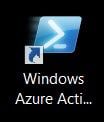
Windows Azure Active Directory Module for Windows PowerShell Icon

At the PowerShell prompt enter the following command and hit enter.

 C:\> Set-ExecutionPolicy –ExecutionPolicy RemoteSigned

Execution Policy Change
The execution policy helps protect you from scripts that you do not trust. Changing the execution policy might expose you to the security risks described in the
about_Execution_Policies help topic at http://go.microsoft.com/fwlink/?LinkID=135170. Do you want to change the execution policy?
[Y] Yes [A] Yes to All [N] No [L] No to All [S] Suspend [?] Help (default is "N"):

Press Y for yes and hit Enter.

[Read more…] about Change the notification email for directory synchronization failures
Filed Under: Office 365 Tutorials

Unable to connect to the Synchronization Service

January 1, 2017 By Gareth Gudger 7 Comments

Share
Tweet
Share

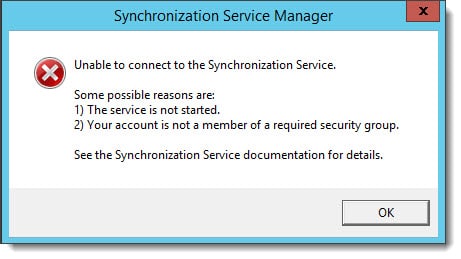
If you run into the following error after installing Azure AD Connect then the fix might be quite simple. There are certainly a number of in-depth articles out there concerning the synchronization service but this might be one quick step to try first.

Unable to connect to the Synchronization Service - Azure AD Connect
Unable to connect to the Synchronization Service.

Some possible reasons are:
1) The service is not started.
2) Your account is not a member of the required security group.

See the Synchronization Service documentation for details.

If you have just installed Azure AD Connect and attempt to launch the Synchronization Service Manager, you may receive the error above. It is likely that the second bullet point regarding membership to a required security group is somewhat true.

Chances are your account has this membership but not the associated token. The fix is possibly quite simple: Log off and log on again.

It’s possible your current login session does not have your updated group membership. Once you do this launch the Synchronization Service Manager again to see if you have access.

If that does not work, then make sure your account is a member of the local ADSyncAdmins group in Computer Management on the server where Azure AD Connect is installed. You will then need to log off and on again.

Twitter

Have you run into this problem? What was your fix? Drop a comment below or join the conversation on Twitter  @SuperTekBoy.

Filed Under: Office 365 Solutions

RunAs Radio #504 – Favorite Exchange sessions at Microsoft Ignite

November 9, 2016 By Gareth Gudger Leave a Comment

Share
Tweet
Share

On October 4th I had the great pleasure of being a guest on the RunAs Radio podcast. I joined host Richard Campbell to discuss what we learned about the future of Exchange from Ignite 2016.

Gareth on Runas Radio #504 - Favorite Exchange Sessions From Microsoft Ignite
[Read more…] about RunAs Radio #504 – Favorite Exchange sessions at Microsoft Ignite

Filed Under: Exchange News, Office 365 News, Podcasts

The Current Status – Episode 43 – Live from IT/Dev Connections

October 26, 2016 By Gareth Gudger Leave a Comment

Share
Tweet
Share

During my recent visit to IT/Dev Connections, I had the great pleasure of being a guest on The Current Status – Episode 43. I joined hosts Phoummala Schmitt and Theresa Miller and special guests Michael Van Horenbeeck and Paul Cunningham.

In this episode, we discuss what we learned from Microsoft Ignite and IT/Dev Connections with regard to the future of Exchange and Office 365.

(Originally posted at https://soundcloud.com/thecurrentstatus/episode-43-exchange-uncut)

[Read more…] about The Current Status – Episode 43 – Live from IT/Dev Connections

Filed Under: Exchange News, Office 365 News, Podcasts

15 Microsoft Ignite sessions every Exchange admin should see (2016)

October 4, 2016 By Gareth Gudger Leave a Comment

Share
Tweet
Share

Microsoft hosted its annual Ignite conference in Atlanta this September. Ignite was massive at 1412 sessions. That is a lot of sessions! Many are posted at the Ignite channel on YouTube. Here are the top 15 sessions I think every Exchange admin should watch.

Understand the Microsoft Exchange Server 2016 Architecture Thumbnail

Understand the Microsoft Exchange Server 2016 Architecture
Ross Smith discusses the Exchange 2016 preferred architecture. Mike Cooper of GM discusses his implementation of Exchange 2016. Ross and Mike take questions from the audience.

  • Ross demonstrates a new feature where you can recover deleted or purged items to their original folder.
Deploy Microsoft Exchange Server 2016 Thumbnail

Deploy Microsoft Exchange Server 2016
Brian Day and Jeff Guillet discuss what’s changed in Exchange system requirements. Discussions included:

  • Exchange 2016 CU3 supports Windows Server 2016
  • Server 2008 R2 FFL/DFL will become the new minimum requirement in future Exchange 2016 releases.
  • .NET 4.6.2 currently only supported on Exchange 2016 CU3 on Server 2016. Will be made available in CU15/CU4 for older operating systems.
  • .NET 4.6.2 will be mandatory with CU16/CU5. The setup will block you if you don’t have 4.6.2 installed.
  • WMFS 5 is only supported on Windows Server 2016. It is not supported when you install it on older operating systems (use the version that comes with your OS).
Design your Exchange infrastructure right (or consider moving to Office 365) thumbnail

Design your Exchange infrastructure right (or consider moving to Office 365)
Robert Gillies, Boris Lokhvitsky, Adrian Moore discuss the business benefits of deploying the Exchange preferred architecture.

  • The importance of eradicating failure domains
  • SAN versus DAS
    • Since Exchange 2003 each version has dropped IOPS requirements.
    • Exchange 2016 uses 93% fewer IOPs than 2003
    • Exchange 2016 uses 30% fewer IOPs than 2013
    • Exchange databases average 10 IOPs
    • 7200 RPM SATA/NL-SAS average 70 IOPs
  • Thick versus Thin Provisioning
  • The importance of controller write cache
  • Bound versus Unbound Namespaces
  • Stretched DAGs
  • Virtual vs. Physical
[Read more…] about 15 Microsoft Ignite sessions every Exchange admin should see (2016)

Filed Under: Exchange News, Office 365 News

The UC Architects – Episode 59

August 17, 2016 By Gareth Gudger Leave a Comment

Share
Tweet
Share

On August 7th I had the great pleasure of being a guest on The UC Architects podcast. I joined hosts Steve Goodman and Dave Stork to discuss the latest in Unified Communications.

Gareth Gudger Recording The UC Architects Podcast Episode 59
[Read more…] about The UC Architects – Episode 59

Filed Under: Exchange News, Office 365 News, Office 365 RSS, Podcasts

  • « Go to Previous Page
  • Page 1
  • Interim pages omitted …
  • Page 11
  • Page 12
  • Page 13
  • Page 14
  • Page 15
  • Page 16
  • Go to Next Page »

Primary Sidebar

Want to stay up to date?

Sidebar Form

Join thousands of IT professionals and get the latest Exchange & Office 365 tips and tutorials direct to your inbox

DigiCert Banner 300x348

(help support us using our affiliate link)

Footer

Site Navigation

  • Subscribe to blog
  • About SuperTekBoy
  • Disclaimer
  • Privacy & Cookies
  • Contact Us

Want to stay up to date?

Footer Form

Join thousands of IT professionals and get the latest Exchange & Office 365 tips and tutorials direct to your inbox

Join the conversation

  • Twitter
  • LinkedIn
  • Facebook
  • RSS

Copyright © 2026 · SuperTekBoy LLC