• Skip to primary navigation
  • Skip to main content
  • Skip to primary sidebar
  • Skip to footer

SuperTekBoy

Practical Help for Exchange & Office 365

  • Exchange
    • News
    • Tutorials
    • Solve a Problem
  • Office 365
    • News
    • Tutorials
    • Solve a Problem
  • Outlook
    • Tutorials
    • Solve a Problem
  • Books
  • Podcasts
  • Quick Links…
    • Generate or Renew SSL Certs for Exchange
    • Connect PowerShell to Exchange Online
    • Connect PowerShell to Office 365
    • Extend Schema for Exchange
    • Exchange Schema & Build Numbers
  • More…
    • Kemp Load Balancers
    • Other tech…
    • Videos
    • About SuperTekBoy
    • Contact Us

Topology discovery failed: Required number of suitable directory servers

August 6, 2017 By Gareth Gudger Leave a Comment

Share
Tweet
Share

Recently, while troubleshooting an Exchange environment, I ran across event ID 2142 from the MSExchangeADTopology source. This error can be found in the application logs and indicates that the topology service could not find the minimum required domain controllers needed for Exchange. For the environment, I was troubleshooting this was particularly odd as this site containing Exchange had three functional domain controllers. The environment was also a single AD site. The error in full:

Process Microsoft.Exchange.Directory.TopologyService.exe (PID=2700) Forest domain.com. Topology discovery failed, error details: No Minimal Required Number of Suitable Directory Servers Found in Forest domain.com Site Default-First-Site-Name and connected Sites.
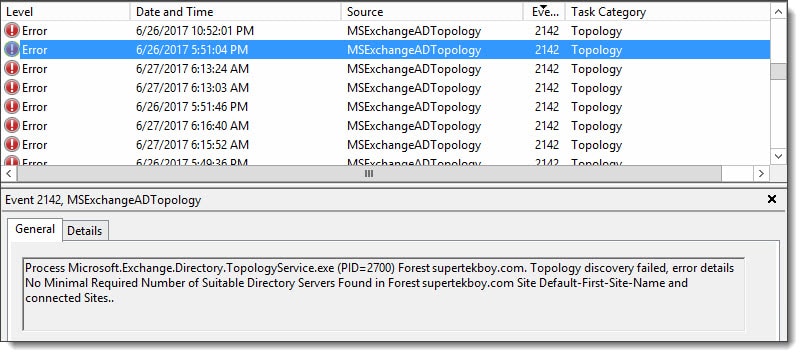
MSExchangeADTopology Event ID 2142
[Read more…] about Topology discovery failed: Required number of suitable directory servers
Print Friendly, PDF & Email

Filed Under: Exchange Solutions

Error 0x8007000B when installing FitBit on Windows Phone

August 5, 2017 By Gareth Gudger 1 Comment

Share
Tweet
Share
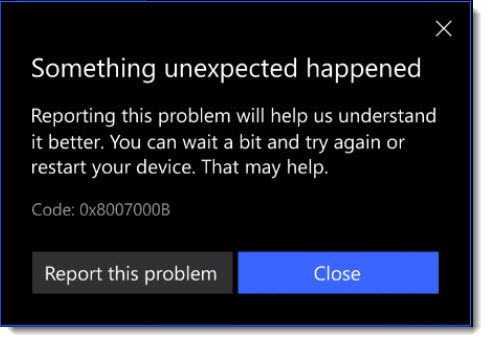
FitBit app will not install on Windows Phone 10 Error Code 0x8007000B

When installing the Fitbit app on Windows Phone 10 you may receive an error. When you click the See Details link, it details that something unexpected happened and provides error code 0x8007000B. The error also instructs that waiting a bit or restarting your device might help. Unfortunately, neither of these recommendations will solve your problem.

The error code is a result of how you have configured your Windows phone to store applications. If your phone has an SD Card and you have configured this as your default location for application installs then this is your problem. The Fitbit app will only install to your phone’s internal storage.

In this article, we explore how to install your FitBit to internal storage. Let’s get started.

[Read more…] about Error 0x8007000B when installing FitBit on Windows Phone
Print Friendly, PDF & Email

Filed Under: Other Tech, Windows

Exchange June 2017 Updates

July 4, 2017 By Gareth Gudger 6 Comments

Share
Tweet
Share
Exchange 2016 Cumulative Update 6

Last week was a big week for Exchange updates. Not only did we get Cumulative Update 6 for Exchange 2016, but we also got Cumulative Update 17 for Exchange 2013.

As always, test these updates in a lab first! I recommend checking out this 7-part guide on configuring Exchange in your lab. It doesn’t take much to get one going.

The updates are as follows:

Exchange 2016 Mini

Exchange 2016 Cumulative Update 6 | KB4012108 | UM Language Pack

Exchange 2013 Cumulative Update 9

Exchange 2013 Cumulative Update 17 | KB4012114 | UM Language Pack

Exchange 2010 Mini

Exchange 2010 SP3 Rollup 18 | KB4018588

A quick word on Exchange 2007

It’s time to update. Exchange 2007 went end of life as of April 11th, 2017. You will receive no further patches and will be unable to acquire telephone support. Published back in March 2017, Rollup 23 is the final update for Exchange 2007.

Exchange 2007 Mini

Exchange 2007 SP3 Rollup 23 | KB4011325 (final update for 2007)

If the lack of security updates from Microsoft isn’t convincing enough, check this article for a list of cool things Exchange 2013 can do. (P.S. Like the fact Exchange 2013 uses fewer IOPS per mailbox than 2007…say what)

[Read more…] about Exchange June 2017 Updates
Print Friendly, PDF & Email

Filed Under: Exchange News

Awarded for a 2nd year as a Microsoft MVP (Thank you!)

July 2, 2017 By Gareth Gudger Leave a Comment

Share
Tweet
Share

On July 1st I had the great pleasure of being awarded for a second year as a Microsoft Most Valuable Professional (MVP). It is truly a great honor to be awarded for another year.

Microsoft MVP Logo Vertical

I want to give a special shout out to everyone who supports this blog. Your comments, your follows, your likes and your shares–they have all got me to this point. Thank you.

I would like to offer special thanks to my family, friends, colleagues, and employer. Thank you for your continued support and for challenging me to the best I can be.

For me, the MVP program grants two fantastic benefits.

The first is being able to interact directly with the Microsoft product groups. Similar to the Technology Adoption Program (TAP), MVPs get early access to the latest software builds. Not only does this allow us to discover new features but it also provides a forum for feedback and feature requests. As an MVP you get to help shape Microsoft products and services.

The second benefit is being able to collaborate with MVPs from all across the globe. I have had the great pleasure of becoming friends with MVPs from many different countries and cultures. It is truly an amazing experience.

[Read more…] about Awarded for a 2nd year as a Microsoft MVP (Thank you!)
Print Friendly, PDF & Email

Filed Under: Site News

Recover Exchange Server after total loss

June 26, 2017 By Gareth Gudger 16 Comments

Share
Tweet
Share

Being able to recover an Exchange Server is key to business continuity. This is magnified in environments where there is only a single Exchange server. Rebuilding an Exchange environment from scratch would be an arduous and monumental task. Luckily Exchange saves much of its configuration settings in Active Directory. As long as Active Directory is healthy you can recover an Exchange Server to its former configuration. This process saves a massive amount of time.

That said there are some items that are not stored in Active Directory. This includes the databases where the user and public folder data is stored, third-party certificates and, customizations made outside of the Exchange management tools.

Certificates are easy. If you don’t have a backup you can have your certificate re-keyed by your provider. This may take some time so it is much better to export your Exchange server certificate and save it to a safe location. Then it can be quickly imported in the event of a failure. This will reduce downtime.

Databases are a little more difficult. Depending on the nature of the failure they may need to be restored from backup. The time required for restore largely depends on the size of the database. With the Exchange standard license you get five databases. So, rather than one large database, go with five smaller ones. These greatly aides your recovery time objective (RTO). Exchange enterprise allows up to a hundred databases giving you even greater capacity.

I always recommend that you architect a database availability group (DAG) where possible. Even if your budget can only cover two Exchange servers–creating a two-member DAG with two copies of each database–will put you miles ahead when it comes to disaster recovery. The instructions to recover a DAG member differ and we will cover that in a later article.

Configuration outside of the Exchange tools is going to be a little tougher. You will either need documentation so the changes can be repeated, or, a backup of the changes. Customizations outside of Exchange can include the registry, IIS, or, text-based configuration files.

[Read more…] about Recover Exchange Server after total loss
Print Friendly, PDF & Email

Filed Under: Exchange Tutorials

Access is Denied when enabling Group Writeback

June 20, 2017 By Gareth Gudger 6 Comments

Share
Tweet
Share

Group Writeback is a feature in Azure AD Connect that allows for Office 365 Groups to be written back to your on-premises Active Directory as a universal distribution group. This allows your on-premises users in a hybrid environment to send email to the Office 365 Group.

When configuring group writeback you specify which organizational unit (OU) you want these objects to be written. Each of these Office 365 groups is then represented by a separate universal distribution group that starts with the name of “Group_” followed by a unique identifier.

In the screenshot below I have two Office 365 groups that are being written back to my local AD.

Group Writeback Azure AD Connect

The problem – Access is Denied

When I first tried to get these groups written back to this organizational unit was where I ran into problems. I was following this Microsoft document verbatim. The document specifies to open Active Directory Users and Computers and locate the account that started with “AAD_”. Which I found.

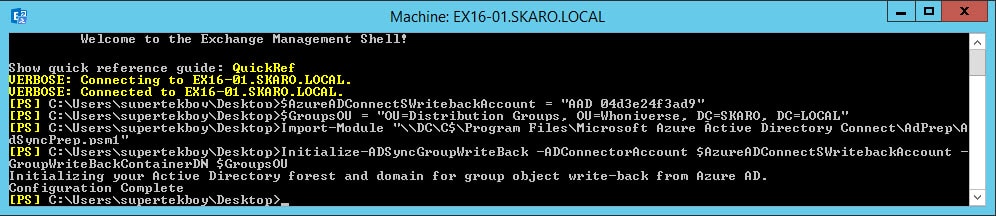
The document later uses this account to run a script. When running the script everything completed as expected. No errors.

Group Writeback Script Azure AD Connect

When I checked the permissions on the organizational unit I could see that the script had added the AAD_ account with a bunch of permissions. Everything looked good.

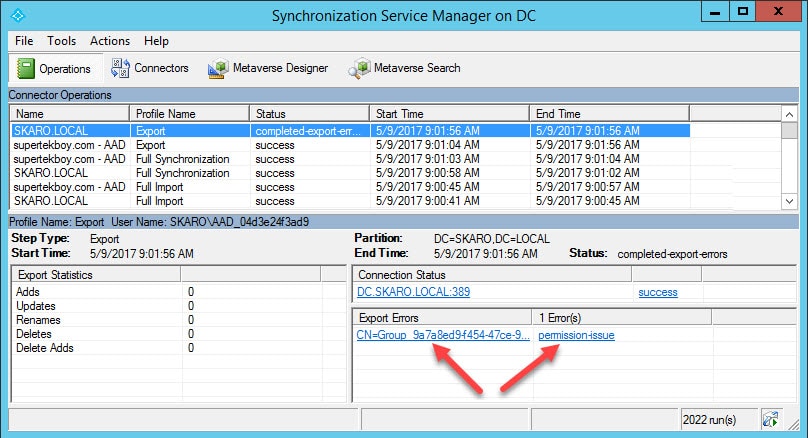
However, I quickly started generating errors in Azure AD Connect. When I opened the Synchronization Manager I received the following error on the export of my Office 365 group. “Permission Issue – Access is denied”

Group Writeback Access is Denied Synchronization Manager
[Read more…] about Access is Denied when enabling Group Writeback
Print Friendly, PDF & Email

Filed Under: Exchange Solutions, Office 365 Solutions

  • « Go to Previous Page
  • Page 1
  • Interim pages omitted …
  • Page 18
  • Page 19
  • Page 20
  • Page 21
  • Page 22
  • Interim pages omitted …
  • Page 51
  • Go to Next Page »

Primary Sidebar

Want to stay up to date?

Sidebar Form

Join thousands of IT professionals and get the latest Exchange & Office 365 tips and tutorials direct to your inbox

DigiCert Banner 300x348

(help support us using our affiliate link)

Footer

Site Navigation

  • Subscribe to blog
  • About SuperTekBoy
  • Disclaimer
  • Privacy & Cookies
  • Contact Us

Want to stay up to date?

Footer Form

Join thousands of IT professionals and get the latest Exchange & Office 365 tips and tutorials direct to your inbox

Join the conversation

  • Twitter
  • LinkedIn
  • Facebook
  • RSS

Copyright © 2026 · SuperTekBoy LLC