• Skip to primary navigation
  • Skip to main content
  • Skip to primary sidebar
  • Skip to footer

SuperTekBoy

Practical Help for Exchange & Office 365

  • Exchange
    • News
    • Tutorials
    • Solve a Problem
  • Office 365
    • News
    • Tutorials
    • Solve a Problem
  • Outlook
    • Tutorials
    • Solve a Problem
  • Books
  • Podcasts
  • Quick Links…
    • Generate or Renew SSL Certs for Exchange
    • Connect PowerShell to Exchange Online
    • Connect PowerShell to Office 365
    • Extend Schema for Exchange
    • Exchange Schema & Build Numbers
  • More…
    • Kemp Load Balancers
    • Other tech…
    • Videos
    • About SuperTekBoy
    • Contact Us

Complete a Certificate Request in Exchange 2013 (and older versions of 2016 & 2019)

October 27, 2015 By Gareth Gudger Leave a Comment

Share
Tweet
Share

In a previous article, we examined the process of generating a certificate request for Exchange 2016. We then submitted that request to a certificate provider. Now that the certificate provider has validated our identity and issued our certificate, we are ready to move on to the next step.

In this article, we complete our certificate request. We explore how to accomplish this using the Exchange Admin Center and PowerShell.

Let’s get started!

Note: These steps are identical for Exchange 2013, Exchange 2016 CU22 and earlier, and Exchange 2019 CU11 and earlier. If you are using Exchange 2016 CU23 or greater or Exchange 2019 CU12 or greater, you must complete your pending certificate request with all new PowerShell commands covered in the following article.

Complete a Certificate Request with Exchange Admin Center

Log in to the Exchange Admin Center (EAC). Select the Servers tab and Certificates sub-tab.

Select your pending certificate request and click the Complete link from the action pane.
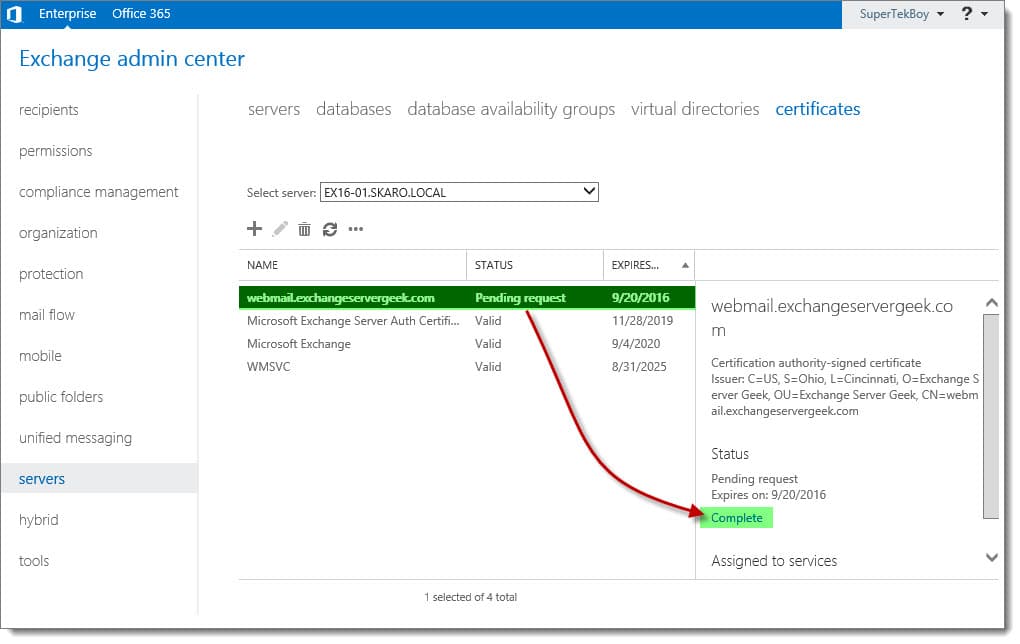
Complete a Certificate Request in Exchange 2016 B
[Read more…] about Complete a Certificate Request in Exchange 2013 (and older versions of 2016 & 2019)
Print Friendly, PDF & Email
Share
Tweet
Share

Filed Under: Exchange, Exchange Tutorials

Generate a Certificate Request for Exchange 2013 (and older versions of 2016 & 2019)

October 27, 2015 By Gareth Gudger Leave a Comment

Share
Tweet
Share

In this article, we examine the process of generating a certificate request for Exchange 2016. We explore how to accomplish this using the Exchange Admin Center and PowerShell.

In future articles, we will explore completing that request, assigning services to the certificate, and importing that certificate to other Exchange servers.

Let’s get started!

Note: These steps are identical for Exchange 2013, Exchange 2016 CU22 and earlier, and Exchange 2019 CU11 and earlier. If you are using Exchange 2016 CU23 or greater or Exchange 2019 CU12 or greater, you must generate your certificate with all new PowerShell commands covered in the following article.

Generate a Certificate Request with Exchange Admin Center

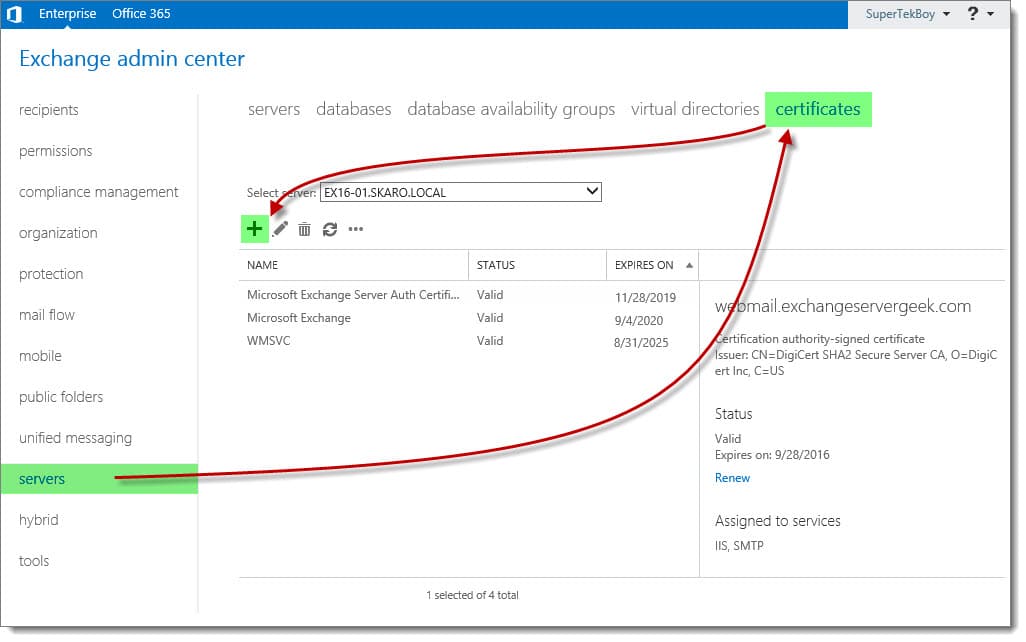
Log in to the Exchange Admin Center (EAC). Select the Servers tab and Certificates subtab.

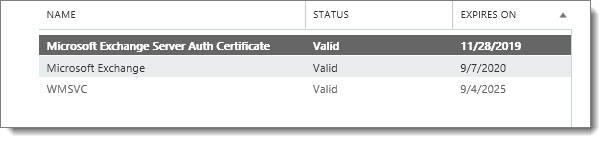
This page displays all currently installed Exchange certificates. These three self-signed certificates are installed with Exchange out of the box. The self-signed certificate titled “Microsoft Exchange” is the one that Exchange is currently using for all of its web services. That’s the one that we will replace with a trusted 3rd party certificate.

Like its predecessor, Exchange 2016 maintains the Certificate Request Wizard. This wizard takes all the guesswork out of generating a certificate request.

To launch the wizard click the New (+) button.

Generate a Certificate Request in Exchange 2016 A2

In the New Exchange Certificate wizard, select Create a request for a certificate from a certification authority. Click Next.

[Read more…] about Generate a Certificate Request for Exchange 2013 (and older versions of 2016 & 2019)
Print Friendly, PDF & Email

Filed Under: Exchange, Exchange Tutorials

Cannot import certificate. A certificate with the thumbprint already exists.

October 23, 2015 By Gareth Gudger 28 Comments

Share
Tweet
Share

While trying to import a 3rd-party SSL certificate into Exchange I received the following error.

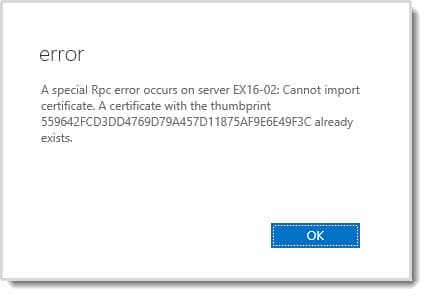
A special Rpc error occurs on server. Cannot import certificate. A certificate with the thumbprint already exists.

This was odd because it was my first time running through the import process on this server. Puzzled, I refreshed the Exchange Admin Center. As expected, no new certificates showed up. Just the default out-of-the-box certificates that come preinstalled with Exchange.

A special Rpc error occurs on server. Cannot import certificate. A certificate with the thumbprint already exists. B

As a sanity check, I confirmed with PowerShell.

 C:\> Get-ExchangeCertificate

Thumbprint                                Services   Subject
----------                                --------   -------
87957CA95B833615C71F7735853CE811F96E6117  IP.WS..    CN=EX16-02
40B938448B42F1D596E9DBB0EC666D8666725E07  .......    CN=WMSvc-EX16-02
1C6E03C3BDCBFD76FAA1375B7D2B4ED1291A0FCF  ....S..    CN=Microsoft Exchange Server Auth Certificate

But as expected 559642FCD3DD4769D79A457D11875AF9E6E49F3C was not returned.

[Read more…] about Cannot import certificate. A certificate with the thumbprint already exists.
Print Friendly, PDF & Email

Filed Under: Exchange Solutions

‘Unread Mail’ – The attempted operation failed. An object could not be found.

October 20, 2015 By Gareth Gudger 7 Comments

Share
Tweet
Share

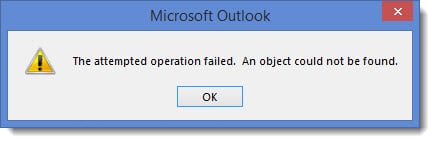
While working on a Cutover migration for Office 365 I ran into an error with the default search folders in Outlook. The data had migrated successfully. The Outlook profiles were recreated. Mail was flowing. However, when clicking on the Unread Mail folder it resulted in the following error.

'Unread Mail' - The attempted operation failed. An object could not be found.

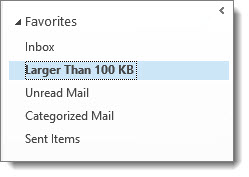
This same error occurred when clicking on other search folders; such as Categorized Mail, or, Large Mail.

Outlook Favorites

Thankfully the fix was incredibly simple.

[Read more…] about ‘Unread Mail’ – The attempted operation failed. An object could not be found.
Print Friendly, PDF & Email

Filed Under: Office 365 RSS, Office 365 Solutions, Outlook Solutions

Exchange September 2015 Updates

October 2, 2015 By Gareth Gudger Leave a Comment

Share
Tweet
Share
Exchange 2013 Big Logo

The Exchange Team has announced Cumulative Update 10.

As always, test these updates in a lab first!

It doesn’t have to be anything elaborate. In fact, I used to do a lot of testing from a Windows 8.1 laptop where I had Hyper-V installed. My laptop ran 3 VMs–Exchange 2010, 2013 and a DC. Hyper-V comes included with Windows 8.

Enough about labs! What are these updates and where can I get them?

The updates are as follows:

Exchange 2013 Cumulative Update 9

Exchange Server 2013 Cumulative Update 10

Exchange 2013 Mini

UM Language Packs for Cumulative Update 10

Exchange 2010 Mini

Exchange Server 2010 SP3 Update Rollup 11

So what’s new?

This update is a culmination of bug fixes and feature tweaks. Most notably it includes official coexistence support for Exchange 2016. 

[Read more…] about Exchange September 2015 Updates
Print Friendly, PDF & Email

Filed Under: Exchange News

Exchange 2016 is here!

October 1, 2015 By Gareth Gudger Leave a Comment

Share
Tweet
Share

It is an exciting new chapter today for the Exchange community. October 1st, 2015 marked the general availability of Exchange 2016.

Exchange 2016 is available to download here.

Download Exchange 2016 RTM

For all the new features and requirements I recommend checking out, What Ignite taught us about Exchange 2016.

It’s always recommended to deploy Exchange to your lab first for testing. Check out the 7-part series, Install Exchange 2016 in your lab.

You will also want to review all the new Exchange documentation on TechNet prior to deploying into your production environment.

You may also wish to take a peek at the Exchange Product Guide.

Videos on Exchange 2016

Office Mechanics has released a number of bite-sized videos under five minutes. Here are the ones I recommend.

Greg Taylor has an excellent video on architectural and performance improvements on Exchange 2016. Greg also announces that CU1 will be available early 2016 with additional features.

Rebecca Lawler demos the new modern attachment feature in Exchange. She describes two available deployment scenarios for Modern Attachments. Rebecca also demos side-by-side collaboration view.

Allen Flush demos all the new features included in Outlook on the Web (formerly Outlook Web App). I also recommend checking out the last part of our Exchange lab series where we explore Outlook on the Web.

Jason Henderson discusses the Search improvements in Exchange that benefit both Outlook and Outlook on the Web users. Jason also discusses improvements to Outlook add-ins.

I recommend checking out all the videos posted by the Exchange Team from Microsoft Ignite. In particular, I recommend checking out Ross Smith IV’s session on Exchange Server Preferred Architecture and Brian Day’s Deploying Exchange Server.

Articles on Exchange 2016

There is a ton of great content out there already. I recommend checking these out.

  • What’s New and Cool in Exchange – It’s out now! — Jason Sherry
  • Exchange Server: Forged in the cloud — Exchange Team Blog
  • Exchange @ Ignite 2015 — Exchange Team Blog
  • Exchange Server Architecture — Exchange Team Blog
  • Exchange Server – Planning, Deployment & Migration — Paul Cunningham
  • Exchange – What’s New? — Jaap Wesselius
  • Exchange debuts to delight on-premises customers — Tony Redmond
  • Exchange Server is available! Now what? — Dave Stork

How about you? What feature are you most excited to see? Perhaps you are disappointed to see a feature dropped. Let us know in the comments below.

Print Friendly, PDF & Email

Filed Under: Exchange News

  • « Go to Previous Page
  • Page 1
  • Interim pages omitted …
  • Page 28
  • Page 29
  • Page 30
  • Page 31
  • Page 32
  • Interim pages omitted …
  • Page 51
  • Go to Next Page »

Primary Sidebar

Want to stay up to date?

Sidebar Form

Join thousands of IT professionals and get the latest Exchange & Office 365 tips and tutorials direct to your inbox

DigiCert Banner 300x348

(help support us using our affiliate link)

Footer

Site Navigation

  • Subscribe to blog
  • About SuperTekBoy
  • Disclaimer
  • Privacy & Cookies
  • Contact Us

Want to stay up to date?

Footer Form

Join thousands of IT professionals and get the latest Exchange & Office 365 tips and tutorials direct to your inbox

Join the conversation

  • Twitter
  • LinkedIn
  • Facebook
  • RSS

Copyright © 2026 · SuperTekBoy LLC