• Skip to primary navigation
  • Skip to main content
  • Skip to primary sidebar
  • Skip to footer

SuperTekBoy

Practical Help for Exchange & Office 365

  • Exchange
    • News
    • Tutorials
    • Solve a Problem
  • Office 365
    • News
    • Tutorials
    • Solve a Problem
  • Outlook
    • Tutorials
    • Solve a Problem
  • Books
  • Podcasts
  • Quick Links…
    • Generate or Renew SSL Certs for Exchange
    • Connect PowerShell to Exchange Online
    • Connect PowerShell to Office 365
    • Extend Schema for Exchange
    • Exchange Schema & Build Numbers
  • More…
    • Kemp Load Balancers
    • Other tech…
    • Videos
    • About SuperTekBoy
    • Contact Us

Exchange

Import & Export SSL Certificates in Exchange Server 2013 (and older versions of 2016 & 2019)

October 28, 2015 By Gareth Gudger 1 Comment

Share
Tweet
Share

If you have multiple Exchange servers, it is imperative that each server have a valid 3rd-party certificate reflecting the namespace. If you don’t, some client connections will get certificate errors.

In our example below, we have two Exchange 2016 servers behind a load balancer in a single site; EX16-01 and EX16-02. Our third-party certificate request was generated and completed on EX16-01. We have also assigned services to that certificate. However, that certificate does not yet exist on EX16-02. Only the default out-of-the-box certificates exist on EX16-02.

When user Amy Pond connects, she is load balanced to EX16-01, which has a 3rd party certificate. The certificate matches the namespace. Her connection is established without error. On the other hand, when Rory Williams connects, he is load balanced to EX16-02. EX16-02 returns its self-signed certificate. This certificate does not match the namespace. Rory receives a security error.
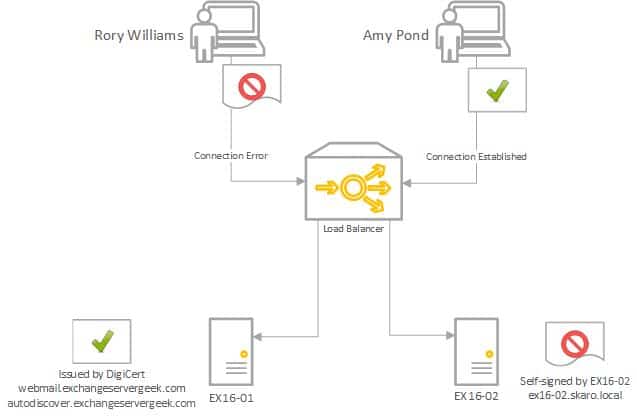
Exchange 2016 Certificate Error

In this article, we explore transferring a third-party SSL certificate from one Exchange server to another.

We explore this process through both the Exchange Admin Center and PowerShell.

Let’s get started!

Note: These steps are identical for Exchange 2013, Exchange 2016 CU22 and earlier, and Exchange 2019 CU11 and earlier. If you are using Exchange 2016 CU23 or greater or Exchange 2019 CU12 or greater, you must renew your certificate with all new PowerShell commands covered in the following article.

Export the certificate with Exchange Admin Center

Log in to the Exchange Admin Center. It doesn’t have to be the server you created your request on.

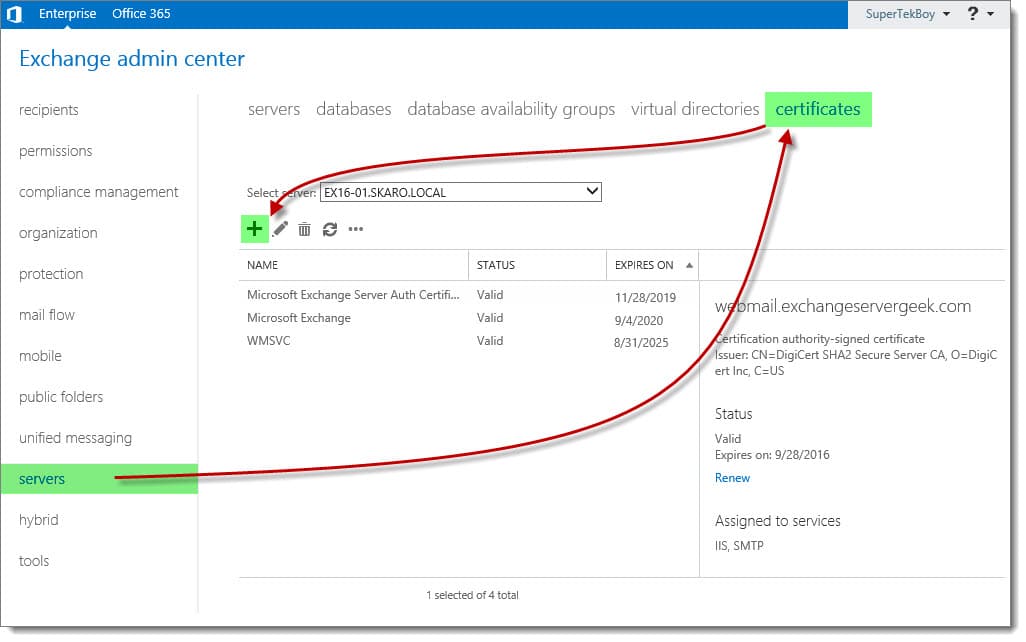
Navigate to the Servers tab and Certificates sub-tab.

In the Select Server drop-down, pick the server you completed the certificate request on. In our example, this was EX16-01.
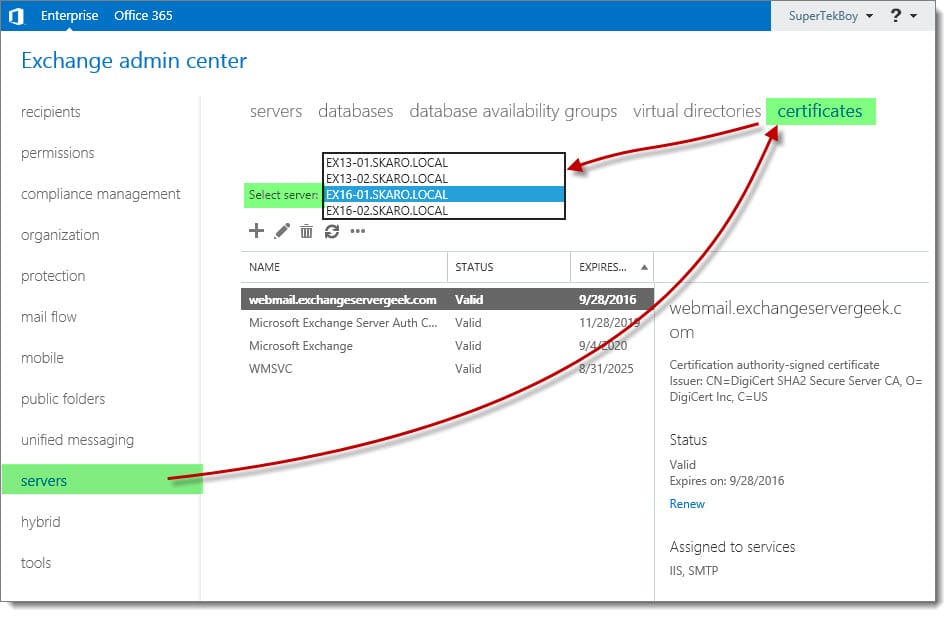
Export Import SSL Certificate Exchange Server 2016 A
[Read more…] about Import & Export SSL Certificates in Exchange Server 2013 (and older versions of 2016 & 2019)
Share
Tweet
Share

Filed Under: Exchange, Exchange Tutorials

Assign Services to a Certificate in Exchange 2013 (and older versions of 2016 & 2019)

October 27, 2015 By Gareth Gudger 1 Comment

Share
Tweet
Share

In previous articles, we generated and completed a certificate request. Keep in mind that despite the request being completed, it is not yet live. We must still assign services to that certificate.

In this article, we will assign services to a certificate (affiliate) in Exchange 2016. We explore how to accomplish this using the Exchange Admin Center and PowerShell.

Let’s get started!

Note: The Exchange Admin Center steps to assign services to certificates are identical for Exchange 2013, Exchange 2016, and Exchange 2019. If you are using Exchange 2016 CU23 or greater or Exchange 2019 CU12 or greater, and you wish to use PowerShell, check this article for the updated commands.

Assign Services to a Certificate with Exchange Admin Center

Log in to the Exchange Admin Center (EAC). Select the Servers tab and Certificates sub-tab.

Select your certificate and click the Edit (Edit button) button.

Assign Services to a Certificate in Exchange 2016
[Read more…] about Assign Services to a Certificate in Exchange 2013 (and older versions of 2016 & 2019)
Share
Tweet
Share

Filed Under: Exchange, Exchange Tutorials

Complete a Certificate Request in Exchange 2013 (and older versions of 2016 & 2019)

October 27, 2015 By Gareth Gudger Leave a Comment

Share
Tweet
Share

In a previous article, we examined the process of generating a certificate request for Exchange 2016. We then submitted that request to a certificate provider. Now that the certificate provider has validated our identity and issued our certificate, we are ready to move on to the next step.

In this article, we complete our certificate request. We explore how to accomplish this using the Exchange Admin Center and PowerShell.

Let’s get started!

Note: These steps are identical for Exchange 2013, Exchange 2016 CU22 and earlier, and Exchange 2019 CU11 and earlier. If you are using Exchange 2016 CU23 or greater or Exchange 2019 CU12 or greater, you must complete your pending certificate request with all new PowerShell commands covered in the following article.

Complete a Certificate Request with Exchange Admin Center

Log in to the Exchange Admin Center (EAC). Select the Servers tab and Certificates sub-tab.

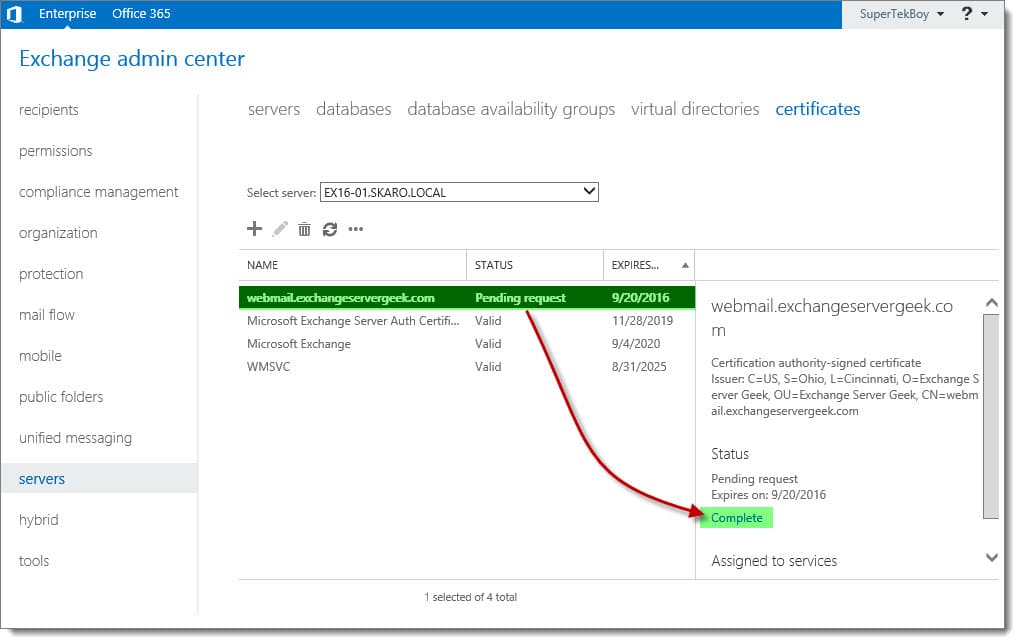
Select your pending certificate request and click the Complete link from the action pane.

Complete a Certificate Request in Exchange 2016 B
[Read more…] about Complete a Certificate Request in Exchange 2013 (and older versions of 2016 & 2019)
Share
Tweet
Share

Filed Under: Exchange, Exchange Tutorials

Generate a Certificate Request for Exchange 2013 (and older versions of 2016 & 2019)

October 27, 2015 By Gareth Gudger Leave a Comment

Share
Tweet
Share

In this article, we examine the process of generating a certificate request for Exchange 2016. We explore how to accomplish this using the Exchange Admin Center and PowerShell.

In future articles, we will explore completing that request, assigning services to the certificate, and importing that certificate to other Exchange servers.

Let’s get started!

Note: These steps are identical for Exchange 2013, Exchange 2016 CU22 and earlier, and Exchange 2019 CU11 and earlier. If you are using Exchange 2016 CU23 or greater or Exchange 2019 CU12 or greater, you must generate your certificate with all new PowerShell commands covered in the following article.

Generate a Certificate Request with Exchange Admin Center

Log in to the Exchange Admin Center (EAC). Select the Servers tab and Certificates subtab.

This page displays all currently installed Exchange certificates. These three self-signed certificates are installed with Exchange out of the box. The self-signed certificate titled “Microsoft Exchange” is the one that Exchange is currently using for all of its web services. That’s the one that we will replace with a trusted 3rd party certificate.

Like its predecessor, Exchange 2016 maintains the Certificate Request Wizard. This wizard takes all the guesswork out of generating a certificate request.

To launch the wizard click the New (+) button.

Generate a Certificate Request in Exchange 2016 A2

In the New Exchange Certificate wizard, select Create a request for a certificate from a certification authority. Click Next.

[Read more…] about Generate a Certificate Request for Exchange 2013 (and older versions of 2016 & 2019)

Filed Under: Exchange, Exchange Tutorials

Cannot import certificate. A certificate with the thumbprint already exists.

October 23, 2015 By Gareth Gudger 28 Comments

Share
Tweet
Share

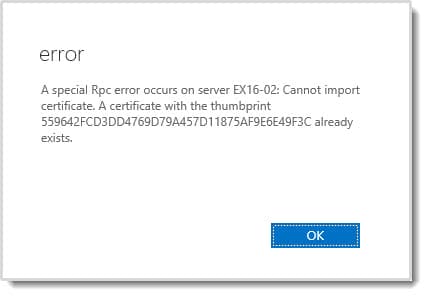
While trying to import a 3rd-party SSL certificate into Exchange I received the following error.

A special Rpc error occurs on server. Cannot import certificate. A certificate with the thumbprint already exists.

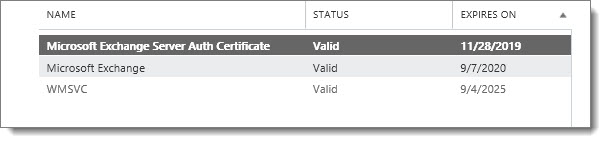
This was odd because it was my first time running through the import process on this server. Puzzled, I refreshed the Exchange Admin Center. As expected, no new certificates showed up. Just the default out-of-the-box certificates that come preinstalled with Exchange.

A special Rpc error occurs on server. Cannot import certificate. A certificate with the thumbprint already exists. B

As a sanity check, I confirmed with PowerShell.

 C:\> Get-ExchangeCertificate

Thumbprint                                Services   Subject
----------                                --------   -------
87957CA95B833615C71F7735853CE811F96E6117  IP.WS..    CN=EX16-02
40B938448B42F1D596E9DBB0EC666D8666725E07  .......    CN=WMSvc-EX16-02
1C6E03C3BDCBFD76FAA1375B7D2B4ED1291A0FCF  ....S..    CN=Microsoft Exchange Server Auth Certificate

But as expected 559642FCD3DD4769D79A457D11875AF9E6E49F3C was not returned.

[Read more…] about Cannot import certificate. A certificate with the thumbprint already exists.

Filed Under: Exchange Solutions

Exchange September 2015 Updates

October 2, 2015 By Gareth Gudger Leave a Comment

Share
Tweet
Share
Exchange 2013 Big Logo

The Exchange Team has announced Cumulative Update 10.

As always, test these updates in a lab first!

It doesn’t have to be anything elaborate. In fact, I used to do a lot of testing from a Windows 8.1 laptop where I had Hyper-V installed. My laptop ran 3 VMs–Exchange 2010, 2013 and a DC. Hyper-V comes included with Windows 8.

Enough about labs! What are these updates and where can I get them?

The updates are as follows:

Exchange 2013 Cumulative Update 9

Exchange Server 2013 Cumulative Update 10

Exchange 2013 Mini

UM Language Packs for Cumulative Update 10

Exchange 2010 Mini

Exchange Server 2010 SP3 Update Rollup 11

So what’s new?

This update is a culmination of bug fixes and feature tweaks. Most notably it includes official coexistence support for Exchange 2016. 

[Read more…] about Exchange September 2015 Updates

Filed Under: Exchange News

  • « Go to Previous Page
  • Page 1
  • Interim pages omitted …
  • Page 19
  • Page 20
  • Page 21
  • Page 22
  • Page 23
  • Interim pages omitted …
  • Page 31
  • Go to Next Page »

Primary Sidebar

Want to stay up to date?

Sidebar Form

Join thousands of IT professionals and get the latest Exchange & Office 365 tips and tutorials direct to your inbox

DigiCert Banner 300x348

(help support us using our affiliate link)

Footer

Site Navigation

  • Subscribe to blog
  • About SuperTekBoy
  • Disclaimer
  • Privacy & Cookies
  • Contact Us

Want to stay up to date?

Footer Form

Join thousands of IT professionals and get the latest Exchange & Office 365 tips and tutorials direct to your inbox

Join the conversation

  • Twitter
  • LinkedIn
  • Facebook
  • RSS

Copyright © 2026 · SuperTekBoy LLC